Category Archives: TEL

Future Orienting Libraries

Today I spent some time with WCI librarians Carlo Fusco and Leah Crowell discussion how they have Future Oriented the school library.  In our discussion, we explored 5 areas of interest and impact which were determined in a previous visit.

  1. Transforming Libraries
  2. Leveraging Multi Media
  3. The impact of 1:1
  4. Visioning the changing world of the teacher
  5. Shifting to device agnostic spaces

Carlo and Leah, thank you for sharing your learning, visioning, and change process.

Interview in 3D video:

Interview in 2D video:

Audio Podcast:

Students I chatted with at the school were very positive about the continued evolvement and current status of the future oriented thinking about the library space to service student learning needs.

Connect on twitter: @mrfusco  and  @WCILibrary.

~Mark
markicon2

Student Feedback 1 to 1

I thought I would share some student feedback on their experiences with our 1 to 1 pilot project this year on the final day of the 15/16 school year.

“Another component of this course that completely differs from my previous year is the use of technology. Everyday, we were fortunate enough to use the chromebooks provided by the school rather than write with pencil and paper. Although, at the beginning I was very reluctant to have the entire course essentially online, I was able to develop my skills with computers and different programs we used throughout the semester.” – MP

“At the beginning of the coarse when i found out we were doing the coarse online and on chrome books everyday….I did not like the thought of it at all because I’m pretty horrible with computers and such. After this semester I now am capable to make a website and transition to using google docs all the time now for everything.” – KP

“Everything we did this semester was digital, meaning I did not use a single piece of paper. I really liked this aspect of the course, as I found it was easier to remain organized, and on-top of assignments. The google classroom was a bonus because it allowed me to work through multiple assignments simultaneously. Overall, I think in the current time period it makes sense for every English course to operate this was, and I’m really happy that I was able to experience this type of course two years in a row.” – MG

“For the entire semester, our class used Google Chromebooks to complete work and participate in class discussions. Not once this semester did I have to pull out a piece of paper (which was nice). Based on my experience, this is the way that all English classrooms should be like in the future.” -SP

“The daily use of technology was new to me for an ENG course. Initially, I was skeptical of its usefulness, and even feared that it would interfere with my ability to do rough work, because I was so accustomed to paper-and-pen work. However, the use of technology was majorly useful. I very much enjoyed the access to an instant and limitless dictionary, thesaurus, encyclopedia, library, and on and on. I am convinced my work was better for having access to these things, especially the first two items of that list.” – SN

“I enjoyed that the course was very technology based with everyone having a chrome book to work on. I feel it makes life a lot easier when all of my work can be accessed from anywhere and can be handed in from anywhere.” – LB

“Although the technology portion of this course was new to me and took a little getting used to, it was one of my favourite parts of this course. Learning through the source of technology was a good way to keep teens of our generation focused on learning in the classroom. Having all/most assignments online and easy to access was really helpful when working at home or somewhere aways from school grounds. Also being able to hand in assignments online was easier for me personally because I liked having the night of the due date to finalize my writing or slideshow before turning it in. “

I look forward to launching our 1:1 program across all secondary schools in September!

~Mark

markicon2

Students Thinking Mobile and Cloud

You never know what surprise might happen in a day. This was such a great student written letter to receive – forward thinking and action oriented with a vision.

By happenstance, I received this letter during the same week as I completed a number of school visits to converse with Principals about the role of technology in the change process.

It is so awesome to see students thinking about change and signalling a readiness from their perspective. I look forward to responding to this student next week. I am thinking a Google Hangout conversation would be a nice approach if it can be worked out.

scan of letter (with student name removed for privacy)
studentletter1

student_letter2


~Mark
markicon2

Learning with Spheros

Screen Shot 2016-04-19 at 9.06.51 PM

I intended to share this blog post much sooner than today, but life has been a little crazy.


On a recent (March)  visit to Ryerson P.S. I had an opportunity to visit the grade 1 classroom of teacher Jenni van Rees.  The excitement in the room was obvious as it was coding day!  Learning goals for the session were clearly laid out and reviewed with the students.

coding_chart

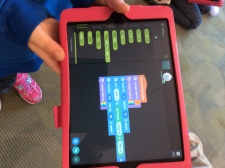
Students were clearly comfortable using both iPads and Chromebooks as they worked in groups of 2 or 3 for collaborative learning and problem solving.

CB&S


Tickle


The students really did work collaboratively, and it was great to see their joy in planning, testing, reviewing results and determining next steps.

Fast foward to April where I had an opportunity to attend a Sphero Challenge event organized by teachers Scott Dickie and Chad Lloyd from Westmount P. S. 

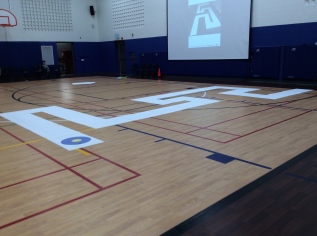
I arrived early to see the first of 4 sphero tracks being marked out in the gym. The remaining tracks were laid down as teams from a variety of schools began to arrive.

IMG_0459

As was evidenced in Jenni’s  classroom, the energy and excitement was in abundance.  Teams were eager to embrace the challenge: planning, measuring, calculating, comparing, testing, observing, collaborating, communicating, iterating … “all in” problem solving for sure. 

I hope this highlights video give you a good sense of the  Sphero Challenge event.

I am already looking forward to the next one!

~Mark
markicon2

Leveraging the Clipboard

On a recent school visit, I had a wonderful opportunity to meet teacher Kim Clegg and see her classroom in action.  One tip Kim shared with me was the benefits of leveraging the google docs permanent clipboard to facilitate providing better descriptive feedback to students.

Permanent clipboard

Kim’s thoughts on changing practice:

~Mark

Shifting Perspectives on Libraries

I stopped at the Starbucks at King & University this morning on the way to see  Carlo Fusco  at Waterloo CI to consult regarding his library project.  As I entered, I happened to notice the striking view change that (literally) just one step made.

sun-combo

One step, a small step, can strikingly change your perspective.  Have a listen to Carlo’s perspective on library change.

~Mark

Let Them Choose

During my ongoing curation of articles about learning, digital tools and social media, I recently came across this article exploring perspectives on  social media in the lecture theatres.  Although the article was primarily examining post secondary perspectives, I would argue the same discussions are relevant in K12. The discussion was centred around various viewpoints on whether or not students:

  • be allowed (by profs) to bring technology to class
  • are distracted by having access to social media  and
  • experience benefits?

Two interviewees interviewed commented that “… because the students are most likely taking notes. Many don’t use pen and paper, and rely on their devices. She says students are old enough to decide if they are to learn or not.” andMy view is they are old enough to choose and multitask (and choose to fail too),“. Meanwhile, others choose to dictate “no access”.

SM choices

Now, if I put a personal perspective on this and let you observe my learning mode,  this is what you would see. Typically I use 2 devices … taking notes on my iPad using notability – not just for notes – adding audio recording, and insert photos for context for a more complete package.  On the second device I organize lists, todos, ideas and share via social media, typically Twitter but this could easily be a Facebook group, G+ community, LinkedIn or open Google doc. I reiterate – this is MY style. This is how I learn best. Paper and pen doesn’t work for me.

device choice

Why not let students choose what works best for them – student voice. To me,  letting students choose what tools they use and how they organize shows a strength based approach to student learning. What benefit is there in forcing students to function in a way that may not be self directed and self optimized?

Weigh in:  Where do you stand?

~Mark

YEAR of {c0de} WR

Year of {c0de} Waterloo Region launched today the Kitchener City Hall.  The room was filled with energy and an amazing array of interesting demonstrations.

I had a great conversations with team members Susan Watt, Peter McAsh and campaign director Stephanie Rozek. I look forward to my meeting with her next week …. just think of the possibilities!

Here are a few of of the sights I enjoyed today.

Robot Video: 3683 in action!

checking out VR

VR

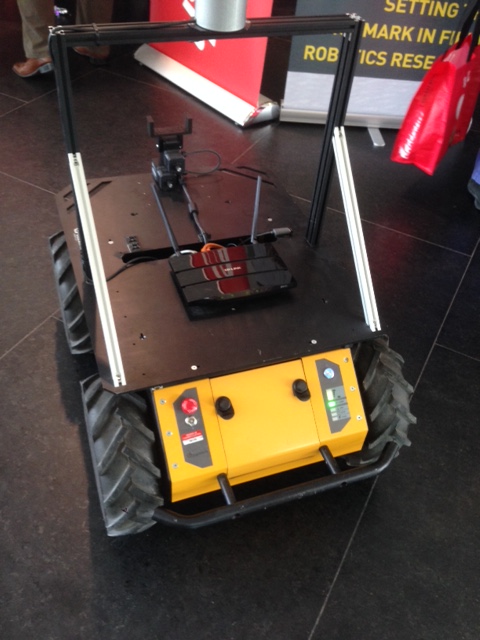
3683 up close

robot_close_up

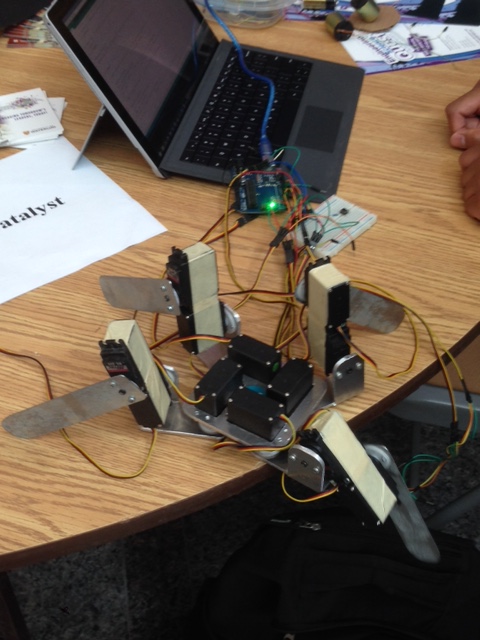
programming ‘gizmos’

programming_gizmos

more robots

robot2

Additional Resources

Web:  Year of {c0de} Waterloo Region

Follow campaign director Stephanie Rozek on Twitter:  @srozek

Follow @yocwr

Follow the Twitter discussion at  #yocwr

~Mark

Help us learn about one to one

In the fall,  we are initiating  a 1:1 chromebooks for all grade nine students project in 3 of our secondary schools.

Our planning team would be interested in learning from your experiences.   If you have a suggestion, tip or perhaps would have done something differently, please share via this  [google doc].

Thanks in advance for sharing your ideas and learning.

Digging Deeper into Edu and Edtech

When opportunity knocks,  answer!

I was recently approached by Kristin Frizzell (@71frizzell) who is taking a course with  Brenda Sherry  (@brendasherry)  to do an interview as a component of the course. This sounded like a great opportunity so we worked out a suitable time this week.

I was impressed with the set of questions the class collaboratively developed around the intersection of learning, instructional practice and edtech.  Our Google Hangout on Air meeting was our first “official”  face to face (F2F)  — hmmm, make that virtual F2F  —  meeting and conversation.  Awesome!

I hope our discussion around the question set stimulates your thinking and supports your learning.

I look forward to a continued connection with ongoing learning and sharing with Kristin.

~Mark