This post combines the slide decks and resources from the 2 English Association sessions on the April 17th professional learning session into one presentation.
~Mark
This post combines the slide decks and resources from the 2 English Association sessions on the April 17th professional learning session into one presentation.
~Mark
At semester turn around I had a great opportunity to connect with WRDSB teacher Jamie Reaburn-Weir. After some conversation about student voice, choice and assessment strategies, she kindly agreed to capture the conversation for wider sharing.
Enjoy Jamie’s forward thinking insights in this video.
I look forward to following along the journey where Jamie is leading her classes.
Follow Jamie on Twitter: Jamie Weir
Read Jamie’s Blog.
~Mark
I recently had an opportunity to enjoy a site visit to John Mahood PS, a WRDSB K-5 school to see a their technology use in action.
Under the leadership of principal Tracy Tait, the staff has been working hard over the last 3 years to explore new effective ways to utilize technology to enable student learning in new ways, change and improve practice and share their successes.
The traditional lab at the school has been dismantled and the desktops have been redistributed throughout the school. The mobile technology (iPads and Chromebooks) within the school has been allocated so that each classroom has a minimum of 6 to 8 devices to share among the students. The lab space is now used as a “tech lounge” – more of a flexible creative work space.
In a site walk through, Tracy commented that she expects staff to integrate mobile technology into the learning environment as part of their daily practice. I enjoyed observing a couple of classes during silent reading time and seeing that student had a choice in both what they read and HOW they read it: paper based, via iPads or Chromebooks. Talk about a great example of student voice and choice!
The school focus on choice for students is making a noticeable difference. Several staff commented about technology options providing choice and independence for students. In some cases, the use of technology created benefits in socialization between students both in and out of class. In conversation, it was noted that technology use improves the focus on learning which in turn impacts behaviour in a positive way. In some cases, the use of technology removes frustration when paper and pencil based tasks create an obstacle for students. The result is increased participation through differentiated approaches.
This video captures some of the observations and thinking of students and staff at the school.
[youtube http://youtu.be/eEDd5oOwI4k]Note: The video and story presentations are published with permission.
~Mark
I experienced a wonderful virtual learning opportunity this week with some fantastic educators from ADSB. Donna Fry, who was leading the learning sessions on site, invited me to provide a kick off presentation to their day. My task was to ignite some change thinking by linking the areas of technology enabled learning, technology change and bringing collaboration into eLearning.
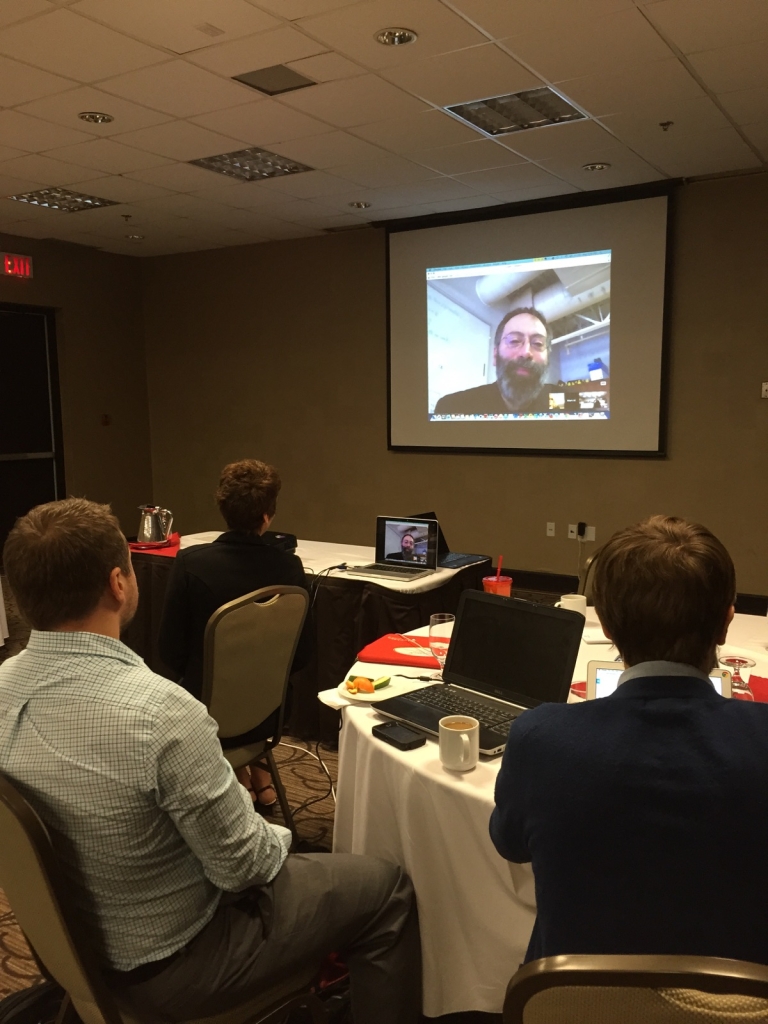
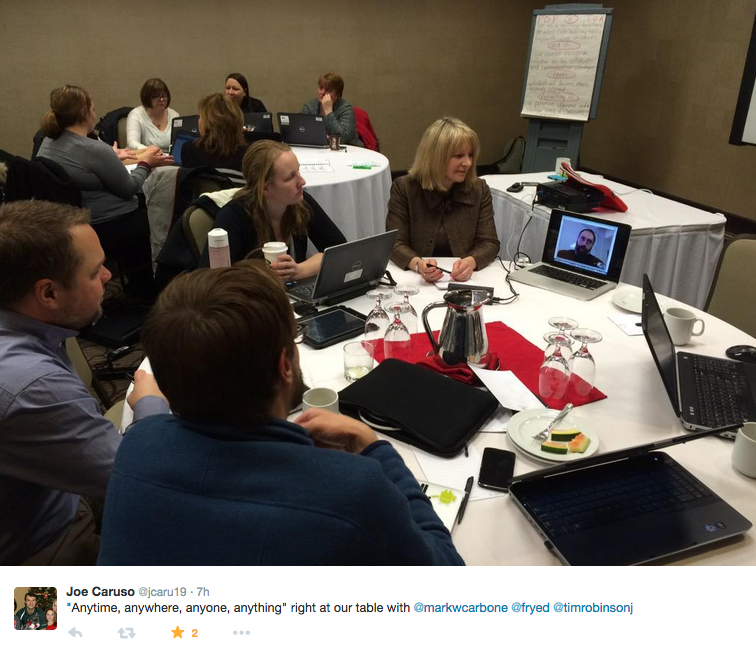
I loved the idea of doing a virtual keynote – what a perfect way to “walk the talk” in terms of connected learning and modelling what we need our students to do.
While there are a variety of tools one could use for this type of activity, we settled on Google Hangouts (GHO) for our session.
Of course, the technology all worked flawlessly <big grin!> – a good demonstration of technology creating a natural flow of sharing.
I really enjoyed being able to participate in a timed table talk opportunity following my presentation as Donna kindly relocated me from the “big screen” to the table.
I was certainly struck by the power of this. We collectively decided that this was a virtual F2F learning session.
Linking back to the theme of the day and my task with the opening kick off, I could envision a day when virtual F2F learning opportunities are normalized into learning environments. I look forward to learning with these educators as they develop their connecting and collaborating strategies.
~Mark
Learn more about the background of the Futures Forum Project.
On the ground with Futures Forum.
It was a pleasure for me to team up with Jennifer Paziuk to present on Innovative Learning Opportunities. As promised, we are sharing the session resources.
Futures Forum Project -June 28, 2013 from WRDSB Learning Services on Vimeo.
Additional blog articles about the WRDSB Futures Forum Project.
~Mark & Jennifer
Thank you to those participants who attended my workshop presentations today. As promised, I am sharing the resources:
Conference Twitter feed #wbecon14
Enjoy a free, connected, self directed, professional learning experience through OSSEMOOC (blog) and/or connect to the OSSEMOOC Twitter feed.
Additional resources are listed at the end of the slide deck. Stay connected and continue to share your learning.
~Mark
The other day I happened to catch a segment of The Current CBC broadcast as I was driving between school appointments. The topic was big data based the book Dataclysm, which certainly captivated my interest for a variety of reasons.

Image from Amazon.com
I happened to tune in just at the moment the discussion was focused on analyzing data written in social media, Twitter in this case. While many view social media communications as somewhat inane, an in depth analysis reveals some interesting facts.

In the interview, Christian commented that this type of analysis can and has been repeated. This is not an isolated ‘one time’ look at this area.
When one considers the writing benefits summarized here, I believe there is a strong case to incorporate the social media writing medium in the school system. Of course there are natural connections to digital citizenship, engagement, real world audiences etc.

As a classroom educator, if you are already doing this, keep going! If not, consider giving it a try with an age appropriate system, a collaborative document with simulated limits or even offline.
Related Resources
Listen to the CBC Podcast with Christian Rudder on Dataclysm
Book: Dataclysm by Christian Rudder
Have a comment? Please share.
~Mark
At this point in my life I find myself with one university graduate and one in first year and on the way. It has certainly been a long time since I attended an elementary school meet the teacher night.
In a recent summer conversation with WRDSB teacher Alison Bullock, my interest in the parent aspect of school year startup was rekindled. Alison was enthusiastically sharing about her plans to provide parents attending with a fast paced “tech slam” – a quick tour through many of the different online services students would be using in their learning journey with her. I approached Alison about attending meet the teacher night, and I was thrilled that she readily agreed.
On parent night evening, I arrived at portable 4 to find an energized room of parents and students. Students were eagerly leading parents to their seating area.
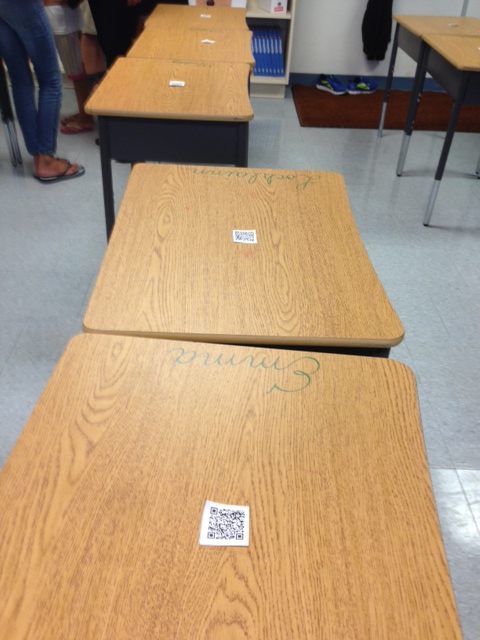
On the top of each desk was a QR Code that linked to a personalized welcome video for each parent. Students were visibly excited to show their parent(s) how to access the video and have them watch it.
Now it was time for the tech slam.
Wow – actioned packed, filled with key learning statements and clearly highlighted the connected learner robust technology enabled approach to be used in the classroom.
Casual conversation with parents afterwords showed excitement and interest about the approach to learning their child would participate in.
If I had elementary school aged children, this is the type of classroom learning experience I would want them to have.
Related Resources:
Follow Alison’s class on Twitter: ESTP4.
~Mark
This year, WRDSB teachers Alison Bullock and Andrew Bieronski ran a very successful cross curricular and cross panel collaborative project with grade 4 and grade 10 students.

Full project details may be read [here]. A “quick peek” overview of the project is included below as a point of reference.
The Collaborating
The grade 10 students will provide mentorship to the grade 4 students as they research, plan and write the scripts needed for the audio guided tour files. Students will be collaborating through the WRDSB Google Apps for Educators (GAFE) environment. The role of the grade 10 students will be related to their civics and English courses.
All students, in both grades, will share about their experiences in this collaborative learning project through their blogs. Blogging platforms may include Google, WordPress or Weebly.
As part of the professional learning with this project, Alison and Andrew met with me for a live streamed interview to share their learning and reflections on collaboration, student voice, engagement and professional practice.

~Mark
I had the pleasure of attending the WRDSB Digital Learning Carousel event today along with 400 educators and students from our Board. The event provided opportunity to share our collective insights around digital learning, changing practice and planning next steps forward for our organization. The carousel sessions I attended included online novel studies, innovative practices with math, inquiry approaches and the Futures Forum program.
Three aspects of the day really struck me. The positive feedback on the interest in using Google Apps for Educators (GAFE) and the high rate of adoption on our roll out was awesome. Secondly, I was intrigued to hear some of the educators sharing the benefits of enough technology to support small group instruction over a 1:1 approach. The ‘just enough’ model allows technology to be used as a learning support as needed while fostering opportunities for interaction, conversation and sharing. A 1:1 approach can result in students being self focused or isolated. This feedback validates our decision to roll out our iPad program in a way that avoided convenient the “portable lab pack” allocation. Finally, so many discussions touched on the idea of the right mobile tool for the learning, teaching or assessment task at hand. I felt proud that our IT department is deploying and supporting iPads, Chromebooks and Windows mobile devices to support learning at WRDSB.

My Session Highlights
The online novel study group talked extensively about taking a proactive approach to digital citizenship before moving into online activities. Their approach included googling yourself to find out what is actually online, reputation management, managing your digital presence and building relationships. Tools used in this program included Google Apps for Educators, Today’s meet, blogging, skype and collaborative web page designs. An impressive approach indeed!
In the math innovative practices session, I noted that educators were really digging into teaching collaboration skills. What does collaboration look like, sound like, feel like? “Look fors” would include accountable talk, building on the ideas of others to highlight two attributes. Digital tools used in this program included Explain Everything, GAFE, GeoBoard, Notability and iMotion.
The inquiry stream focused on the relationship of two key elements:
1. What do students need to learn and what do I need to learn as a teacher?
2. If I do this as a teacher, then students …
The final session featured the Futures Forum program, which I am very familiar with due to my involvement with the program. Presenters emphasized the importance of a growth mindset for both staff and students. The approach used this year involving SparKW really engaged the students in a meaningful way.
Clearly, all of the presenters I saw today demonstrated a high level of professionalism and a growth mind set. Thank you for sharing your learnings!
~Mark
 ~ Mark's Musings ~ blog.markwcarbone.ca