Category Archives: Technology in Education

IT’s about the students – Reflections

As one would expect, many of the Ontario Association of School Board Officials (OASBO) ICT meeting discussions centre around core IT challenges such as work load, work flow, infrastructure, drive imaging, costs, sustainability, integration challenges etc. and the list goes on. These discussions are valuable and critical for learning, planning, and some sense of provincial alignment. Over the course of the last few months, more and more of these discussions cross into the instructional realm. There is an increasing understanding that all of these core IT functions are intertwined with important instructional ICT needs.

This year I had the pleasure and opportunity to contribute to the planning process of the OASBO ICT Winter Workshop. In order to move the collective IT and ICT agendas forward, there is a need for critical understanding of each other’s (traditional IT and instructional ICT) needs. To this end, the decision was made to begin incorporating an ICT instructional strand into the annual winter workshop.

21st Century Classroom – IT’s about the Students!, this year’s workshop was held Feb. 25th, 2010. Mary Jean Gallagher, Chief Student Achievement Officer and Assistant Deputy Minister – Student Achievement Division of the Ontario Ministry of Education delivered the keynote address. I thought the core message of her address was right on the money.

Mary Jean began by reviewing educational goals of  the provincial government and goals the Ministry of Education. She continued by making the point that IT is a strategic part of every thing we do in both the learning and business sides of education. From a philosophical point of view, there are perhaps only two roles in education:  the front lines work of teaching in the classroom and figuring out how to make this happen easier and more effectively.

In IT, our work certainly falls to the second category. The work that has been done to facilitate data driven decision making is absolutely critical as it drives the analysis and planning processes. This work includes assessment data collection, the OnSIS process and reporting. The impressive result of this work is that, based on international standards, Ontario students have collectively made significant gains over the last few years – and yes, Ontario is being noticed in these international circles. It is important to note that these international tests do not have 100% alignment with EQAO testing. As a result, these improvements are not seen as strongly in the EQAO results. The bottom line – this could not happen without the detailed work of IT supporting the process.

On the instructional agenda, student achievement in the 21st century is all about the work we do together: Dream, Inspire, Achieve. Fundamentally, technology must:

  • be embedded in strong instructional practice
  • enable more powerful pedagogy
  • drive changes to instruction and assessment practices

The important question is how do we make this happen?

  • we need to have more events like this one to keep the discussion alive
  • IT personnel need to embrace conversations of change and accommodating needs
  • teachers and ICT need to clearly define their strategic needs
  • IT needs to deliver on the enablers, such as wireless, guest network access (etc.)
  • collectively, we need to establish an approach to funding, sustainability, support and PD/training

The balance of the winter workshop day had at least one ICT session available within each breakout session, and most importantly, provided opportunities to cross fertilize the IT/ICT discussions. Feedback about the format from participants was extremely positive. During the debriefing session at the business meeting the following day, a motion was made to continue with the instructional ICT strand as a key component of future OASBO ICT workshops.

From my point of view, this was a very successful event with an excellent keynote address and forward thinking discussions. I look forward to keeping this discussion going!

~ Mark
Building community at #ABEL

Last Friday I had the pleasure of attending the Mobilizing 21st Centruy Teaching & Learning Leadership Symposium hosted at York University by the ABELearn program. The timetable for the day was:

  • ‘Unleashing the Passion’ Keynote by Sheryl Nussbaum-Beach
  • How Does It Work? – Tools, Strategies and Results – a Carousel of break out sessions
  • ‘Teacher Professional Learning for the 21st century’  Keynote by Ron Owston
  • Dimensions of Change: Leveraging the Wisdom of the Crowd (facilitated discussion and action planning)

During the Carousel of breakout sessions, I chose to attend the discussion titled ‘Building Capacity: A Shared Leadership Approach’. This session was an open round table discussion. A quick round of introductions revealed a diverse group of roles represented including teachers, eLearning leaders, ICT consultants, school administrators and CIOs.

The range of ideas and comments put forward hit the predictable topic list: getting more teachers on board, training, costs, access and funding. While many good points were made, I was quite fascinated by the discussion from one point of view. It was very interesting to see how many people focused on ‘getting something going’ in their own classroom, school or program. This approach certainly does create an energy at the grass roots level and is arguably important in the context of change at the local site level.

However, this approach does not guarantee a coordinated change at the system level. A few of the participants, including me, also spoke in support of the need for a system perspective on planned change as well. Key areas from a system point of view would include setting expectations, a focus on embedded technology use of specific curriculum needs (e.g. non fiction writing), staff development program support and IT support. Once these points were made, the group generally seemed to express agreement that this aspect of moving forward is a key ingredient.

All in all, this was a fantastic learning opportunity. I look forward to reviewing the content, actions and ongoing discussion in session wiki that will be set up.

~ Mark

Tethering with your iPhone

Have you ever needed to access the internet with your laptop when there was no suitable wifi connection?

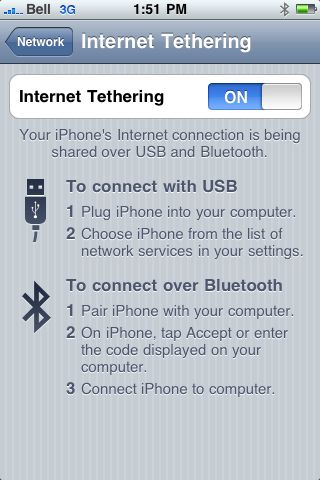
One solution is to use your iPhone as a wireless modem. Using a smartphone as a wireless modem is called tethering. Setting up this feature with your iPhone is very straight forward.

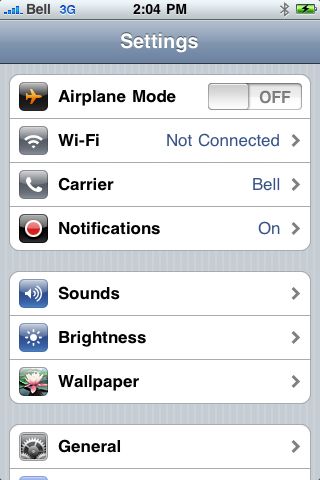
Step 1: open the settings menu

Step 2: select ‘general‘ from the settings menu

Step 3: Select ‘network‘ from the general menu

Step 4: Select ‘Internet Tethering‘ from the Network menu.

Step 5: Slide the ‘Internet Tethering‘ button to ‘on’

Now you are ready to connect your iPhone with ‘modem mode’ enabled. You have options to connect with USB or bluetooth.

USB  connection mode: The first time you connect the iPhone in this mode, iTunes will load the necessary drivers and you are ready to go.

Bluetooth connection mode: Before you can connect in bluetooth mode, bluetooth must on active (on) and the iPhone must be paired with the computer in the same manner as you would pair a bluetooth headset. (refer to system documentation for this step)

I have found tethering to work great. If fact, this blog post was written using a tethered internet connection via my iPhone.

Note: Please review your data plan limits and applicable data charge rates before actively using this connection method. You certainly don’t want any surprises on your monthly bill.

Stay connected 🙂

~ Mark

The X100e – first impressions

Last fall, I wrote a blog post titled Are Netbooks Ready for Primetime. At the time of writing, it seemed to me that the answer was yes, no and maybe depending on needs and environment.

Certainly, in the time frame of 4 to 6 months ago, many netbooks were running XP home for their OS and consequently were challenging to use in a managed domain based environment. I spend some time testing the Lenovo Ideapad. In many respects this was a great machine, and it showed me the potential of a netbook sized machine for travel and web 2.0 uses. I did not like the keyboard layout and found the keyboard a little to small. The Ideapad also used XP home.

This week I have had an opportunity to try out the new ThinkPad X100e model. This unit is clearly a step up from a true netbook in that it is a smaller ThinkPad with many of the solid design features you would expect from the ThinkPad model line. The clunky keyboard design of the IdeaPad was gone. The keys are nicely sized and shaped, and the overall keyboard layout is very clean from my perspective. The unit I tried came with Windows 7, and worked like a charm – easy to use, no setup issues and the wireless connected easily and worked without issue. I also understand that the X100e unit can be configured to use XP pro, so this gives some options within the managed enterprise environment.

IdeaPad (left) and X100e (right)

IdeaPad keyboard layout

X100e keyboard layout

The unit comes with a number of options including:

  • Windows 7 home/pro (Eng/Fr)
  • 1/2/3/4 GB RAM
  • Eng/Fr keyboard
  • 160/250/320 GB hard drive
  • bluetooth
  • Microsoft software bundles.

Given the Windows 7/XP options, improved keyboard layout and price point, I think the X100e unit could find a real niche in the K-12 education environment – a little more than a traditional netbook, a little less than an expensive laptop. I will look forward to hear what others think about this exciting product.

~ Mark

K-12: Entrepreneurship 2.0

Further to my last blog post, Valuing Online Communities in the K-12 educational arena, I have been reflecting on the many possibilities of using social media tools to an advantage.

Mitch Joel discusses the five C’s of Entrepreneurship 2.0 in his book Six Pixels of Separation, and identifies them as follows:

  • Connecting
    • Connecting to Consumers
    • Building loyalty
    • Nurturing those connections to make more connections
    • Making money and growing
  • Creating
  • Conversations
  • Community
  • Commerce

He goes on to discuss strategies to use social media tools to achieve specific business goal(s). These tools have certainly leveled the playing field in terms of the potential to connect and get your message out.

What happens if we take out ‘business’ and replace it with ‘education’?

The goals of building strong connections between members like groups (administrators, teachers, support staff etc.) is key within an organization. Building a strong culture of learning and sharing is also important for the long term success of the organization. Furthermore, I believe building a community between these strategic groups to maximize learning and sharing with a focus on the ‘big picture collective goal(s)’ is also important.

It seems to me, the strategy of using the five C’s of Entrepreneurship 2.0 should be just as effective in the educational environment. Perhaps with the exception of making money, in my opinion, the other points are in strong alignment. If you were going to promote some new resource for example, I wonder what the impact would be of using social media tools as part of the promotion and marketing strategies would be?

After all, don’ t we want to

  • connect to our customers (internal, e.g. teachers)
  • build loyalty (return customers to continually use provided resources)
  • nurture these connections, and make new connections (connect more teachers & share)
  • grow (and engage)

I would say yes to all four points. This is, after all, part of the culture of a successful education organization too. IN addition to system announcements, posters etc., why not use social media tools to enhance these strategies?

Now, all that I need is a great project to give this a try!

~ Mark

K-12: Valuing online communities

I recently had an opportunity to present to our senior admin group to examine new directions concerning access to online resources. As part of the preliminary discussion, I outlined a frame of reference that included:

  • the value of online communities as an extension of school communities and classrooms, and
  • aligning internet resource selection processes with existing resource selection processes to form a basis of comparison as a starting point.

During the presentation, I made the following points to frame the discussion:

A growing body of evidence validates the importance of the sense of community within the learning environment for administrators, teachers and students alike. Benefits include:

  • promote life long learning
  • engaged learners
  • a sense of belonging and support
  • a culture of learning and sharing
  • communities are built on trust
  • embrace Character Development and Digital Citizenship ideals

In his book, Grown Up Digital, Don Tapscott promotes 7 strategies that support a ‘School 2.0’ environment. The strategies are summarized as follows:

  • Focus on the change in pedagogy, not the technology itself. Use technology for a student-focused, customized and collaborative learning environment
  • Reduce lecturing, broadcast learning does not work as effectively for this generation of learners. Allow the students to co-create a learning experience
  • Empower students to collaborate
  • Focus on life long learning
  • Use technology to get to know each student
  • Design programs that leverage the strengths of the Net Generation in project based learning
  • Reinvent your as an educator

Further to this presentation, I have been reading Six Pixels of Separation by Mitch Joel.  Mitch also documents some important characteristics of communities. Although some of these statistics are more business oriented, I feel there is a strong connection to educational based online communities. Mitch notes that community users:

  • spend more money that non community users
  • remain customers 50% longer than non community members
  • visit 9 times more often than non community members
  • login one or more times per day (56%)

Additionally, 43% of Internet user who are members of online communities say they feel ‘as srtongly connected’ to their virtual communities as their real world communities.

To my way of thinking, these are impressive statistics. Online communities are here stay, are highly valued by users and provide valuable professional learning and sharing opportunities. It seems to me that it is equally important to establish online communities as a natural extension to school communities and classrooms. It is time to charge ahead and embrace social media tools within the curricula, not as an option, but as a planned strategy of curriculum delivery and learning opportunties.

~ Mark

The iPad and K-12 education

I was great to finally hear the details of the Apple iPad this week. As one would expect, people predictably polarize their opinions on one side of the fence or the other – all raves or a long list of perceived short comings before they have even had a chance to try the device.

I have tried to put these potentially more extreme reactions off to the side. My interest in looking at the device was to consider its potential in the K-12 educational environment. From my point of view, their are many positives. Three in particular, are worthy of specific mention.

  • connectivity choices – wifi with or without a cellular based plan
  • full access to the suite of iPod Touch and iPhone apps
  • readiness for a new eBook and ePublishing strategies

What does this all mean for K-12?

  • internet connectivity: resources, inquiry based research
  • access to writing and collaboration tools
  • access to communication tools
  • well positioned to use new eBook and Publishing options
  • support for mobile learning

From my point of view, the iPad seems to be well positioned for a solid place in K-12 curriculum delivery. I look forward to learning more about the device and its educational potential.

Watch Apple’s iPad video.

~ Mark

FirstClass Mobile – a few more tips

A number of us at work have been using the FirstClass Mobile client for a while now. Overall the current version seems quite stable and works well, but there seemed to be 3 short-comings that needed to be addressed from my point of view. Thanks to my trusty PLN, I have 2 answers and 1 work around which I will share in today’s post.

1. When addressing mail, it was not obvious how to add multiple recipients in the address line. Thanks to @dougpete for pointing out the ‘ To: ‘ label is actually an active button, which takes you to a screen that facilitates adding multiple addresses to the To: CC: or BCC: address fields as per the two iPhone screen captures below.

.

2. The second issue was that the Public conferences area was not showing any conferences when opened. Coworker @rebrouse figured out the tapping the bottom right icon that looks like a folder with an arrow, displays the ‘missing’ icons. This works consistently with folders too.

.

3. It seems that the reply all with quote option is not available. In the regular client, you simply highlight the text to be quoted then choose reply all. It is possible to work around this using a copy and paste technique with the reply all option to simulate the correct message content. Select, copy is activated by holding your finger on the touch screen, dragging the highlight box to cover the required text, then pressing the ‘copy’ button. Once you choose reply all, tap the screen then choose paste.

Thanks to my PLN for helping me learn!

~ Mark

School Blogging: A New Twist

Today I had the opportunity to attend a technology planning meeting at one of our elementary schools. As I anticipated, the conversation was engaging and the work session productive.

The Principal, Mr. James Bond, is certainly providing excellent curriculum leadership with well thought out technology integration plans which align with our system goals.  I was really impressed with the blogging initiative that has been started at the school and wanted to share a few highlights. In addition to the dedicated class blogs being run by some of the staff, Mr. Bond has also taken a unique approach to setting up a school blog.

The school blog project is designed to promote building an online school community. Accordingly, the blog is set up to allow everyone in the building to participate. Within the blog, a number of categories have been set up to organize the posts by topic. Teachers are assigned blog categories to monitor and be responsible for moderating. Each student is registered on the blog as a contributing author, which allows them to add posts or comments to any of the areas that interest them.  Mr. Bond indicated this strategy has guaranteed each student in the school has class time with at least one, but usually more than one, teacher who is active in the project at this point in time.

Blog post categories cover a wide range of topics and teachers are encouraged to try new ideas too. Some of the topics include math journals, book reviews, as well as many other areas of curriculum and general interest. The project has been underway for just one month, and steady growth in participation is already being observed. Teachers have observed that students are engaged in the writing process during school hours, and many contribute from home outside of school time too.

Our session finished with some discussion around strategies to share this exciting approach to build community and increase capacity within our Board and beyond. I look forward to watching this project grow, and my next visit to the school!

Related Resources

Mr. Bond’s Blog
Follow Mr. Bond on Twitter

~ Mark

Student View: iPod Guidelines

The first day back after the holiday break is complete. At dinner, we talked about what happened today. My daughter, who is involved in a class iPod project, mentioned they had a class discussion about developing some iPod use guidelines. Naturally, I was interested to hear about the dialogue. I took the role of the reporter, prompted the discussion with a couple of questions, but mainly tried to sit back, and listen to a student version of the outcome of the class discussion.

My transcription of the conversation:

  • Be prepared
    • The unit and headphones should be at school each day, fully charged
    • Required apps must be installed timely, as required
    • Units will be kept on the desktop ready for action
    • Be responsible
  • Manners and etiquette
    • Be considerate of others. Give them your attention when they are talking or presenting. The iPod should NOT be a distractor.
    • Use when asked (there may be non use activities)
    • Text communication will not likely be required
  • Applications and Content
    • Apps should be appropriate for school. Any games should be educational (problem solving etc.)
    • No illegal music
    • Note: I must admit the last comment made my heart smile – nice to see copyright as part of the discussion!

To me, it sounds like they had a good discussion and captured the important points. My daughter seemed confident that this approach would work well. I think this set of guidelines would work well for adults too, especially the point in blue italics. 🙂

~ Mark