Category Archives: Technology in Education

2009: What’s Changed?

Last week, while waiting at Starbucks to meet my wife for a coffee, I fired up Tweetdeck on my iPhone and flipped through the recent list of Twitter updates. One that caught my interest was from Will Richardson asking “What changed in 2009?”. I read his reflective blog post at Weblogg-ed.com. Great question, great time to reflect and time to jump in with a blog post to respond.

Will specifically asks “So, as a way of taking stock, I’m asking, what’s changed?

I mean really changed in your school? What stories are there of moving wholesale to an inquiry-based curriculum, of real reinvention of assessments, of students participating in global learning networks, learning how to create their own personal networks around their own passions? Or even moving off of paper into a digital reading and writing space? Or moving from a teaching community to a learning community? Or other changes? My sense is that once again, there’s not all that much different today than a year ago.”

I will comment from two perspectives: personally, and from a K-12 system point of view. For me personally, 2009 was an amazing year filled with many projects, a lot of learning and many opportunities. Upon reflection, I consider all of the following to be successes for me:

  • began blogging mid year, still doing it, writing regularly, and having fun doing it
  • embraced Twitter and other social networking tools
  • actively participating in a number of online forums (ISTE, Ning, Classroom 2.0, Ontario Meetup etc.)
  • participating in the Ontario PLP cohort
  • developed a solid personal learning network (PLN)
  • completed a leadership course at the Queens University Business Executive Development Centre
  • continued participation with education committees/organizations including: OSAPAC, COCA, RCAC, OASBO

In the broader K-12 context in my Board, things ARE different than a year ago – maybe not in the ‘wholesale’ way quite yet, but they are in fact different. Specific targets that were set 12-18 months ago are being realized or are at least under way. Some of these successes include:

  • implementing our new shorter technology replacement cycle
  • roll out of wireless with network access control (NAC) is under way
  • convert 40 elementary schools to a new dual boot Mac environment (starting Jan. 2010)
  • mobile learning projects with iPod Touches in the classroom are underway
  • implementing our Library Learning Commons model for better system support
  • significantly improved alignment between Learning Services and IT departments
  • provided greater access to online resources (less content filtering) including access to some social media tools
  • planning new staff development strategies for Sept. 2010 to include social media component
  • more people are ‘involved’ than a year ago, and the thinkers and changers are better connected
  • more teachers and students are using blogs, wikis, media, inquiry based research/learning

What have I learned?

  • I can make a difference
  • I can participate
  • I can help to keep these important conversations going
  • I can initiate
  • educational change takes time
  • maybe we (the big picture we) are not ready (yet) for chaotic change given the variance of teacher understanding and readiness in the areas of technology use and embedding in the curriculum
  • there are indeed systematic approaches that can be taken to engage people and move the agenda forward – and we need to actively keep working on them

A Context for Continuing the Journey

At the end of the day, or school year, or graduation day for our students, I think we fundamentally will arrive in a similar place – we want to graduate students with:

  • certain experiences and character traits in place
  • well developed critical thinking and problem solving skills
  • strong skills in writing and a variety of literacies
  • developed emotional intelligences
  • creativity
  • etc. ( I am not attempting to generate the perfect list here, just make a point)

Maybe we don’t need to revisit/review/change every classroom, teacher and instructional practice. What we can change, in a broader strategic manner with impact, is the journey that happens between enrollment and graduation.We do need to systematically put things in place so that each child that journeys through a system has some guaranteed experiences. These experiences should also include:

  • readiness to live and work in a technology oriented world
  • embedded technology supported learning
  • collaborative online experiences
  • social media use and awareness
  • participate in a culture of sharing
  • digital literacies and digital citizenship

Count me in! This is doable. The question is how do we achieve greater invovlement, provide the right ‘enablers’, keep costs down, change things at the systemic level at a greater rate of change, keep the energy behind sustained change and yet without ‘upending the apple cart’? Personally, I am looking forward to 2010 to keep working on this agenda. When 2011 arrives, I want to look back at 2010 and say that more change has occurred and that I made a difference.

~ Mark

Streaming with your iPhone

We decided to take a drive down to see the lights at Niagara Falls as a family holiday outing. Ummm, how about adding a sprinkle of tech stuff to spice things up. Great idea! – left with my iPhone fully charged.

Prep Work: I had recently downloaded two apps to do live streaming from the iPhone to a website where others could watch live, or watch the saved video clips, provided they knew the web address. For this particular event I decided to try the QIK app. Once the free software was downloaded, setting up the software was a snap – register a user ID, password and email address and you are ready – it is that easy. Any video you shoot is streamed to the vendor website and linked to your account, http://qik.com/markwcarbone in my case. Entry level accounts are free. Some upgrades are available.

At the Falls: Once we arrived and cased out some parking, I flipped a note out on Twitter and Facebook to announce my streaming experiment. I had lots of fun experimenting with the iPhone video as there was plenty to look at – Christmas lights, Disney light displays and of course the Falls themselves. Given the evening darkness, below 0 temperatures and the freezing mist, I was not sure how things would turn out. I was pleased with the results given the conditions. I am sure the steaming with ‘regular’ lighting conditions would yield great results.

As it turned out, my streaming experiment was viewed from Windsor, Ottawa, Florida, Oakville and Kitchener. Thanks to @dougpete, @kimmcgill@kpuddington, @kimsten, @trustsocmedia and @rebrouse for tuning in and providing some feedback!

Sample Video Clips

The Falls Take 1
The Falls Take 2
The Falls Take 3

Of course, it does take long to start thinking about all of the educational possibilities to use this technology for recording events, interviews, field trips, experiments …. how exciting!!!

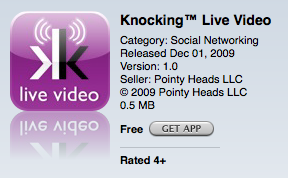
Try the app: iTunes Link to Qik Live

I think with this app, ‘have fun’ goes without really saying it. 🙂

~ Mark

Video Conferencing with Skype

As a long time user of Skype, it is nice to see the use of this powerful, yet free, software package getting greater use in the classroom. Recently we have had a few more teachers in our Board asking to use Skype for classroom projects,  so we have installed it when requested. If it performs well in our network environment, it could easily be made part of our standard setup.

Of the Skype related resources listed below, the first two were of particular interest to me. The Skype an Author project seems like a natural way to connect reading and writing experiences in the classroom with the real world. The blog post outlining steps to create video content for blogs using skype offers some useful tips and could be a great resource in classrooms where blogging is part of the writing process.

One of my PLN members and Twitter user, teacher @zbpipe, has been using skype to connect to other classes to learn folk songs as part of their music and global studies. You can find additional information on Twitter about Skype in the classroom by simply searching for the term ‘Skype’. I keep a ‘Skype’ search open in my Seesmic Desktop application to keep up with new ideas and resources.

Resources

1. Virtual Author Classroom Visits: Skype an Author

2. How to produce video interviews for your blog using Skype.

3. Skype Directory for Educators

4. Skype in Schools wiki

5. Blog Post:  All Schools Should Skype

6. Download Skype Software

Give it a spin and enjoy the video conferencing!

~ Mark

Edu chit chat at ground level

We kicked today off with a lovely brunch hosted by very close friends – a perfect way to start the day! Many of the people in attendance are connected to the education scene in one way or another. Collectively we covered the range of parents, secondary teachers and department heads, vice principal, recently retired principal, university profs, soon to be teachers and me.

Of course, there was a healthy round of catching up on what is happening with the various families, plans for the festive season and, teachers being teachers, some ‘shop talk’ about what everyone was doing. So …. when it was my turn, I dived into the Ontario PLP experience I was enjoying and chatted about the potential powerful uses of social media tools in our system. Well, talk about start a multi dimensional conversation. I think we could have had a 2 day symposium with the brunch gang to explore the pros and cons all of the various options.

As a group, we represented decades of solid teaching experience. As a group, we represented an extremely diverse experiences in the areas of using, adopting (and embedding) technology in the way we teach, work and live.  We hit the whole range (minimum to maximum) of personal comfort levels, willingness to embrace new technologies, student engagement, the powerful potential of the tools available today and how the use of these tools would/could impact education in positive ways — a fascinating discussion to say the least.

We did cover one last point, and I saved it to last so it could stand on its own for emphasis — and it really struck a chord with me. The general consensus was that the typical teacher of today is not ready to embrace social media tools at this point in time for a number of reasons. At ‘ground level’

  • only a small percentage actually use social media tools
  • most teachers are not comfortable with the tools themselves, let alone embrace them in teaching
  • most teachers have not thought about embracing the power of social media in useful ways to support curriculum delivery
  • many teachers are not sure about the level of engagement the use of these tools may bring
  • some are curious about this ‘new world’

So, in yet another setting, we end up back at some of my favourite pondering points:

  • building communities and cultures of sharing
  • getting more teachers involved
  • etc., you can read my ‘list’ in an earlier blog post from this week

The important aspect of arriving at my favourite pondering points (again) is that I really trust the observations, opinions and insights that this group has about where things are at ‘in the field’. In some ways, this conversation was a reality check. Is the gap getting wider? In general, are we ‘preaching to the choir’?  More thinking and planning about systemic change, impacting the educational front etc. In some ways this is a nice lead into Will Richardson’s question, “what changed in 2009?”  Watch for an upcoming blog post where I will share my views on what changed.

~ Mark

Ontario Meetup: Are We Asking the Right Questions?

The recent Ontario Meetup online session provided the anticipated engaging discussion of educational directions. This particular session was led by @courosa. The discussion centred around the intersecting tensions in the K-12 educational environment between building online communities, embracing the value and power of social media tools and content filtering.

@dougpete captured the key points in his recent blog post  Getting Priorities Straight.  I have had the pleasure of having many engaging discussions with Doug around this very topic. I think he hit the nail on the head with his statement “From what we can see, there’s a real tightrope to be walked to reach the other side and keep the organization’s needs and the needs of the end user in balance”.

As I listened and participated in the online session, which wandered between the benefits and challenges with each of these areas, and since reflected on the nature of the discussion, it struck me that there may be a ‘new lens’ in the midst of this discussion. I am beginning to wonder if we are focusing on the right questions. It is my observation that there is a trend developing in these discussions:

  • building learning communities is the right thing to do in an educational environment
  • building a culture of sharing is important
  • content filtering policies can get in the way of reaching these goals

What I find troubling in these discussions, is that they often narrow to a focus on YouTube and Facebook, almost implying that the only way to achieve these goals is with the specific use of these tools.  I think the ‘new lens’ or focus on this topic needs to look at this from a different point of view. I am thinking more about change at the system level to embrace this in a more holistic way. Certainly, simply unblocking a site or two does not mean an education system of several thousand staff and students is ready to change and be instantly successful.

Assuming that building learning communities and establishing this culture of sharing are important, and fundamentally the right place to ‘get to’, perhaps the questions that need addressing are:

  • How do we get more people involved?
  • How do we make them comfortable in their journey to ‘jump in’ to this new world?
  • How do we best teach, practice and embed character development and digital citizenship for both students and staff?
  • How do we keep training costs to a minimum so that this does not become a barrier?
  • How do we move this agenda forward with or without the specific use of  ‘magnet’ sites such as YouTube and/or  Facebook?
  • How do we select some free/low cost tools so that
    • cost is not a barrier
    • there is some elements of consistency as teachers change grades and/or schools
    • the integrity of the environment (the ‘network’ = internal + internet) is reliable for all to use for both learning and business functions
  • Should there be some thought put into the ‘gradual release of responsibility’ concept being applied to social media use as there is in other curriculum areas?
  • As things change, and opportunities present themselves, we are promoting and celebrating the change(s)

These are the questions whirring though my mind. I want to extend a thank you to my PLP group and the participants of the Ontario Meetup group for continuing this important dialogue and keeping the discussion going. More thinking and planning to do!

~ Mark

Class visit for iPod project launch

This past week had a number of highlights:

  • Tuesday night Ontario Meetup online session with Alec Couros
  • Discussions with school administrators about content filtering and system readiness for change
  • iPod Touch project launch
  • a presentation from @AnitaBK to our Board’s consultant staff regarding our new library program design
  • ongoing discussions with @ron_mill, @hniezen and @rebrouse about keeping the conversation alive, keep pushing the envelope

So much to blog about, and not enough available time to blog this past week. Why are days only 24 hours long???

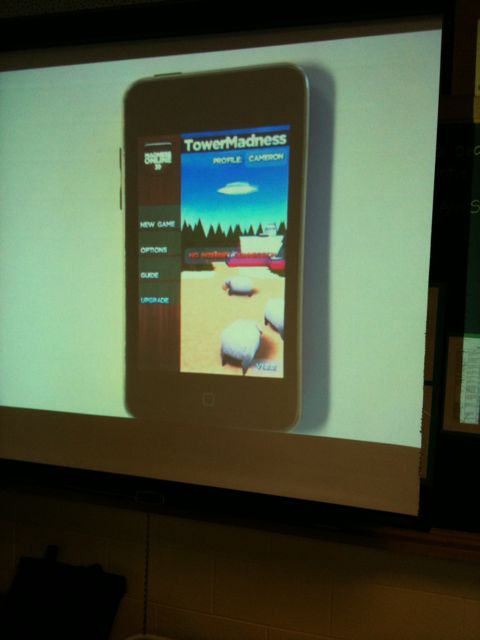
Thursday, I had the opportunity to visit the classroom of @kimsten for the launch of the iPod project. This particular class has been issued a set of iPod Touch units to use on a 1:1 basis for the balance of the school year. The iPods will be used both at school and at home.

The students had been issued their iPods a day or two before the ‘launch’. With expectations reviewed, students were busy with their first assignment – check out the iTunes store to see what applications were available and which ones captured their interest.

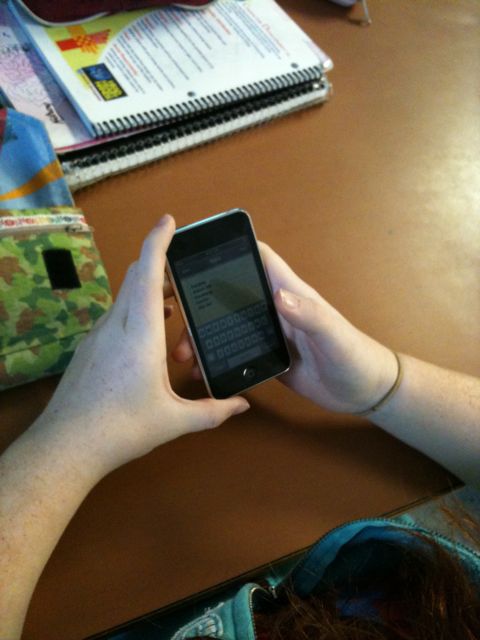
I appreciated the opportunity to attend the session and feel the excitement in the room as students eagerly waited for their turn to demonstrate their application choice to the class with the document camera. As one might expect, many of the students had investigated the games section. I was impressed with the number of students that had also explored other areas of interest and were prepared to present these choices. Chatting informally with the students, they shared a broad range of interests in the applications including google earth, wordpress (for blogging), puzzle/problem solving, interactive whiteboard (shared drawing), creation tools for art and communication tools. Some students were already taking typing lists to capture the choices of other students with the iPod notes application.

I know this will be an interesting learning opportunity for the class, and I look forward to being involved as they travel this mobile learning journey.  A few photos from my visit are displayed below.


Following the student presentations, the class was off to the lab to do a collaborative writing session using etherpad with @wattsup56.

~ Mark

New Facebook Privacy Settings Get Mixed Reaction

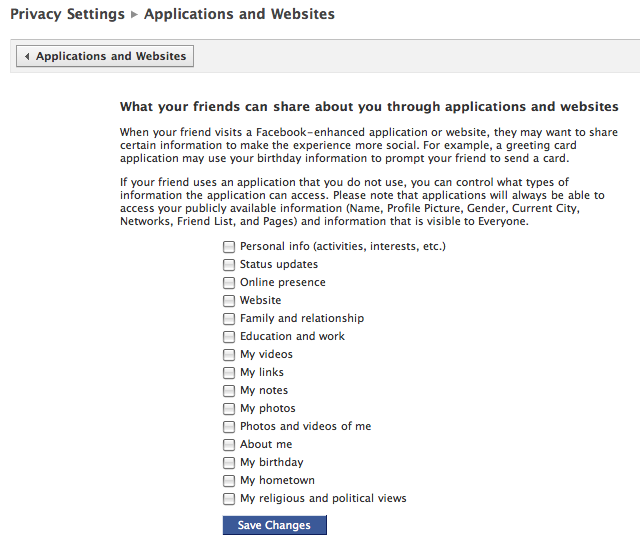
There has been a fair bit of hype around the promised improvements to Facebook privacy settings. The release of the new privacy settings format this week has come with a mixed reaction from users and privacy advocates. Many users claim some settings are in fact more open than they were before and that it is easier for users to give out details they may not wish to share.

The first time you log in since the new settings were put in place, you are prompted to review and update your settings. As you can see from the screen capture below, there is a long list of things impacting your privacy options to work through and check.

Personally, I was disappointed to see that some of the settings default to friends of friends. I was certainly hoping for default settings to be more locked down with the onus on the user to open up the settings to their liking. In working through this new setup, I noticed that not all settings seemed to adhere to the way I set them the first time through.

Be aware, and be safe online. Take the time to complete a thorough review of your settings. I would recommend the following actions:

  • a detailed review of ALL of your settings with appropriate changes saved
  • logout
  • login
  • recheck the settings for verification

I believe there continues to be more work for privacy and online safety advocates to do.

Related Reading

From the Facebook blog: new privacy tools
ABC News: 5 things to know about the new Facebook privacy settings.
Yahoo News: Privacy Advocates slamFacebook change

~ Mark

RCAC: Managing the Gap

One of the things I really enjoyed about the RCAC event this week was meeting people for the first time that I have only known though online interactions. It was truly a pleasure to meet @thecleversheep, @peterskillen and @aforgrave.

The format of the RCAC day is keynote, break out sessions, lunch, keynote and another round of break out sessions. This formula works well, and there is always a good selection of presenters and topics for the break out sessions. This year, I had registered for a presentation about the Creative Commons. What a pleasant surprise to discover that the session was being presented by @thecleversheep, who I had been following for some time on Twitter.  How wonderful to meet a kindred spirit who shares the same passion about copyright, licensing, managing content in appropriate ways in the web 2.0 world and spreading the word about digital citizenship!

I really liked the framework used to discuss content from a cradle to grave perspective: creation, ownership and rights of use through to public domain. You own the rights to content you create (original or using legal sources), all rights reserved and 50 years after your death, it becomes part of the public domain. The ‘gap’, defines the timeframe between creation and public domain. The Creative Commons provides a great way for you to formally indicate a specific type of copyright licensing and use of your work(s) while you are alive. Licensing typically fall into the  areas of:

  • attribution
  • share alike
  • non commercial
  • non derivative
  • and combination of these principles

Detailed license descriptions are available at the Creative Commons website. Excellent examples were given to illustrate music, videos, written content and remix/mashups. I had to smile when audience questions were taken at the end of the session and the answers to some scenarios were ‘that’s illegal’ and ‘that breaks copyright’. Just because something is easy to do with technology does not mean it is legal to to it.  The Clever Sheep knows his stuff !

I would encourage you to visit the Clever Sheep website and view the Creative Commons for RCAC article. Thanks for a great session, being a creative teacher and promoting digital citizenship.

Thank you to @dougpete and his organizing team for a great learning opportunity.

~ Mark

Video Streaming on the Go

I recently became aware of two applications that allow users to stream video from their iPhones. Today was a download, install and try out apps for the the first time day. The products I tested are listed below.


I am already thinking about curriculum applications. First impressions will follow in a future post.

~ Mark

Social Media ID Probe

Question of the day: How willingly do social network users give up personal data?

This very question has been explored by Sophos UK. Sophos conducted testing in 2007 and 2009. The results may surprise you.

Given the efforts put into promoting and raising the awareness levels of Digital Citizenship, online safety and privacy, I would have anticipated a trend of improvement to be reflected in the results. However, this was not the case. I wonder if a big factor in this result stems from the continuing growth in the numbers of social network users. The Facebook blog currently reports over 300 million users. Just a few months ago the number was in the 250 million range. TwitDir, a Twitter directory currently shows 5.3 million users with an aggressive growth rate. Some estimates place the Twitter growth rate at 1382%. The reality is that this means there are high numbers of relatively inexperienced social networkers in the mix at any given point in time who may not be as savvy as more experienced online users.

Some highlights from the testing showed that:

  • 41 – 46% of users probed blindly accepted a friend request
  • one of the ‘blind friends’ was in fact a plastic duck
  • younger users tend to give out information more freely

Actual results of the probe are summarized in the chart below.


I would encourage you to read the report and recommendations for online safety at Sophos.com. From my point of view, the results indicate that there is considerable work to do in the area of Digital Citizenship and online safety.

~ Mark