Category Archives: Technology in Education

iPhone live streaming

This past weekend my daughter was carolling as part of the festive activities. The final stop was to do a neighbourhood performance using someone’s porch as the stage. I couldn’t help but think this would be a great chance to trying streaming their performance with my iPhone to a wider audience.

Decision time: Qik or Ustream?  After a bit of testing, I decided on Qik – just seemed a little easier to use, and no annoying pop up ads in the video window.

I was sure I would not hold the phone still enough, so needed to come up with a stabilizer of some sort. I removed the snap cover from my iPod case and twist tied it to a camera tripod…. and presto, a streaming pouch for the iPhone.

iPhone streaming in action.

I choose to optimize the audio since I was recording music and minimize the bandwidth required. the audio quality turned out quite well. The video is a bit grainy, but this lighting was not the best and may have contributed to the lower video quality.

Check out Amber’s Angels recording. Enjoy!

Note: This streaming activity could just as easily been an event in a classroom. Just think of the possibilities.

~ Mark
Stats: the survey says …

When I got home today the newest publication from the Ontario Teachers College was in the mailbox. I did a quick thumb through and the article that initially caught my eye was the ‘Survey says …’

The article reports on a recent members survey. I noted two points:

1. Usage of social media by teachers is increasing (not really a surprise). Details showed

  • 30.1% connect on Facebook for up to 2 hours per week
  • 32.4 % watch YouTube for a little under an hour/week
  • 50.3% tune into YouTube for as much as 2 hours/week
  • 35.8% use other forms of social media

2. In answer to the question ‘Should the college (OTC) make use of social media tools?’, I found the results very interesting.

  • MySpace 8%
  • LinkedIn 11%
  • Twitter 14%
  • YouTube 20%
  • Facebook 48%

Hmmm. Facebook wins by a landslide. While I am not surprised that members see value in using Facebook as a connecting tool, the margin of choice was surprising to me. I would have also anticipated the Twitter use would have been higher, especially given the extensive education based PLNs members are using effectively.

It is good to see the overall growth in the use of social media tools. Keep those PLN online connections alive. Invite a new person to participate today!

~ Mark

Tips and Tricks iPad Resources

Are you looking for some tips and tricks for using your iPad?

Here are a few that I have found in the last month or so that I found to be worthwhile.

1. Free from the iBook store (via the free iBooks app), simply search for iPad

  • iPad User Guide from Apple
  • iPad Starter Guide (Macworld)
  • iPad Publishing Guide (by M. Ashley)

2. Secrets for iPad (app) – free and pay ($0.99) versions

3. iPad for Dummies (by E. Baig & B. LeVitus)

4. iPad Wikis

Enjoy the learning. Make the most of your iPad.

~ Mark

Creating a Facebook group for your K12 class

In my previous blog post, I made reference to a number of strategies to embrace the use of Facebook within the K12 classroom to support learning. One of the most powerful features of Facebook for use in the classroom, is the groups feature.

The process used to setup a Facebook group is straight forward and can be completed in just a minute or two. The steps are:

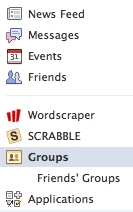
1. Select the Groups link on the left side of your Facebook ‘Home’ page.

2. Click the ‘Create a Group’ button

3. Complete the basic group information.

4. including the category and type information.

5. Click the create groups button to proceed to the group property settings page. I would recommend unchecking the ‘Non-admins can write on the wall’ setting. Unchecking this parameter prevents wall posts leaking out side of the group to Facebook friends of group members.

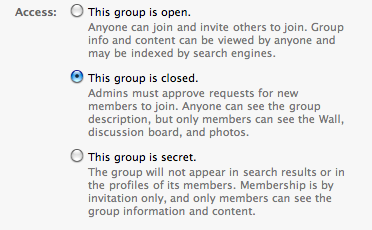
6. The bottom section of the group property settings page governs the visibility and privacy settings for the group.  For K12 purposes, I recommend the closed group setting. This allows the group name to be searched, but keeps the content of the group private to the group membership. With this setup, the group owner can invite members via email addresses and NOT be friends with the members. From the K12 perspective, this allows a teacher to create (own) a group and invite student membership without becoming Facebook friends with the students. In our case, this can be done easily by using our Board generated student email addresses.

Note (20101012): Since researching and experimenting for this blog post, the new groups feature was introduced within the Facebook environment. This feature may impact the functionality described here in terms of the groups members are, or are not, friend relationships. Until this is more clearly understood, I recommend that privacy and security settings are implemented accordingly.

7. Click the ‘Save’ button to activate your settings.

8. Select the ‘invite people to join’ link to send group invites.

Once people accept your group invitation, the collaborating will begin.  Enjoy your Facebook Learning space.

~ Mark

Adobe Connect – audio update

Further to my earlier blog post regarding my Adobe Connect ‘live teaching’ experience, I wanted to provide an update re my live audio testing sessions. With the help of a test group, we had participants ‘tune in’ from the same building as I was broadcasting, other school sites within our Board network and a couple of off site connections. For all connection types, we were able to improve audio quality.

Before the scheduled session each participant looked after two tasks:

1. check that their flash player was up to date, and complete the update if required and
2. complete this Online Audio Test.

Listeners found the greatest audio clarity when I used the USB Yeti microphone, which I purchased at the Apple store.

We also experimented with web cam settings to determine impact on the audio. With only one camera active, the fast image and slow image settings worked well. The high quality camera setting reduced audio quality (slight choppiness) but not overly disruptive. With multiple cameras active, the slow image setting produced the best overall results.

The test results were validated across the 2 test sessions using different locations and equipment for each session. I feel confident we can proceed with online teaching and our Canada Connections project.

~ Mark

Facebook in K12 – Resources

Links: 2010-09-18  — Facebook in the Classroom


Synthesize the Concepts

Iowa city are now using the social media website inside the classroom

The Science Behind Feeling Good While Social Networking

Ideas for Social Media Guidelines

Social Media Guidelines – More Thoughts

Suggestions: Facebook guidelines for students, parents and schools

ST. CHARLES Community College Facebook Guidelines

Use Facebook to Support School Homework

Note: These resources have also been posted in my ‘Facebook in the Classroom’ user group on Facebook.

~ Mark

Adobe Connect Live

This week I tried my first ‘extended time’ online instructional session with a few administrators in our system using Adobe Connect.  The features of Adobe Connect all worked well in the live setting: status flags, chat window for comments and questions, the notes window for our agenda and screen sharing, which I used to project my browser window to remote users.

The feedback on the method of delivery was very positive. The challenge we experienced was the audio being somewhat choppy. This was not evident on my end as the extra ‘remote view’ computer I had set up to have an idea of what the participants were seeing and hearing yielded good results. Today I spent some time completing some research to learn more about how to improve this aspect of session delivery.  The results of my search provided some good insight into some things to experiment with.

I am going to hold a couple of live audio test session to experiment with mics and audio settings to see if I can make some improvements in the audio delivery.  I am experiementing with 4 different mic setups: a direct plug audio mic/headset, a Microsoft USB LifeChat LX3000 headset,  a USB Snowball and the USB Yeti microphone.  One recommendation was for a Shure 58 mic (requires a pre-amp before it can plug into a computer). I have the equipment to test this too, so may throw this option into the mix. I will share what I learn.

I found the following resources to be helpful:

Adobe Connect Resources
Microphone Options
Microphone Help
Connect 7 Audio Tips
Can they hear you now?
U. Dallas Resources
Penn State – Audio Tips
Online Audio Test

If you have tips to share on this topic, please leave a comment.

~ Mark

Leadership Day 2010

A few days ago, I saw this tweet from @gcouros while reviewing the daily action from my PLN.

This certainly caught my attention, so I read the blog post and decided to participate.

Lets be straight up to begin. Administrators are busy people with many responsibilities to juggle. They can’ t ‘know everything’ – and they don’t need to.  I do believe there a some critical elements that are attached to their role in terms school success and staff development that will make a key difference.

School Administrator To Do List

  • walk the walk & talk the talk
  • understand digital literacy and digital citizenship
  • be familiar with, and understand the power of  web 2.0 and social media tools
  • establish a PLN (self directed, job embedded learning) and share the learnings with staff
  • promote technology use as an embedded & key part of the learning process
  • understand appropriate technology use, highlight/showcase it as a part of good teaching practice
  • include technology use in the learning process as part of the teacher feedback and evaluation process
  • require that staff learn about best technology integration strategies as part of ongoing PD/learning plans
  • ensure that technology uses are well connected to Province/State and Board/District level priorities
  • understand the role of technology in establishing and/or improving school and classroom community
  • build a culture, not a ‘one of’ island
  • embrace change
  • be vocal: share, promote and connect with other administrators
  • STAY THE COURSE!

~ Mark

Information Fluency

I came across this video today via a tweet from @ijukes. It is certainly an interesting video – food for thought for sure. Check out InfoWhelm and Information Fluency video.

What are your thoughts re the message in the video? Share your reaction in a comment.

~ Mark

iPads on the Move

After using my iPad for the last 6 weeks, thanks to @ron_mill, I thought I would share a few first impressions and some thinking about use in education. On the topic of first impressions, I note:

  • how much I enjoy using the touch screen interface – very easy to use
  • the context sensitivity of having the right options at the right time (such as a pop up keyboard) is amazing
  • the pop up keyboard is sized to allow for ‘traditional’ typing (not the fingering poking method)
  • battery life is amazing – I am getting 9 – 10 hours per charge.
  • the selection of quality apps is good
  • e-reader capabilities are strong
  • overall, lots of potential
  • the only drawback I have found to date, is that the wifi connection process seems a bit clunky as stored known networks do not always auto-connect

With all of these good qualities, I can’t help but think about the possibilities ….  iPads for classrooms, staff development, library learning commons, moving the e-books agenda forward all would link nicely to our key initiatives.

Currently, the following iPad plans are in place for the 2010/2011 school year:

  • some will be available for staff to try at CATC Camp, our summer teacher PD session
  • a number of units will be available for use by elementary classroom teachers
  • iPads will be used in our secondary school Futures Forum project, developed as our PLP project
  • units will be purchased for our central elementary teacher librarian group for September

Other plans under discussion include:

  • iPads preloaded with staff development reading material that could be loaned out
  • additional expansion of the iPad program as it relates to our Library Learning Commons project

I am looking forward to supporting these new initiatives!

~ Mark