All posts by markwcarbone

I have 36 years experience in K-12 education. I have been fortunate to work in many different roles including teacher, department head, ICT consultant, IT Manager and CIO. Personal interests include performing in the Venturi Winds woodwind quintet, the Cambridge Symphony and the KW Community Orchestra as well as composing and arranging music. Connect, Learn, Reflect & Share - make a difference today!

All in the numbers

A few days ago, a family friend posted a statement on Facebook indicating their belief that 13 was in fact a lucky number. There were a couple of ‘like this’ responses and a comment supporting that statement and also indicating that 13 is a ‘fine prime’ number too.

Well, then my daughter jumped into the fray. She, if fact, does have a lot of ’13’ connections. Once the full list was compiled through the various posts, I thought it was worth sharing here as a point of interest.

The list of Stephanie’s special connections to 13 are:

  • born in our 13th year of marriage
  • on the 13th day of the month
  • adopted on the 13th of the month
  • was the 13th member of the Carbone family
  • will graduate from university in 2013
  • was assigned residence phone extension 2813 (28th is my birth date)
  • was in position 13 in her commencement line up

We helped acknowledge Stephanie’s special number and favourite animal with the purchase of a personalized license plate: MOOSE 13. I think is is pretty cool, and am always amazed by these connections. I look forward to future ’13’ connections as life unfolds.

~ Mark

As of today, September 13th, 2017 there are a number of ’13’ connections to add to the list.

  • started 2 different jobs on the 13th of the month
  • worked in one job for 13 months
  • house number is 13
  • son was born on the 13th

I look forward to future ’13’ connections as life unfolds.

~Mark

The iPad and K-12 education

I was great to finally hear the details of the Apple iPad this week. As one would expect, people predictably polarize their opinions on one side of the fence or the other – all raves or a long list of perceived short comings before they have even had a chance to try the device.

I have tried to put these potentially more extreme reactions off to the side. My interest in looking at the device was to consider its potential in the K-12 educational environment. From my point of view, their are many positives. Three in particular, are worthy of specific mention.

  • connectivity choices – wifi with or without a cellular based plan
  • full access to the suite of iPod Touch and iPhone apps
  • readiness for a new eBook and ePublishing strategies

What does this all mean for K-12?

  • internet connectivity: resources, inquiry based research
  • access to writing and collaboration tools
  • access to communication tools
  • well positioned to use new eBook and Publishing options
  • support for mobile learning

From my point of view, the iPad seems to be well positioned for a solid place in K-12 curriculum delivery. I look forward to learning more about the device and its educational potential.

Watch Apple’s iPad video.

~ Mark

Sharp right corner

Timeframe: Thursday January 14th, 2010

I had just returned home from our Admin Council seminar. I felt great about the technology directions agreed too as part of our work. I had also attended a school planning session around some Digital Citizenship initiatives. After dashing home for dinner, I headed out for quintet rehearsal – final preparations for our weekend concert.

Friday morning I following my normal routine and headed into work. My plan was to take care of some paperwork in the morning then attend a school technology planning session with one of our Principals. Well, that was my plan. Mother Nature had other ideas.

Mid Friday morning, Mother Nature took control of the agenda, turned a sharp right corner, a led me on a new path that would turn out to be a 8 day adventure in the hospital to deal with a number of interconnected and complex issues. Talk about an instant disconnect from the world! It turned out to be a week to:

  • remind yourself to appreciate good health
  • focus on health improvement
  • appreciate the skills of my Doctor, nurses and medical technicians
  • and be thankful for the love and support from my family

Everything has turned out fine, and I am delighted to be at home recovering. As energy returns, I will begin reconnecting with my various online activities.

~ Mark

FirstClass Mobile – a few more tips

A number of us at work have been using the FirstClass Mobile client for a while now. Overall the current version seems quite stable and works well, but there seemed to be 3 short-comings that needed to be addressed from my point of view. Thanks to my trusty PLN, I have 2 answers and 1 work around which I will share in today’s post.

1. When addressing mail, it was not obvious how to add multiple recipients in the address line. Thanks to @dougpete for pointing out the ‘ To: ‘ label is actually an active button, which takes you to a screen that facilitates adding multiple addresses to the To: CC: or BCC: address fields as per the two iPhone screen captures below.

.

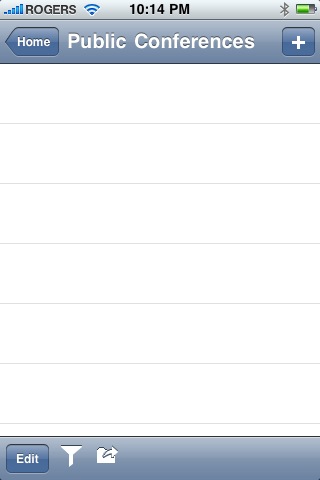
2. The second issue was that the Public conferences area was not showing any conferences when opened. Coworker @rebrouse figured out the tapping the bottom right icon that looks like a folder with an arrow, displays the ‘missing’ icons. This works consistently with folders too.

.

3. It seems that the reply all with quote option is not available. In the regular client, you simply highlight the text to be quoted then choose reply all. It is possible to work around this using a copy and paste technique with the reply all option to simulate the correct message content. Select, copy is activated by holding your finger on the touch screen, dragging the highlight box to cover the required text, then pressing the ‘copy’ button. Once you choose reply all, tap the screen then choose paste.

Thanks to my PLN for helping me learn!

~ Mark

School Blogging: A New Twist

Today I had the opportunity to attend a technology planning meeting at one of our elementary schools. As I anticipated, the conversation was engaging and the work session productive.

The Principal, Mr. James Bond, is certainly providing excellent curriculum leadership with well thought out technology integration plans which align with our system goals.  I was really impressed with the blogging initiative that has been started at the school and wanted to share a few highlights. In addition to the dedicated class blogs being run by some of the staff, Mr. Bond has also taken a unique approach to setting up a school blog.

The school blog project is designed to promote building an online school community. Accordingly, the blog is set up to allow everyone in the building to participate. Within the blog, a number of categories have been set up to organize the posts by topic. Teachers are assigned blog categories to monitor and be responsible for moderating. Each student is registered on the blog as a contributing author, which allows them to add posts or comments to any of the areas that interest them.  Mr. Bond indicated this strategy has guaranteed each student in the school has class time with at least one, but usually more than one, teacher who is active in the project at this point in time.

Blog post categories cover a wide range of topics and teachers are encouraged to try new ideas too. Some of the topics include math journals, book reviews, as well as many other areas of curriculum and general interest. The project has been underway for just one month, and steady growth in participation is already being observed. Teachers have observed that students are engaged in the writing process during school hours, and many contribute from home outside of school time too.

Our session finished with some discussion around strategies to share this exciting approach to build community and increase capacity within our Board and beyond. I look forward to watching this project grow, and my next visit to the school!

Related Resources

Mr. Bond’s Blog
Follow Mr. Bond on Twitter

~ Mark

Student View: iPod Guidelines

The first day back after the holiday break is complete. At dinner, we talked about what happened today. My daughter, who is involved in a class iPod project, mentioned they had a class discussion about developing some iPod use guidelines. Naturally, I was interested to hear about the dialogue. I took the role of the reporter, prompted the discussion with a couple of questions, but mainly tried to sit back, and listen to a student version of the outcome of the class discussion.

My transcription of the conversation:

  • Be prepared
    • The unit and headphones should be at school each day, fully charged
    • Required apps must be installed timely, as required
    • Units will be kept on the desktop ready for action
    • Be responsible
  • Manners and etiquette
    • Be considerate of others. Give them your attention when they are talking or presenting. The iPod should NOT be a distractor.
    • Use when asked (there may be non use activities)
    • Text communication will not likely be required
  • Applications and Content
    • Apps should be appropriate for school. Any games should be educational (problem solving etc.)
    • No illegal music
    • Note: I must admit the last comment made my heart smile – nice to see copyright as part of the discussion!

To me, it sounds like they had a good discussion and captured the important points. My daughter seemed confident that this approach would work well. I think this set of guidelines would work well for adults too, especially the point in blue italics. 🙂

~ Mark

2009: What’s Changed?

Last week, while waiting at Starbucks to meet my wife for a coffee, I fired up Tweetdeck on my iPhone and flipped through the recent list of Twitter updates. One that caught my interest was from Will Richardson asking “What changed in 2009?”. I read his reflective blog post at Weblogg-ed.com. Great question, great time to reflect and time to jump in with a blog post to respond.

Will specifically asks “So, as a way of taking stock, I’m asking, what’s changed?

I mean really changed in your school? What stories are there of moving wholesale to an inquiry-based curriculum, of real reinvention of assessments, of students participating in global learning networks, learning how to create their own personal networks around their own passions? Or even moving off of paper into a digital reading and writing space? Or moving from a teaching community to a learning community? Or other changes? My sense is that once again, there’s not all that much different today than a year ago.”

I will comment from two perspectives: personally, and from a K-12 system point of view. For me personally, 2009 was an amazing year filled with many projects, a lot of learning and many opportunities. Upon reflection, I consider all of the following to be successes for me:

  • began blogging mid year, still doing it, writing regularly, and having fun doing it
  • embraced Twitter and other social networking tools
  • actively participating in a number of online forums (ISTE, Ning, Classroom 2.0, Ontario Meetup etc.)
  • participating in the Ontario PLP cohort
  • developed a solid personal learning network (PLN)
  • completed a leadership course at the Queens University Business Executive Development Centre
  • continued participation with education committees/organizations including: OSAPAC, COCA, RCAC, OASBO

In the broader K-12 context in my Board, things ARE different than a year ago – maybe not in the ‘wholesale’ way quite yet, but they are in fact different. Specific targets that were set 12-18 months ago are being realized or are at least under way. Some of these successes include:

  • implementing our new shorter technology replacement cycle
  • roll out of wireless with network access control (NAC) is under way
  • convert 40 elementary schools to a new dual boot Mac environment (starting Jan. 2010)
  • mobile learning projects with iPod Touches in the classroom are underway
  • implementing our Library Learning Commons model for better system support
  • significantly improved alignment between Learning Services and IT departments
  • provided greater access to online resources (less content filtering) including access to some social media tools
  • planning new staff development strategies for Sept. 2010 to include social media component
  • more people are ‘involved’ than a year ago, and the thinkers and changers are better connected
  • more teachers and students are using blogs, wikis, media, inquiry based research/learning

What have I learned?

  • I can make a difference
  • I can participate
  • I can help to keep these important conversations going
  • I can initiate
  • educational change takes time
  • maybe we (the big picture we) are not ready (yet) for chaotic change given the variance of teacher understanding and readiness in the areas of technology use and embedding in the curriculum
  • there are indeed systematic approaches that can be taken to engage people and move the agenda forward – and we need to actively keep working on them

A Context for Continuing the Journey

At the end of the day, or school year, or graduation day for our students, I think we fundamentally will arrive in a similar place – we want to graduate students with:

  • certain experiences and character traits in place
  • well developed critical thinking and problem solving skills
  • strong skills in writing and a variety of literacies
  • developed emotional intelligences
  • creativity
  • etc. ( I am not attempting to generate the perfect list here, just make a point)

Maybe we don’t need to revisit/review/change every classroom, teacher and instructional practice. What we can change, in a broader strategic manner with impact, is the journey that happens between enrollment and graduation.We do need to systematically put things in place so that each child that journeys through a system has some guaranteed experiences. These experiences should also include:

  • readiness to live and work in a technology oriented world
  • embedded technology supported learning
  • collaborative online experiences
  • social media use and awareness
  • participate in a culture of sharing
  • digital literacies and digital citizenship

Count me in! This is doable. The question is how do we achieve greater invovlement, provide the right ‘enablers’, keep costs down, change things at the systemic level at a greater rate of change, keep the energy behind sustained change and yet without ‘upending the apple cart’? Personally, I am looking forward to 2010 to keep working on this agenda. When 2011 arrives, I want to look back at 2010 and say that more change has occurred and that I made a difference.

~ Mark

Welcome to 2010

There is no doubt that 2009 has been an exciting year for me on many fronts. I am not big on New Year’s Resolutions because they are typically unrealistic and therefore get broken, and often quickly. However, there is still the ‘what will 2010 bring’ question.

My list is simple in terms of what I promise myself:

  • ongoing commitment to a healthy living style
    • regular exercise
    • eat GI
    • maybe do a little better in the get more sleep department (maybe because I know it is unlikely :-))
    • work at the balance
    • enjoy family, friends, work & play
  • embrace the new opportunities that present themselves
  • make a difference

Each year brings a renewed opportunity to appreciate family, friends, fellow workers and new acquaintances. Certainly the PLP & the related experiences of blogging and exploring the social media tools has been a big part of the ‘new’ this past year. Truthfully, I feel very thankful for the people & opportunities in my life. I anticipate 2010 will bring continued learning, more dialog (online & F2F) regarding educational change, greater use of social media tools and change – yes, more change – yeah!!!  I will embrace 2010 with energy, enthusiasm and a passion to make a difference.

I wish you a happy, healthy and successful 2010.

~ Mark

Streaming with your iPhone

We decided to take a drive down to see the lights at Niagara Falls as a family holiday outing. Ummm, how about adding a sprinkle of tech stuff to spice things up. Great idea! – left with my iPhone fully charged.

Prep Work: I had recently downloaded two apps to do live streaming from the iPhone to a website where others could watch live, or watch the saved video clips, provided they knew the web address. For this particular event I decided to try the QIK app. Once the free software was downloaded, setting up the software was a snap – register a user ID, password and email address and you are ready – it is that easy. Any video you shoot is streamed to the vendor website and linked to your account, http://qik.com/markwcarbone in my case. Entry level accounts are free. Some upgrades are available.

At the Falls: Once we arrived and cased out some parking, I flipped a note out on Twitter and Facebook to announce my streaming experiment. I had lots of fun experimenting with the iPhone video as there was plenty to look at – Christmas lights, Disney light displays and of course the Falls themselves. Given the evening darkness, below 0 temperatures and the freezing mist, I was not sure how things would turn out. I was pleased with the results given the conditions. I am sure the steaming with ‘regular’ lighting conditions would yield great results.

As it turned out, my streaming experiment was viewed from Windsor, Ottawa, Florida, Oakville and Kitchener. Thanks to @dougpete, @kimmcgill@kpuddington, @kimsten, @trustsocmedia and @rebrouse for tuning in and providing some feedback!

Sample Video Clips

The Falls Take 1
The Falls Take 2
The Falls Take 3

Of course, it does take long to start thinking about all of the educational possibilities to use this technology for recording events, interviews, field trips, experiments …. how exciting!!!

Try the app: iTunes Link to Qik Live

I think with this app, ‘have fun’ goes without really saying it. 🙂

~ Mark

Video Conferencing with Skype

As a long time user of Skype, it is nice to see the use of this powerful, yet free, software package getting greater use in the classroom. Recently we have had a few more teachers in our Board asking to use Skype for classroom projects,  so we have installed it when requested. If it performs well in our network environment, it could easily be made part of our standard setup.

Of the Skype related resources listed below, the first two were of particular interest to me. The Skype an Author project seems like a natural way to connect reading and writing experiences in the classroom with the real world. The blog post outlining steps to create video content for blogs using skype offers some useful tips and could be a great resource in classrooms where blogging is part of the writing process.

One of my PLN members and Twitter user, teacher @zbpipe, has been using skype to connect to other classes to learn folk songs as part of their music and global studies. You can find additional information on Twitter about Skype in the classroom by simply searching for the term ‘Skype’. I keep a ‘Skype’ search open in my Seesmic Desktop application to keep up with new ideas and resources.

Resources

1. Virtual Author Classroom Visits: Skype an Author

2. How to produce video interviews for your blog using Skype.

3. Skype Directory for Educators

4. Skype in Schools wiki

5. Blog Post:  All Schools Should Skype

6. Download Skype Software

Give it a spin and enjoy the video conferencing!

~ Mark