Category Archives: Social Media

RCAC11 Presentation Notes: Facebook 1 year later

RCAC 2011 presentation notes: Facebook – one year later in WRDSB

A special thank you to my presentation guests:

Elaine MacKenzie
Dan Ballantyne
Adrienne Fiander
Shannon Smith

Related Links:

Ontario ConnectEd Leader Consortium
Log into Facebook to see OntCLC on Facebook
OCT Backgrounder
OCT Advisory
OCT Social Media video
Principals and Social Networking Report (2010)
Log into Facebook to see Dan Ballantyne’s Teacher Fan Page
RCAC

~Mark

Social Media Check

Thanks to a tweet from @trustsocmedia this week, I found out about the  The Doc Zone  feature titled Facebook Follies   . Although I was not able to view the CBC broadcast, the title did capture my interest. Today, I took the time watch the online version of  Facebook Follies .

In my view, the production was very well done.  The realities, cautions, benefits and highlights of using Facebook, and social media tools in general, are all explored through real situations. To me, this speaks to the reasons why students need to be educated through authentic experiences about the use of social media tools, digital citizenship and managing your online profile/digital footprint.

Your online actions live forever. I applaud educators who are making efforts to embrace social media tools, leverage their power , teach and model ethical and responsible use.

~Mark

ECOO 2011 Reflections

One thing really struck me about this ECOO 2011 — energy. There is a genuine energy in Ontario teachers for change in teaching practice. There is a synergy building in the province, and it was certainly great to be part of the learning.

A few personal highlights:

  • @snbeach & @willrich45 – great keynotes – motivating: be a change agent
  • Trending @dougpete – super group effort
  • Finally got to meet @shannoninottawa F2F – must continue the building school admin capacity discussion
  • Insightful talk by @gcouros
  • Presented my first pecha kucha – wonderful experience
  • Interesting discussions at the OSAPAC booth
  • The OCT: use Social Media tools but don’t put yourself at risk, maintain professional boundaries
  • Connected with new educators, new learning opportunities
  • Noon hour discussion topics – removing barriers, great thinking
  • Chatting with WRDSB Futures Forum Project teachers — next steps, thinking BIG
  • Pleased to have a good turn out for my Facebook in the Classroom session
  • Explored new staff development resources at the PLP booth.

ECOO 2011 was a great conference and wonderful learning opportunity. Thank you to the planners and organizers — take a bow!!! This conference was certainly an opportunity to be WRDSB Proud. WRDSB had a strong contingent attending the conference to learn and share. WRDSB presenters were well received on the wide variety of topics presented – go team!

Related Resources

ECOO 2011 Twitter feed
Twitter bio update challenge #changegame
ECOO


~Mark

Online orientation

While participating on the OTF21C panel discussion this past week, an interesting point came up.  Since the discussion, I have been thinking about this:  What is your online orientation?

1. Are you offline, and you choose when to go online?

or

2. Are you online, and you choose when to go offline?

Please leave a comment, or connect via Twitter or Google+

~Mark

The OCT Advisory – my view

On Monday April 11th, the long awaited press release of the Ontario College of Teachers (OCT) electronic communication and social media advisory was released. I was attending the OCT live presentation on Tuesday in Toronto, and viewed the advisory print document and watched the video to be well informed for the session.

My initial impression of the print document was that it was a well written, solid framework to guide educators into this new territory. I was very impressed with the video production as it captured a positive spirit for leveraging these new tools within our education system. I did feel that some additional clarification was required in the area of Facebook use, and planned my comments and questions for the live session.

It was interesting to watch the press and media take on the documents and follow the reactions via Twitter. As one would expect, reaction varied widely, tending towards the ‘too cautious’ end of the scale. Tuesday morning, I was able to have a conversation with Chris Vollum, an excellent speaker who has significant experience presenting social media sessions to school and parent audiences across the province and at many WRDSB schools. Chris, who was interviewed as part of the video, had a positive reaction and felt the overall message was positive. I also had a good phone discussion with Jane Mitchinson who has provided extensive leadership in technology and social media use within our Board.

The session was well organized, with the agenda organized as: presentation, table discussion and Q&A.  I captured some of the important highlights and shared them on Twitter:

  • Opening remarks: OK to use social media in responsibly and ethically — key factors: care, trust, integrity and respect
  • The intent of the advisory is to clarify responsibilities while capitalizing on the potential of these tools
  • Social media tools can be appropriate, useful and powerful
  • OCT: ‘off duty’ use of social media tools matters – what does appropriate use look like?
  • Online behavior by teachers should reflect the same professional ethics as used in the school setting
  • Private vs. Professional: onus on members, off duty conduct matters, exercise caution, act professionally at all times
  • The internet is part of a teacher’s off duty realm
  • Any online presence should respect professional integrity, even in the somewhat less formal social media environment
  • Reviewing some examples of professional misconduct -I note that these examples would be inappropriate online or offline
  • Teachers: model good behavior, advocate proper use (digital citizenship) be courteous and professional at all times
  • Facebook – caution re ‘friending’ – but no distinguishing of friend=contact, it is all about the security and privacy settings – education!!
  • My comment: follow the Grandma rule— if you don’t want your Grandma to find out, don’t put it on Facebook
  • You can’t judge social media from outside
  • Board hosted email should be used for communications with parents (not personal email addresses)

The table discussions were interesting. We were given 4 scenario questions to consider. All were great questions  with pros and cons and certainly generated excellent discussion around the different viewpoints — risk factor(s), legal implications, empathy, professional approach.

In some ways, I enjoyed the Q&A best. Many good questions were asked, and gave further indication that there are multiple factors to consider in almost all situations. I did take the opportunity to raise a few points during the discussion:

  • Digital citizenship and character development programs are essential for teachers and students
  • Staff and students need authentic experiences with social media tools in a real world context
  • Your digital footprint represents your online presence – how google-able are you?
  • Your digital legacy is your digital reputation – how will other perceive you and remember you?
  • Social media tools offer many opportunities for connecting, collaborating and sharing – embrace & capitalize
I did ask specific clarification around the ‘teachers should not friend students’ point.  In the Facebook environment, a ‘friend’ is a contact. How any 2 contacts interact is dependent on security and privacy settings, and the relationship — a professional context suitable to the educational environment.  I sited examples where teachers might ‘friend’ students, but have suitably locked down profiles and interact with students in a Facebook group setting.  Panel members who addressed my question indicated that there is no issue with this if it is done properly with appropriate settings and professional conduct. We all recognized and acknowledged  the need for people to know, understand and use appropriate settings (Digital Citizenship).
I took the time to meet the panel members after the session. I appreciate the work done on this document, and the importance of the framework established and congratulate the team that worked on the preparation of this document.
What if I could change one thing? – The one thing that I wish could be changed is the manner in which this was handled by the media. They really grabbed a couple of small pieces of information and cast a giant negative spin on things — so much for fact finding and balanced reporting. Unfortunately, this is all some people will remember.
Next steps: Embrace change! Given the great potential of these tools, it is important that those comfortable in leading, continue to learn and share best practices and experiences. Boards and federations need to make sure Digital Citizenship and Character Development programs and other training supports are in place. Pre-service teacher programs should provide a good grounding in Web 2.0 and social media tools. Teachers need to be familiar and comfortable with these tools before using them with students.
Related Links:

OCT Backgrounder
OCT Advisory
OCT Social Media video
Viewpoint: Pipedreams (blog)
Viewpoint: Off the Record (blog)
Viewpoint: The Clever Sheep (blog)
Viewpoint: Jane Mitchinson (blog)
Viewpoint: People for Education
People for Education’s Online Community

~ Mark

Twitter at the Board Table

Tonight I had the wonderful opportunity to participate in a presentation to the WRDSB Trustees. The focus of the presentation was to provide in-servicing regarding the many diverse program opportunities and supports for secondary school students. Main goals included a demonstration of using social media tools in a classroom context and to showcase work from our Futures Forum Project.

@kimkeena provided a nice over view of many of our secondary program offerings, with a focus on eLearning and Futures Forum opportunities.

My role was to provide an explanation of Twitter in less than 5 minutes, then introduce a brief activity. Click here to view the slide deck of my Twitter explanation effort. Students were seated a various tables with our Trustees. After sharing their thoughts describing how learning in our Futures Forum classes was different from their experience in traditional classrooms, their thoughts were shared via Twitter using the hashtag #wrdsbtss.  I demonstrated a live Twitter feed using Twitterfall to capture and display tweets from the group.

Next, @kempscott demonstrated a Google Docs collaborative writing example. The evening closed with a student speaking about his experience in one of our alternative learning programs.

All in all, a great evening and wonderful opportunity to share our student learning experiences with our Trustees.

~ Mark

Teaching the Facebook Generation

I came across this post today via Twitter from @pmcash.

The article covers the use of social media tools with in Australian schools. Based on the article, the general approach seems to be cautious about allowing access. Concerns raised include safety, teacher awareness of how to use the tools and online relationships between teachers and students.

In my Board (WRDSB), we have been making great strides in moving forward with the use of social media tools. Facebook and Twitter (and other tools too) are open for use to support curriculum delivery. These tools offer incredible opportunities to connect, collaborate and access real world information and events in real time. Teachers are finding many exciting uses for these technologies within the classroom.

Currently, teachers are using Facebook for:

  • fan pages to distribute classroom resources to students (& parents), raise awareness of issues etc.
  • study and enrichment groups
  • online writing (poetry, character analysis, debates/discussion re current events etc.)
  • opportunities to share student work (within groups)
  • online galleries (artwork, student created music and videos etc.)
  • teacher feedback and peer review
  • ‘ask a question’ homework groups
  • casual writing for learning second languages
  • teaching digital citizenship in a real world context

It is critical that staff and students understand the importance of having their privacy and security settings set up appropriately. This must be part of the education process.

In terms of staff/student relationships in this environment, it is business as usual in many respects. Any online relationship must follow the same professional conduct as any situation whether it is in the classroom, on the playground, on a school trip or in an extra curricular situation. Relationships must be kept at the professional level. No one should put themselves in a risky situation.

These social media tools are powerful — we need to leverage their power to support curricular delivery, while educating staff/students about appropriate use and maintaining the required professionalism within these environments.

~ Mark

Up next: Demonstrating Twitter to our Trustee group on March 7th.


WRDSB Futures Forum Project Goes Live

It is hard to believe that after almost 2 years of planning, the WRDSB Futures Forum Project will go live. This has been a real journey involving:

  • ongoing discussions with the Communitech organization in Waterloo to look at a view of a future classroom
  • PLP experience for a centrally based team (including me)
  • The formulation of a new innovative approach to learning within secondary schools with staff from Learning Services and IT Services working collaboratively on the planning
  • 7 of our secondary schools commit to this project
  • PLP experience for teachers and administrators from each school site involved in this project and a library resource team for project support
  • course design, technology components (wireless, netbooks, iPads, web 2.0 tools, Adobe Connect etc.)
  • planning, planning, resource development
  • and we are ready to go live!!!

Background:

The project emerged out of the recognition that although educators and others were striving to engage students in a variety of approaches and learning activities to better prepare for the changing world, these efforts often occurred in isolation without a systemic approach or support.  The project strives to integrate promising practices and learning across schools to meet the needs of all students in a more effective, sustainable and progressive manner.

The Futures Forum Project is an inquiry based, multi-disciplinary, project oriented approach integrating the teaching and learning of grade 10 Academic English, Civics, and Careers expectations (see Appendix A) into a morning block of 220 minutes (2 periods) during semester 2 of the 2010-11 year.

The overall curriculum expectations are addressed through the following components:

1. Guided Inquiries – These involve opportunities for students across participating schools to use technology to interact and work together.

2. Independent Inquiries – These self directed tasks provide students with opportunities to meet course expectations independently and tailor learning based upon their interests and readiness.

3. Portfolios – Portfolios allow students to engage in learning of interest to them and supports sharing with “authentic” audiences.

4. Summative Project – Students demonstrate mastery of Civics, Careers, and English expectations; independent inquiry, personally relevant learning and the of use technology as an effective collaborative and communication tool.

The summative project is focused around a “big question”…“What is my digital footprint?”  It addresses the separate course expectations by requiring students to demonstrate, in a variety of ways, responses to the following specific questions:

  • How am I an informed, participating citizen in a democratic and technological society? (Civics)
  • How can I develop and achieve personal goals for future learning, work, and community involvement in a technology rich society? (Careers)
  • How can I demonstrate I have a range of oral communication, reading, writing, and media literacy skills needed for success in school and life in a technology rich society? (English)

As part of the approach to the project each teacher will work with a network of teachers focused on this same inquiry based, multi-disciplinary, project oriented, and technology mediated approach to learning.   OT Coverage and professional learning are provided to plan and facilitate the use of effective instructional strategies and technology related resources (e.g., PDAs, notebooks, online tools) to develop and deliver the interdisciplinary class addressing expectations of the English, Civics and Careers grade 10 curriculum.

The Futures Forum project is focused on addressing the system success plan goal of improving the ability of students to communicate their thinking in writing by providing job-embedded professional learning opportunities, and access to some technological resources, as part of an inquiry based, multi-disciplinary, project oriented, technology mediated approach to learning.  The project’s focus is on:

  • achieving the system success plan goal of improving the ability of students to communicate their thinking in writing
  • promoting job-embedded professional learning opportunities for administrators, teachers and central staff,
  • increasing access to technological resources,    exploring an inquiry based, multi-disciplinary, project oriented, technology mediated approach
  • addressing grade 10 Academic English or History, Civics, and Careers expectations during semester 2 of the 2010-11 year
  • identifying and consolidating effective instructional strategies (i.e., instruction, assessment and reporting), tools and techniques mediated with technology related resources (e.g., PDAs, notebooks, online/internet networking tools, specifically Facebook, wireless access, etc.)
  • monitoring and reporting on project progress and system learning (e.g., resource requirements, professional learning requirements, promising instructional practices, scalability, sustainability, etc.).

The Project metrics (indicators for assessing the project) include:

  • increased student success rates in grade 10 credit accumulation, specifically for boys.
  • increased student engagement in learning (i.e., more choice, opportunities for inquiry, topics of interest to students, etc.)
  • increased school administrator, teacher, and central staff knowledge and expertise in using technology to engage students and promote learning;
  • increased familiarity and effectiveness in the use of WRDSB research-based strategies, tools and techniques for improving written communication (e.g., student exemplars, anchor charts, non-fiction writing, graphic organizers/frameworks, open-ended critical questions), professional learning networks and professional learning cycles

Futures Forum Participants

School participants include a teacher and vice Principal lead.  Grades 10 teachers teaching academic type English, open type Civics and Careers courses in semester 2 of 2010-11 are participating in the project. Participation includes a commitment to professional learning sessions, co-planning, networking, implementing, reflecting on lessons and assessment tasks, and a willingness to use technology to effectively implement system identified instructional tools and techniques in an inquiry based, multi-disciplinary, project oriented approach to teaching and learning.

Futures Forum teachers maintain a daybook, collect teacher reflections on learning, complete reports requested by central staff, and attend regular meetings with Learning Services staff.   In addition, expectations include:

  • Participation in co-learning with other Futures Forum teachers.
  • Completion of data collection (e.g., survey teachers on what strategies they found most effective) for assessment purposes by central staff.
  • Work with the administration to implement the project.
  • Consider and contribute suggestions to support the project’s focus as determined with Learning Services staff.

Learning Services and Information Technology Services (ITS) staff provide leadership and support in the coordination of the project. They are involved in facilitating professional learning, monitoring project progress, allocating resources as required, supporting access to technology (e.g., students using both board and their own technology) through a wireless classroom environment, collaborating with the vice-principals and assisting in the completion of reports (e.g., status reports, final reports, data analysis).

Technology Components

A Variety of devices  including Netbooks, laptops, smartphones, etc. along with wireless access and the use of specific internet based applications (e.g., Facebook, Desire to Learn – Learning Management System, Ontario Educational Resource Bank, Moodle, Ning) are among the technological tools and vehicle utilized to facilitate learning in the project

Professional Learning and Resource Support

A variety of technologies, regular professional learning sessions and facilitated professional learning network (i.e., PLP – 2 full day face to face and 4 adobe connect mediated by External experts) is used to support staff (teachers, administrator and central staff) involved in the project and promote collaborative learning and networking.  This work in learning teams involves:

  • collaborative planning of instruction including a common assessment task with rubric, and
  • moderated assessment of student work
  • effective instruction/assessment;
  • use of instructional tools and techniques;
  • use of technology mediated applications
  • reporting on and assessing the project.

It is very exciting be at the ‘go live’ point, and I look forward to seeing this project in action.

~ Mark

Note: Some of the above content is from an internal report and is used with permission.


Facebook security and privacy basics for K12

One of the important aspects of using Facebook in the K12 environment is having appropriate security and privacy settings. Whether you are teaching digital citizenship or using Facebook as a collaboration and communication tool, it is important to understand and review your security and privacy settings.

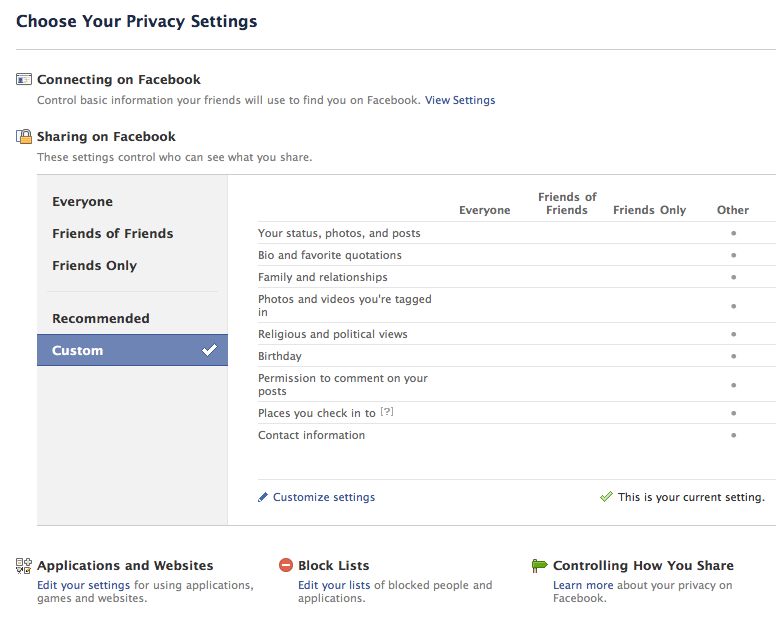
After logging into Facebook, click the ‘account’ tab and choose privacy to view the screen below. Next, select the ‘view settings’ option.


The top 3 settings (below) govern the settings for your visibility on Facebook, that is, how easy it is for people to find you. Narrowing down the permissions (friends of friends, friends)  in these settings places increasing limitations on who can locate you. Leaving these settings at ‘everyone’ makes it easy for people to find you.

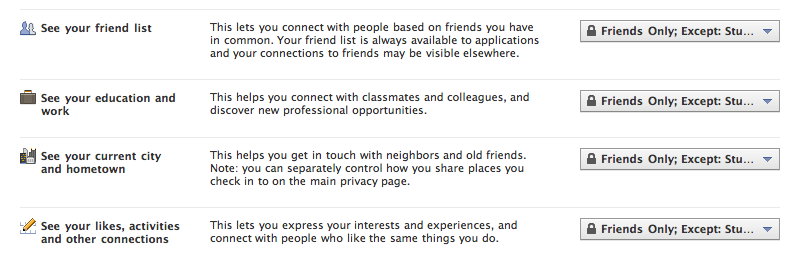
There are settings for all other aspects of Facebook. Facebook security and privacy settings allow for control over most aspects of this environment. The greatest control is implemented by organizing your contacts (friends)  into ‘lists’. Once your lists are created (through the manage friends option), use can further control access to Facebook features by adding these list names to the ‘exclude’ section within the option panel. This feature is particularly helpful in the K12 space where administrators, teachers and students may be collaborating together within the Facebook space.

Many Facebook users like to make their friends/contacts aware of a personal or professional web resources such as a web site, blog or wiki etc. Access to the listing of your web resource is controlled by the website option as listed below.

The screen shot below shows a small sample of the other security options available.

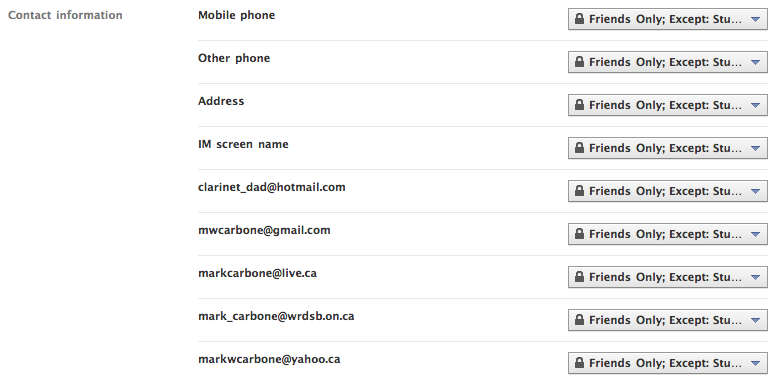
Facebook users have complete flexibility over how much contact information is shared, if any. I have personally found it helpful to include my professional email address  so that potential contacts can use that address as a search option.

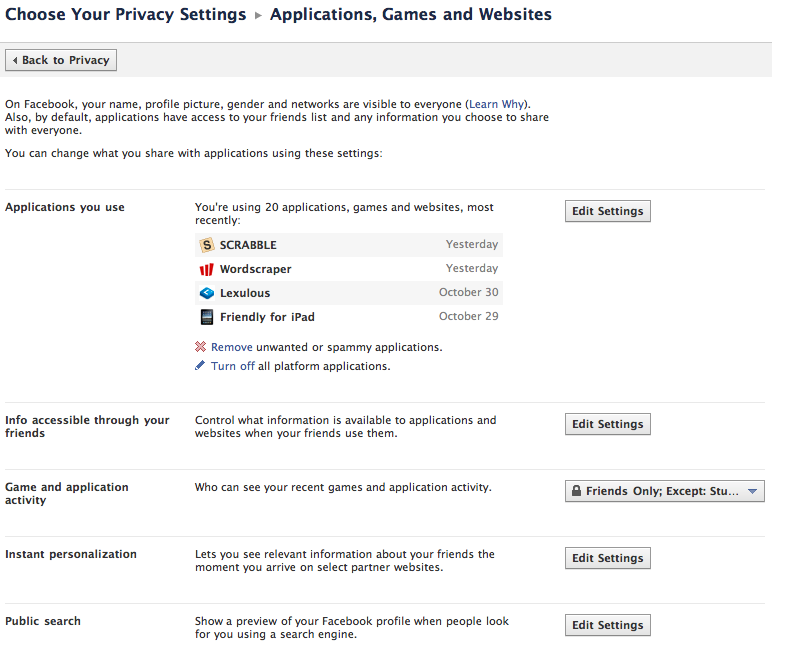
I would certainly recommend a thorough review of the various options in the applications section since many applications require some access to your profile in order to function.

Facebook uses strategies to personalize your experience by tracking what you click, much in the same way an Internet browser does using the cookie function. It is important to decide whether or not you want this information to be potentially available outside of the Facebook environment. A greater level of privacy is maintained by unchecking the ‘enable instant personalization on partner websites’ option. This is on be default.

Finally, there is an option to completely turn off public search results. Turning this off (by unchecking the option) means your Facebook profile, as you defined it, will not display in Facebook searches. Essentially, turning this off means people can not find you, you must find them.

Note: There are additional settings to block interactions with specified Facebook users.

I hope this security/privacy overview provides some insights to using Facebook in a professional manner within the K12 environment.

~ Mark

Stats: the survey says …

When I got home today the newest publication from the Ontario Teachers College was in the mailbox. I did a quick thumb through and the article that initially caught my eye was the ‘Survey says …’

The article reports on a recent members survey. I noted two points:

1. Usage of social media by teachers is increasing (not really a surprise). Details showed

  • 30.1% connect on Facebook for up to 2 hours per week
  • 32.4 % watch YouTube for a little under an hour/week
  • 50.3% tune into YouTube for as much as 2 hours/week
  • 35.8% use other forms of social media

2. In answer to the question ‘Should the college (OTC) make use of social media tools?’, I found the results very interesting.

  • MySpace 8%
  • LinkedIn 11%
  • Twitter 14%
  • YouTube 20%
  • Facebook 48%

Hmmm. Facebook wins by a landslide. While I am not surprised that members see value in using Facebook as a connecting tool, the margin of choice was surprising to me. I would have also anticipated the Twitter use would have been higher, especially given the extensive education based PLNs members are using effectively.

It is good to see the overall growth in the use of social media tools. Keep those PLN online connections alive. Invite a new person to participate today!

~ Mark