Category Archives: Technology in Education

Social Media Check

Thanks to a tweet from @trustsocmedia this week, I found out about the  The Doc Zone  feature titled Facebook Follies   . Although I was not able to view the CBC broadcast, the title did capture my interest. Today, I took the time watch the online version of  Facebook Follies .

In my view, the production was very well done.  The realities, cautions, benefits and highlights of using Facebook, and social media tools in general, are all explored through real situations. To me, this speaks to the reasons why students need to be educated through authentic experiences about the use of social media tools, digital citizenship and managing your online profile/digital footprint.

Your online actions live forever. I applaud educators who are making efforts to embrace social media tools, leverage their power , teach and model ethical and responsible use.

~Mark

ECOO 2011 Reflections

One thing really struck me about this ECOO 2011 — energy. There is a genuine energy in Ontario teachers for change in teaching practice. There is a synergy building in the province, and it was certainly great to be part of the learning.

A few personal highlights:

  • @snbeach & @willrich45 – great keynotes – motivating: be a change agent
  • Trending @dougpete – super group effort
  • Finally got to meet @shannoninottawa F2F – must continue the building school admin capacity discussion
  • Insightful talk by @gcouros
  • Presented my first pecha kucha – wonderful experience
  • Interesting discussions at the OSAPAC booth
  • The OCT: use Social Media tools but don’t put yourself at risk, maintain professional boundaries
  • Connected with new educators, new learning opportunities
  • Noon hour discussion topics – removing barriers, great thinking
  • Chatting with WRDSB Futures Forum Project teachers — next steps, thinking BIG
  • Pleased to have a good turn out for my Facebook in the Classroom session
  • Explored new staff development resources at the PLP booth.

ECOO 2011 was a great conference and wonderful learning opportunity. Thank you to the planners and organizers — take a bow!!! This conference was certainly an opportunity to be WRDSB Proud. WRDSB had a strong contingent attending the conference to learn and share. WRDSB presenters were well received on the wide variety of topics presented – go team!

Related Resources

ECOO 2011 Twitter feed
Twitter bio update challenge #changegame
ECOO


~Mark

Ryerson Public School

I recently had an opportunity to participate in a Grand Magazine interview with Peter Berndt, Principal at Ryerson Public School in the Waterloo Region District School Board. The article, linked below, captures the technology focus of the school and highlights the excellent work of the teachers in using technology to support student learning.

Congratulations to Peter and the Ryerson staff for their excellent work with technology and forward thinking about student learning.

This article is posted and linked for viewing purposes only with permission from the publisher. A special thank you to Nancy Silcox for preparing this article for publication.

Ryerson Public School

~Mark

App selection for JK/SK students

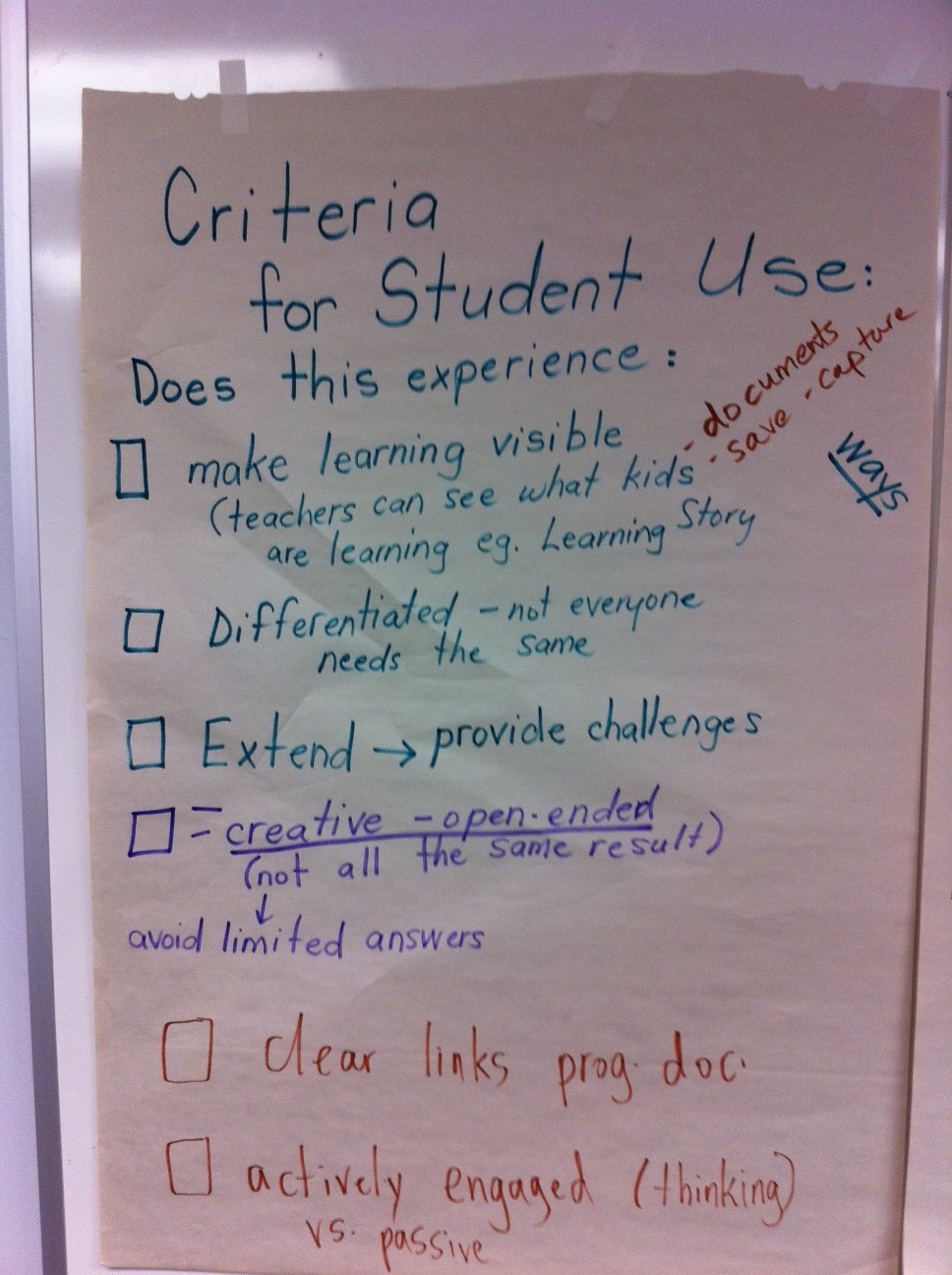
Just prior to the end of the school year, we held a meeting of the group the teachers involved in our JK/SK iPad project.  The meeting was a great sharing of  learnings to date. Much of the discussion centred around criteria for choosing apps for students of this age/grade level. Here is what they had to say.


Chart 1

Chart 2

~Mark

iPads for JK/SK students

Earlier this month I had a chance to visit Central Public School (website) with Rebecca Rouse (@rebrouse) to have a first hand experience observing our JK/SK students using iPads. Central P. S. is one of 5 Waterloo Region District School Board sites participating in a focused study on the impact of the use of  iPads to support early reading and early literacy development in our students.

Upon arriving at the classroom, we initially stayed off to the side to observe without interupting the natural flow of the classroom. A kindergarten classroom is a busy space, and I was immediately struck by my initial observations. There was certainly an air of energy and excitement in the classroom. Students were checking with staff to see when it was their turn to move to the iPad station. Clearly, they were motivated and did not want to miss their turn.  I was very impressed with preparation and organization of teachers Brenda Fowler Mandy Serpa. They had really thought through the physical logistics of managing the iPads within this busy environment. iPads were numbered via the screen background for easy tracking. Cases were used for protection during storage and transportation from room to room. A picture book of app (application) icons was created to assist the students in locating the correct software. Screens were cleaned regularly to maintain the sharp image and reduce germs. I also noted how careful the students handled the technology – impressive!  With guidance from the staff, students used a variety of apps (applications) for word recognition, spelling, personal exploration and story creation.

Eventually we joined the student table and sat next to the students. I asked one student what he thought about using the iPads. Without a pause, he enthusiastically stated that iPads were ‘fun and creative’. All of the students were eager to share their work and successes with us.

Teacher Observations:  After watching the students in action with the iPads at the learning centre in the classroom, teachers shared their observations from the first month of the project.

  • lesson preparation time had become more streamlined (less paper based)
  • time spent on learning activities increased
  • students spent more time on task during guided reading sessions
  • there has been a significant increase in student engagement levels
  • reading skills are developing more rapidly compared to a more traditional approach
  • the built in audio support enhances student learning
  • a notable increase in student confidence
  • students are eager to demonstrate something new they have learned
  • 5 iPads is a good number of devices for managing the student group
  • students were keen to assist each other with problem solving
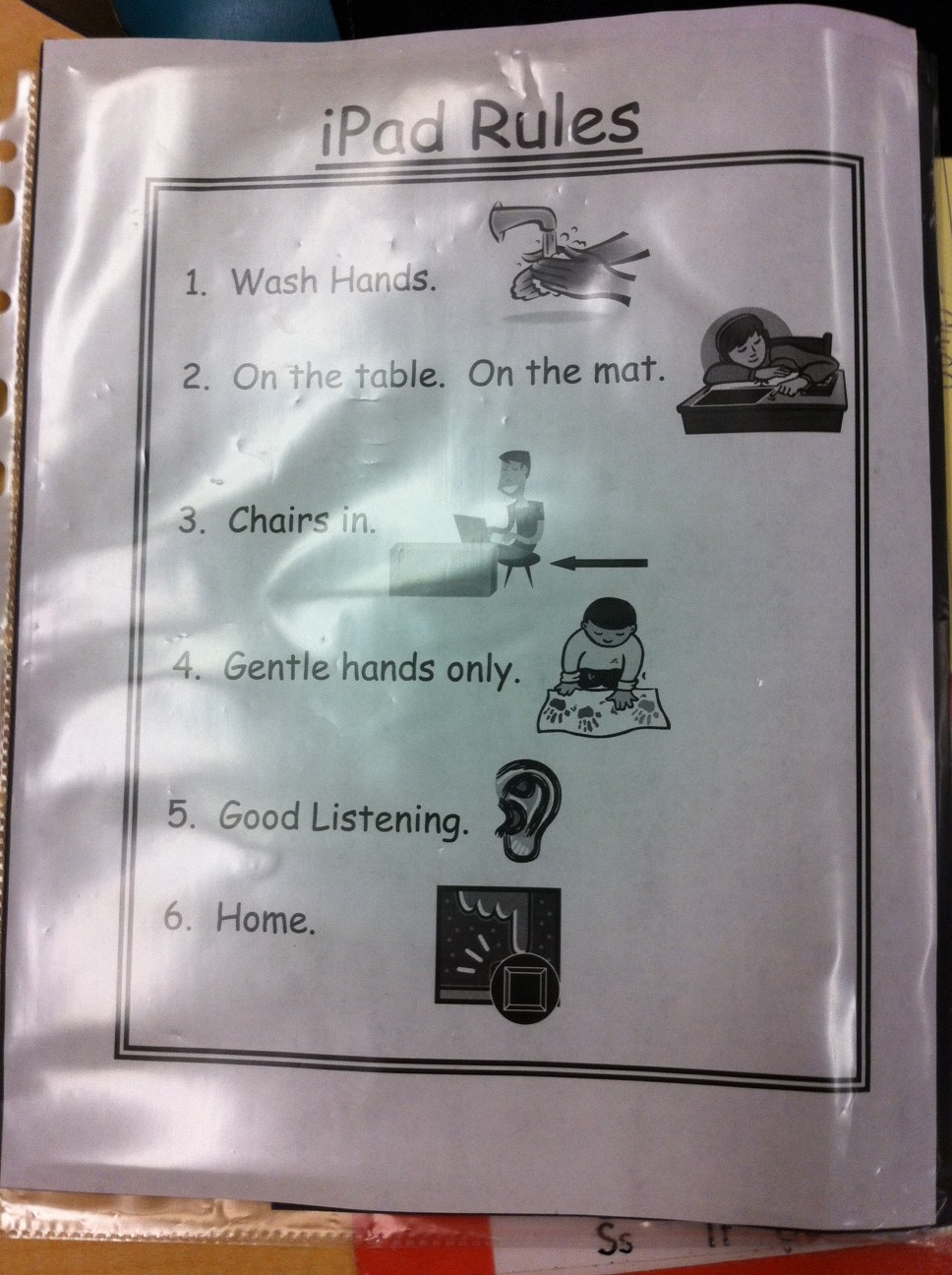
iPad Rules

Spelling words

Sample App Icon Card

iPad Centre

This project has certainly had a positive start. Thank you to Principal Jennifer Crits and teachers Brenda Fowler and Mandy Serpa for sharing their experiences to date.
If the results of this proof of concept project  show a strong correlation to improved early reading and early literacy then we revise how we allocate technology for all JK/SK programs.
~Mark

Digital Storytelling Resources

Today I had the pleasure of tuning in to a webcast presentation by Alan Levine about digital story telling resources. I ideas were great and the chat window was action packed with comments, ideas and positive feedback. I wanted to share a list of a few of the resources that were highlighted.

Dipity
Vuvox
Glogster
Zooburst
Google Maps
Pixton
ToonDoo
Flickr
Blabberize
Jaycut
Animato
Slideboom
Vcasmo
Prezi

This is a great set of tools to support digital story telling. Visit Alan’s blog and wiki to get the full story and lots of good ideas. Everyone has a story to tell. Give one of these great tools a spin today then do something fun. innovative and engaging with your students!

Thank you to Sheryl and the PLP Network team for setting up this learning opportunity with Alan.

Related Resources

Alan’s 50 ways
Alan’s wiki
Bitstrips for School (licensed for use for Ontario publicly funded schools by OSAPAC)

~Mark

CDN PLP – Culminating Session

On Friday May 20th we held our culminating day for this year’s PLP  and  Futures Forum session. From my point of view, the day was a wonderful success — an opportunity to passionately share about our learnings, celebrate our collective successes and begin the scaling process by introducing next year’s Futures Forum teachers to the process. I captured much of the morning presentations with my Livescribe pen. I have uploaded many of the recordings and linked to the sections by topic as per the list below.

Futures Forum Course Design

The Power of Blogging

Online Magazine

Civics Mirror

Careers

Going Forward

Related Links

Futures Forum PD Wiki
Futures Forum Online Magazine
Twitter Stream #wrdsbffp

~Mark

A Surprise Conversation

You never know when an interesting social media conversation will break out.

Last Sunday, our woodwind quintet, the Venturi Winds, performed a concert at the Wellington County Museum & Archives building. Following the program we decided to go out for a light dinner along with a few family members who attended the event.

Seated at the table and previewing menus, the unsuspecting conversation started. One person, who operates their own business, begins to tell the story of needing to terminate an employee for continually spending company time on their personal cell phone. They turn to me and ask “What you you do in the schools? Do you allow cell phones in the classroom?”

I provide some background on our digital citizenship program indicating that it is important to:

  • recognize that value of mobile devices to support certain aspects of curriculum delivery
  • teach appropriate, ethical and safe use for a particular situation
  • and teach self regulation

Many of our schools have designated some ‘cell phone safe’ zones where students may use their phones. Classroom use is generally at the discretion of the teacher. Everyone could see the value in our approach, and that providing some real world context to these experiences was of value.

The conversation deepens. “What about laptops? What about Facebook? (etc.)? Are these allowed in the classroom? These are distractions.”

I provide some additional information about our program and approach. True enough, these could be distractions, but mobile technology and social media tools provide:

  • ways to interact with the world in real time
  • access to information
  • collaboration opportunities
  • authentic audience opportunities and experiences to students

I went on to explain the use of blogs, wikis, ning, Google docs, Facebook etc. and how the use of these tools can support important curriculum goals such as non fiction writing (e.g. journals, poetry, peer review of projects …). The conversation went on to talk about the role of the teacher shifting from the ‘sage on the stage’ to the learning coach who facilitates inquiry and project based learning.

All in all, a great conversation that stretched out over most of the meal time.  The conversation did eventually drift to other topics. Finally  a question came up about time zones and daylight savings time.

My solution: “If you had a smart phone, you could look that up right now.” – and I did. What a great segue to the power of access to information via mobile devices. Our time together concluded with a good laugh from the group.

~ Mark


A Visit to @ecmackenzie’s classroom

One of the highlights of this week was my visit to @ecmackenzie ‘s classroom. Students in Ms. MacKenzie’s class has been working on producing book trailer videos over the last few weeks. The new twist in this year’s project is that students are sharing their video via a Facebook group. With the group structure, students can enjoy and peer comment and receive teacher feedback.

The Facebook group was created by Ms. MacKenzie. She sent a group invite to herself to establish the first member of the group. Once this was done, students were invited to search for the group and request access. Using this methodology, suitable professional boundaries are maintained with regard to the teacher/student online environment.

As an honourary member of their Facebook group, I have enjoyed watching the videos as the students completed their projects and posted their work. I was impressed by a number of aspects of this project.

  • Dialogue and comments within the group showed a solid level of respect among the participants
  • It was clear that there had been discussions about Digital Citizenship
  • Based on viewing the movie trailers, students had received excellent instruction regarding use of copyright free images and source siting
  • I was very impressed by the level of creativity demonstrated in the student projects
  • There is potential to share work to parents using this model

I really enjoyed meeting the students face to face after watching their work. Following the video viewing session, I talked to the students about some of our key ITS initiatives to support learning – our dual boot Macintosh environment, wireless hotspots with bring your own device options, and social media and collaboration tools available.

I appreciated the student feedback regarding our progress on these initiatives. Their comments included:

  • Facebook access was very valuable for sharing and collaborating (class project, homework, receiving school information)
  • From their view, Facebook provides a one stop shopping approach to obtaining school related information
  • Access to web based resources & internet searching is a critical part of researching – wifi access allows more effective use of class time
  • Facebook is a familiar tool. Using it eliminates the need to use (and learn) extra tools that may not be required
  • Bring your own device wifi takes advantage of personal technology that contain one’s collection of information and frees up school computing resources for others to use
  • Expansion of wireless access for greater classroom coverage would be a significant advantage

The students also raised the issue to electronic textbooks. Clearly, they see a shift to e-books as a good thing. Key discussion ideas identified were:

  • easy portability (many books on a single device)
  • makes it easy to have all your resources with you (ebooks, internet access, bookmarks etc.)
  • no need for ebook to be more expense, business models should make this an affordable transition

Summary: an excellent teacher + motivated and respectful class + innovative project = first rate educational experience

Thank you for the opportunity to participate in your project and visit your classroom.

~ Mark

WRDSB Futures Forum Project Goes Live

It is hard to believe that after almost 2 years of planning, the WRDSB Futures Forum Project will go live. This has been a real journey involving:

  • ongoing discussions with the Communitech organization in Waterloo to look at a view of a future classroom
  • PLP experience for a centrally based team (including me)
  • The formulation of a new innovative approach to learning within secondary schools with staff from Learning Services and IT Services working collaboratively on the planning
  • 7 of our secondary schools commit to this project
  • PLP experience for teachers and administrators from each school site involved in this project and a library resource team for project support
  • course design, technology components (wireless, netbooks, iPads, web 2.0 tools, Adobe Connect etc.)
  • planning, planning, resource development
  • and we are ready to go live!!!

Background:

The project emerged out of the recognition that although educators and others were striving to engage students in a variety of approaches and learning activities to better prepare for the changing world, these efforts often occurred in isolation without a systemic approach or support.  The project strives to integrate promising practices and learning across schools to meet the needs of all students in a more effective, sustainable and progressive manner.

The Futures Forum Project is an inquiry based, multi-disciplinary, project oriented approach integrating the teaching and learning of grade 10 Academic English, Civics, and Careers expectations (see Appendix A) into a morning block of 220 minutes (2 periods) during semester 2 of the 2010-11 year.

The overall curriculum expectations are addressed through the following components:

1. Guided Inquiries – These involve opportunities for students across participating schools to use technology to interact and work together.

2. Independent Inquiries – These self directed tasks provide students with opportunities to meet course expectations independently and tailor learning based upon their interests and readiness.

3. Portfolios – Portfolios allow students to engage in learning of interest to them and supports sharing with “authentic” audiences.

4. Summative Project – Students demonstrate mastery of Civics, Careers, and English expectations; independent inquiry, personally relevant learning and the of use technology as an effective collaborative and communication tool.

The summative project is focused around a “big question”…“What is my digital footprint?”  It addresses the separate course expectations by requiring students to demonstrate, in a variety of ways, responses to the following specific questions:

  • How am I an informed, participating citizen in a democratic and technological society? (Civics)
  • How can I develop and achieve personal goals for future learning, work, and community involvement in a technology rich society? (Careers)
  • How can I demonstrate I have a range of oral communication, reading, writing, and media literacy skills needed for success in school and life in a technology rich society? (English)

As part of the approach to the project each teacher will work with a network of teachers focused on this same inquiry based, multi-disciplinary, project oriented, and technology mediated approach to learning.   OT Coverage and professional learning are provided to plan and facilitate the use of effective instructional strategies and technology related resources (e.g., PDAs, notebooks, online tools) to develop and deliver the interdisciplinary class addressing expectations of the English, Civics and Careers grade 10 curriculum.

The Futures Forum project is focused on addressing the system success plan goal of improving the ability of students to communicate their thinking in writing by providing job-embedded professional learning opportunities, and access to some technological resources, as part of an inquiry based, multi-disciplinary, project oriented, technology mediated approach to learning.  The project’s focus is on:

  • achieving the system success plan goal of improving the ability of students to communicate their thinking in writing
  • promoting job-embedded professional learning opportunities for administrators, teachers and central staff,
  • increasing access to technological resources,    exploring an inquiry based, multi-disciplinary, project oriented, technology mediated approach
  • addressing grade 10 Academic English or History, Civics, and Careers expectations during semester 2 of the 2010-11 year
  • identifying and consolidating effective instructional strategies (i.e., instruction, assessment and reporting), tools and techniques mediated with technology related resources (e.g., PDAs, notebooks, online/internet networking tools, specifically Facebook, wireless access, etc.)
  • monitoring and reporting on project progress and system learning (e.g., resource requirements, professional learning requirements, promising instructional practices, scalability, sustainability, etc.).

The Project metrics (indicators for assessing the project) include:

  • increased student success rates in grade 10 credit accumulation, specifically for boys.
  • increased student engagement in learning (i.e., more choice, opportunities for inquiry, topics of interest to students, etc.)
  • increased school administrator, teacher, and central staff knowledge and expertise in using technology to engage students and promote learning;
  • increased familiarity and effectiveness in the use of WRDSB research-based strategies, tools and techniques for improving written communication (e.g., student exemplars, anchor charts, non-fiction writing, graphic organizers/frameworks, open-ended critical questions), professional learning networks and professional learning cycles

Futures Forum Participants

School participants include a teacher and vice Principal lead.  Grades 10 teachers teaching academic type English, open type Civics and Careers courses in semester 2 of 2010-11 are participating in the project. Participation includes a commitment to professional learning sessions, co-planning, networking, implementing, reflecting on lessons and assessment tasks, and a willingness to use technology to effectively implement system identified instructional tools and techniques in an inquiry based, multi-disciplinary, project oriented approach to teaching and learning.

Futures Forum teachers maintain a daybook, collect teacher reflections on learning, complete reports requested by central staff, and attend regular meetings with Learning Services staff.   In addition, expectations include:

  • Participation in co-learning with other Futures Forum teachers.
  • Completion of data collection (e.g., survey teachers on what strategies they found most effective) for assessment purposes by central staff.
  • Work with the administration to implement the project.
  • Consider and contribute suggestions to support the project’s focus as determined with Learning Services staff.

Learning Services and Information Technology Services (ITS) staff provide leadership and support in the coordination of the project. They are involved in facilitating professional learning, monitoring project progress, allocating resources as required, supporting access to technology (e.g., students using both board and their own technology) through a wireless classroom environment, collaborating with the vice-principals and assisting in the completion of reports (e.g., status reports, final reports, data analysis).

Technology Components

A Variety of devices  including Netbooks, laptops, smartphones, etc. along with wireless access and the use of specific internet based applications (e.g., Facebook, Desire to Learn – Learning Management System, Ontario Educational Resource Bank, Moodle, Ning) are among the technological tools and vehicle utilized to facilitate learning in the project

Professional Learning and Resource Support

A variety of technologies, regular professional learning sessions and facilitated professional learning network (i.e., PLP – 2 full day face to face and 4 adobe connect mediated by External experts) is used to support staff (teachers, administrator and central staff) involved in the project and promote collaborative learning and networking.  This work in learning teams involves:

  • collaborative planning of instruction including a common assessment task with rubric, and
  • moderated assessment of student work
  • effective instruction/assessment;
  • use of instructional tools and techniques;
  • use of technology mediated applications
  • reporting on and assessing the project.

It is very exciting be at the ‘go live’ point, and I look forward to seeing this project in action.

~ Mark

Note: Some of the above content is from an internal report and is used with permission.