Category Archives: Social Media

CEA Presentation Resources

CEA1to1-2

Social Media in the Classroom and School Community

CEA International 1:1 Computing Conference

Slide Deck

Contact info
Ed Doadt
Mark W. Carbone

Videos

Corbett Ball:  Change Perspective

Joe Cvetish on  Blogging

Jane Mitchinson-Schwartz on  Google Docs

Aaron: student voice

Andrew: student voice

Teacher  Andrew Bieronski

Teacher  Gavin Albrecht

Additional Resources:

Waterloo Region District School Board  Responsible Use Procedure

 WRDSB  Digital Literacies Pathway

Q & A from the  Today’s Meet back channel:

Facebook training around privacy, security and appropriate use of groups and teacher fan pages was provided through after school workshops, online workshops via Adobe Connect at a variety of times after school and evening, as well as site based workshops arranged through our instructional technology consultants.

Edmodo  is also used by many teachers.

Internet radio re-broadcasts of the session, advertised on Twitter and G+, will be available via QueST Radio 1-24 .

~Mark & Ed

Connecting Students with Google Hangouts

After 2 days of being immersed in conversation about technology enabled learning, focusing on using technology to get to deeper learning, and engage the relationship aspect of the possibilities with George Couros, I was thrilled to hear how WRDSB  teacher Ryan Wettlaufer is using Google Hangouts with his students.

To me, this is a perfect example of the SAMR model.  Ryan has thoughtfully and skillfully created real life opportunities for his students by leveraging his personal learning network (PLN) giving his French language program a whole new meaning.  I was able to connect with Ryan for an interview via Google Hangouts.  Learn about Ryan’s insights in our interview.

Thank you Ryan for taking time to share your leadership and best practices, and a perfect topic for Connected Educators month.

~Mark

CASA13 Presentation Resources

CASA Conference 2013 Presentation Resources

Conference Theme: Theme: Pedagogy to Technology: Hardware to Headwear

Our presentation  : Leveraging the use of Social Media Tools in your School Community — the use of social media tools in the Waterloo Region District School Board as things are now,  the journey and the challenges.

Video Samples from our CASA2013 presentation:

Haley   (Student)
Aaron   (Student)
Andrew  (Student)
Andrew Bieronski  (Teacher)
Kevin Donkers  (Teacher)
Kathi Smith  (Trustee)

additional video resources 

Twitter  (Teacher)
Facebook (Teacher)
Edmodo  (Teacher)
Student Perspective  (Students)
Principal Perspective (Bill Lemon)

Q&A from Today’s Meet backchannel

Information regarding the WRDSB iPad approach

Related Resources

Canadian Association of School Administrators  (CASA)  conference.

WRDSB  Responsible Use Procedure  (RUP)

Social Media Drive By (Blog post)

Quest Radio 1-24  Programming Info  – watch here for announcements regarding additional rebroadcasts of this session.

Join a live broadcast or rebroadcast  on Quest Radio 1-24.

Mark W. Carbone  and  Ed Doadt

~Mark and Ed

Jenni van Rees: Blogging with primary students

Meet Jenni van Rees.

JVR

After a casual conversation at  Ed Camp Hamilton,  and some email correspondence, I arranged to do an interview with  WRDSB  teacher Jenni van Rees to further explore her work in blogging with her grade one students. The interview was initially done live on the internet on QueST Radio 1-24 .   The audio recording is now available as a resource to this blog post, and will also be rebroadcast on QueST Radio 1-24.  Watch radio.markwcarbone.ca , Twitter and G+ for announcements.

Guiding Questions for the Interview

1. Introductions

2. Professional technology interests

3. What drove your interest in getting your students online and blogging?

4. Administrative support?

5. What did you do in the area of communications with parents?

6. Describe/share how this has worked, benefits to students,

7. Did anything surprise you? anything unexpected happen?

8. How did you prepare the students in the area of digital citizenship?

9. Based on the results, will you continue to encorporate blogging as part of your instructional practice?

10. Closing comments.

Jenni provided excellent insights into these interview questions.  Hear her thoughts on professional learning, role modelling, real world audience, digital citizenship and PLNs in the  QueST Radio 1-24 broadcast recording .

Related Resources

Jenni’s class website

Jenni’s student blogging site

Jenni’s professional blog: Thinking about Teaching.

Collaborating with Division 18 in B.C.

Follow Jenni on Twitter

Follow Jenni’s on class on Twitter

Kathy Cassidy’s Connected from the Start: Global Learning in the Primary Grades

Happy learning.

~Mark

Blogging with primary students

Today (Wed. May 29th, 2013)  I will be interviewing  Waterloo Region District School Board  teacher  Jenni van Rees  at 4:30 (EDT).

Our discussion topic:  blogging with primary students.

Catch the live broadcast by visiting the   QueST Radio 1-24   website.   I will also be writing an upcoming blog post featuring Jenni’s work in this area.

~Mark

Resources for Compass For Success Presentation

 Slide Show

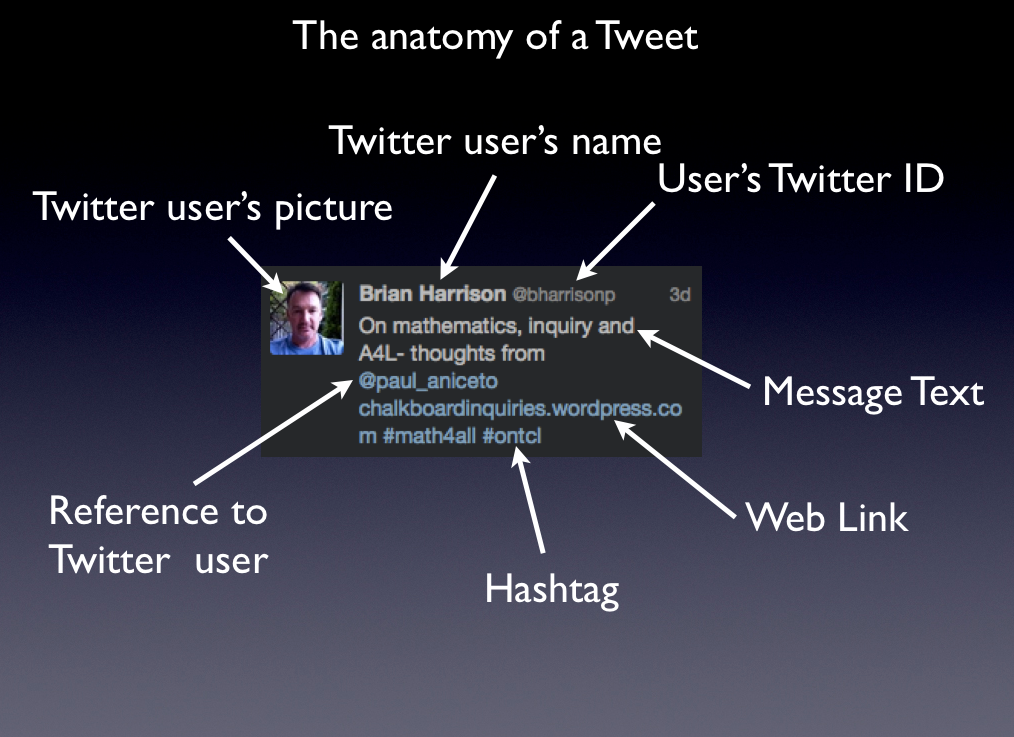
Tweet Anatomy

Digital Footprint 

My Digital Footprint by George Couros
Your Digital Footprint by Diana Graber

Twitter Resources

Twitter Guide Book by Mashable
Twitter Basics (pdf)
Twitter 101 (pdf)
Twitter Essentials
Leveraging Your Twitter Experience

~Mark

Maxing your Twitter Experience

I have been enjoying an extended conversation with Jane Mitchinson regarding the process of participating in social media. The conversation has wandered between conversations over coffee, to Twitter, to connecting face to face at Ed Camp Hamilton and back online, most recently in the comments section of my  Ed Camp Hamilton  post. Now that is a great example of keeping the learning going and leveraging different tools.

The last comment, raises a number of points and questions about whether or not Twitter becomes in echo chamber.  While I do understand that concept, and have seen it happen, there is also the idea of reach – communication reach through social media tools. Reach, and the notion of the 6 degrees of separation make explain some of this.  None the less, there are some solid points to consider when navigating this space.

  1. Given the number of your followers, and the number you follow, how do you best get traction in important conversations?
  2. Although Twitter arguably represents only a ‘slice of society’ what strategies yield the best diversity for enriching your experience
  3. Engagement styles:  depth vs skimming – how do you keep your learning rich? and your contributions worthwhile?
  4. Finally, I believe it is important to contribute by contributing content through blogging etc.  and asking good questions.  I wonder what percentage of Twitter users are also actively contributing?

Please join this conversation.  How are you maximizing your Twitter experience?

~Mark

Call to #WRDSB teachers

Ed Doadt, Principal at Huron Heights Secondary School and I will be presenting at the Canadian Association of School Administrators (CASA) annual conference in July. The theme for this year is ‘Technology Meets Pedagogy: Hardware Meets Headware’. Our presentation will focus on how the use of web 2.0 and social media tools positively impact student learning and engagement.

If you have a great story to share about what has occurred in your classroom, we would love to hear from you.  Please  add your story/journey to our Google Doc.

~Mark & Ed

Student Voice: social media in the classroom

My daughter Charlotte just completed a grade 11 online secondary school course (HNC3OE) on fashion & creative expression here in the Waterloo Region District School Board.  She was recently sharing with me,  her work completed for the summative project on the topic of creative expression. There were 4 components to the work in addition to a personal reflection on the course.

The first component of the summative was a research assignment that reports on sweat shops in the apparel industry. The report is called  The Ugly Side of Fashion . Another component was to review wardrobes used in a high profile event such as a fashion show, new collection, red carpet event or video. Charlotte chose a  Costume Review.  One of the aspects of the summative that Charlotte really enjoyed was designing new clothing.  Her Fashion Design (graphic) was prepared using a drawing tablet and multi layer capable software called Art Rage 3.

The last component of the project really captured my interest. The idea was to research and explore, in a real life manner,  how personal  perceptions of attractiveness relate to how others see you.  The research methodology included comparing the subjects opinions of themselves, Charlotte’s perceptions  based on knowing the subject and input gathered from others who did not know the subjects.

Charlotte has an active online component to her life as a fan fiction writer and co-administrator of 3 blogs.  The one blog, administered with 2 online friends from Malaysia, is  kpop fans can relate, and has over 15,000 followers. This blog was used to gather anonymous input from people for the research.  I thought this was a great use of social media and crowd sourcing some feedback to provide an authentic context to research.  This also demonstrates an example of why students should have access to social media and web 2.0 tools to support their learning. The topic, research and findings are presented in this Fashion Video (12 min.) which was planned, filmed and edited by Charlotte.

Note: All noting and final documents were prepared using Google Drive. The video was produced in iMovie and uploaded to Google Drive.

I enjoyed learning how social media added a key component to this learning opportunity.

~Mark (& proud Dad!)

WRDSB Student Voice

Each year, I look forward to opportunities to interact with our WRDSB students and have conversation about technology, learning and Board plans etc.  My recent meeting with our student trustee group yielded some fantastic discussion, so I thought I would share a few highlights in this forum.

The trustee group submitted some questions ahead of time to create a framework for our discussion.  They were interested to know more about:

  • differentiated access to resources
  • the need for wifi login
  • software licensing
  • ITS department projects for this year and Board directions

After addressing their questions, we opened up the floor to additional questions from the student trustees.  This lead to a wonderful discussion which brought together a number of interconnected ideas.  I was very impressed that students were well aware of the need to manage their privacy online. Through our discussion we extended this to managing one’s online identity and reputation.  I encouraged the students to see how ‘Googlable’ they were. Would their online reputation precede them?  As a self reflection, do they choose to use social media, communication and collaboration tools for positive purposes? – and what might they change in their typical actions? After all, “the net does not forget”.  Digital citizenship is something that must be lived, a way of being. I also took the time to talk about the expectations defined in the WRDSB Responsible Use Procedure.

In the final portion of the meeting, I was given the opportunity to ask the student trustee group questions. I chose to ask one question: Given the changes that have been achieved over the last 4 years ( access to more resources including social media and collaboration tools, wifi in all classrooms, BYOD, improved internet bandwidth etc. ), what has been the impact to their learning?
The students were very frank and open with their responses.  I have captured a few highlights in the list below:
  • extremely positive feedback on the establishment and expansion of the Futures Forum Project
  • learning and engagement is improved through blogging and collaborating online
  • like to be able to use their phones in class – looking up information in the context of a discussion is beneficial
  • excellent class projects through the use of wikis
  • technology affords many forums for peer help
  • social media tools keep students connected and focused, engagement is up
  • web based teacher resources very helpful (blogs, wikis etc.)
  • the 4 any’s: learning anytime, anywhere, anyone and anything
  • easier to work and organize electronically, paper just does not work well
  • online connections (community) is very beneficial
  • use of Facebook groups and web (fan) pages very helpful – easy to connect, collaborate and stay up to date
  • the type of environment we have created helps prepare us (students) for post secondary learning
What Next:
  • continue to promote teachers as risk takers with technology
  • continue to build more capacity for technology use (reduce fears in using technology)
  • encourage teachers to learn from students too
Finally, I was impressed that a number of the students present were aware of the learning strategy of the “flipped classroom”. My sense is that this approach was seen as beneficial in many learning situations. It was hoped the WRDSB teachers were open to exploring the benefits of this approach.
I extend my thanks to the WRDSB student trustee group for such a great conversation about technology enabled learning. I look forward to my next session with group.
~Mark