Category Archives: 21st century learning

CASA13: An important remix

As June came to a close, I eagerly anticipated my attendance at the CASA conference as a good learning opportunity and to present with Ed Doadt on the use of social media in the classroom and school community.   With a conference title of Pedagogy to Technology &  Hardware to Headware  I certainly felt some great learning and networking opportunities would unfold.

I must admit that I was taken aback by the approach taken in the keynote address.  The intent may very well have been to cause people to stop, reflect, and engage in meaningful dialogue about the use of technology to support student learning, but the rather hard nosed approach taken seemed to disengage the audience. Although several key points were made, including:

  • innovation has a high failure rate
  • technology is an expensive and ongoing investment
  • the “light house” approach typically ends up as a moth balled project that went nowhere
  • improvement strategies in education must be based on the best instructional and assessment practices

the message seemed to be stay out of this arena and focus on aspects of education that are already proven by research.  Two important questions emerged from this framework: a) why would we (educators) get into the innovation game in K-12 education where funds are limited?, and b) where is the research that demonstrates technology makes a difference?

The audience reaction was rather subdued and there was a smattering of polite applause.  While a few people offered up examples where technology was making an observable difference in student learning, the comments were essentially shot down based on statements of “lack of research”.  There was a real sense of disconnect in the room. The view presented was polarized relative to current directions and thinking in this area by many.  Audience member and conference presenter  George Couros ended the session with a very important point: learning with technology is significantly different than learning about technology.

I have been reflecting on this scenario since attending the conference trying to sort through the various perspectives that come into play.  First off, I don’t think anyone would debate the 4 bulleted points outlined above. These are known facts that are well researched and documented.  Teaching and learning with technology must be done well, and in the framework of best instructional and assessment practices.  Learning WITH technology IS different:  it is about NEW possibilities. The SAMR model, as described in the diagram below, offers a great way to define stages of development in terms of how well technology may be used to support learning.

SAMRgraphic

Yet, there is this nagging question: why do educators want to move in this direction if it does not make any difference?  So many people I talked to indicate that technology DOES make a difference in how students learn.  Many shared reports that perceptual, observation based, focus group data etc. indeed show differences in this area.

After chatting with several people after the presentation and some personal reflection time, I think there is an important perspective missing:  the timing of the research (assuming that this should be researched at all).

REMIX:  In reality, we are still in the infancy in this area of teaching and learning with technology.  We need to apply the right lens and connect the dots differently. Why? Learning how to use technology effectively in education is NOT wild reckless expensive innovation in my opinion.  It is about doing things differently and exploring new possibilities.  We are not at a point in time where enough teachers use technology effectively in their practice. To me, it would make sense that if one researches and measures the effectiveness of technology  now, the results may indeed be somewhat marginal. Then again, if any educational tool/resource is used ineffectively, research will show that the impact of that tool/resource is marginal.

So Now What?  We need to consider the way in which the term innovate is used in the context of education.  Like it or not, technology is here to stay.  Learning to use it effectively is not reckless innovation or transformation.  We need to learn how to leverage it in the most effective ways possible. This means trying things, and sharing the learnings — blogging about is would be great!  I believe we need to invest in teacher training, close the gap, and raise the bar in the area of technology use. Continuing to gather data and formalizing research is a ‘must do’.  Every educator needs to commit to sharing their learnings and best practices (add another plug for blogging).

Finally, in the keynote, technology was portrayed as the big bad beast:  you were IN or OUT. I strongly believe that we  can not look at this sandbox stage as some definitive point of decision.  We do need to continue leveraging learning WITH technology, exploring new possibilities and sharing.

Perhaps it is time to throw a technology challenge on the table:  eliminate technology from your line of work and personal use for a month  — no corresponding, collaborating, note taking, internet enabled research/fact finding, analysing, exploring, reading, social media, email … well you get the picture.  At the end of the month, reflect on whether or not technology makes a difference to how you work, then share your learnings by commenting on this blog post.

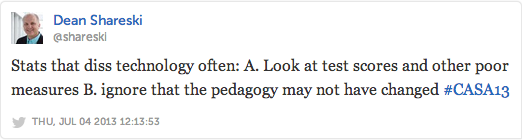
I also wanted to share a few notable quotes from the #CASA13 Twitter stream from this session.

<insert screen caps from storify> 

CASA13-1

CASA13-2

CASA13-3

CASA13-4

CASA13-5

CASA13-6

CASA13-7

Other Resources

SAMR model resources from Scoop.it

Happy reading and reflecting

~Mark

TPACK meets the knowledge domains

Last night I came across this article via Zite:   3 Knowledge Domains For The 21st Century Student.  I was rather intrigued by this way of looking at 21C learning, and have linked to the main graphic.

Many of you will no doubt be familiar with TPACK.

TPack

Image credit http://tpack.org/

Points for reflection:  

  • How do these ideas fit together?
  • Does the 3 domain chart replace part of the TPACK chart?
  • If yes, how?

Happy pondering!  Please share your ideas.

~Mark

ISTE13 BoF reflections

One of the sessions I attended at the ISTE13 conference was a Birds of a Feather discussion.  The original discussion topic was advertised was chromebooks.  When the actual event happened, the chromebooks topic was replaced by a more general discussion on mobile devices in K-12 learning environments.  There were about 8 people at the table, mainly representing independent schools as it turned out.

What really surprised me was the nature of the conversation put forward by most of the participants.  From most participants, the discussion centered around being a “one device school”.  The key question that emerged was:  “How might one go about choosing between the variety of available options: windows netbooks and tablets, android tablets, iPads and chromebooks.”

It seems to me that different tools have different strengths, and that there would be value to having a variety of options available. Besides, at the rate of change with technology,  it would be challenging to set a particular long term direction at this point in time that you could stick to.  Perhaps the key idea is to focus on learning with technology, and leveraging new possibilities rather than focusing on the device itself.  No matter what the device mix is now, things will change.  I believe investing in the infrastructure to support the needs of students and staff in todays 21C learning environment with a variety options including BYOD is the best way forward.

An invitation:  I am curious to know your view.  Please share your thoughts in a comment or tweet.

~Mark

Related Resources

Blog Post:  What’s in a device

CASA13 Presentation Resources

CASA Conference 2013 Presentation Resources

Conference Theme: Theme: Pedagogy to Technology: Hardware to Headwear

Our presentation  : Leveraging the use of Social Media Tools in your School Community — the use of social media tools in the Waterloo Region District School Board as things are now,  the journey and the challenges.

Video Samples from our CASA2013 presentation:

Haley   (Student)
Aaron   (Student)
Andrew  (Student)
Andrew Bieronski  (Teacher)
Kevin Donkers  (Teacher)
Kathi Smith  (Trustee)

additional video resources 

Twitter  (Teacher)
Facebook (Teacher)
Edmodo  (Teacher)
Student Perspective  (Students)
Principal Perspective (Bill Lemon)

Q&A from Today’s Meet backchannel

Information regarding the WRDSB iPad approach

Related Resources

Canadian Association of School Administrators  (CASA)  conference.

WRDSB  Responsible Use Procedure  (RUP)

Social Media Drive By (Blog post)

Quest Radio 1-24  Programming Info  – watch here for announcements regarding additional rebroadcasts of this session.

Join a live broadcast or rebroadcast  on Quest Radio 1-24.

Mark W. Carbone  and  Ed Doadt

~Mark and Ed

ISTE13 session notes

Once again, ISTE was a great conference with wonderful learning opportunities. Today I am sharing some of my session “quick notes”,  taken on the  fly  during the sessions, as links to Evernote documents.  Additional ISTE13  reflections will be shared later.

1. Migrating to a Google Environment

2. Google Tools on iOS

3. Flipped, Curated and Mobile

4. Coaching for Education Transformation


~Mark

Nurturing Your First Followers

During May,  the Waterloo Region District School Board  held a Digital Learning Symposium involving central staff, teachers, students and guests from the Ontario Ministry of Education and community. The intent of the day, was to bring staff and students together to dig deeper into what is working and what is needed as next steps forward. While the day was a huge success with great interaction and discussion within the various stakeholder groups, there is one aspect of this that I have continued to mull over:   Capacity building, and nurturing first followers.

WRDSB teacher, Scott Kemp, selected this “Starting a Movement” video to show as part of the final session discussion kickoff for the day.

On route to ISTE13, I had some great conversations about this idea with Rebecca Rouse  and  Susan Watt .   While the notion of nurturing first followers could be applied to many situations, we were looking at this from a technology enabled learning perspective.

By the numbers: From a strictly numbers point of view, you could think about: one helps another, two help four, four help eight , 8 > 16 > 32 > 64 > 128 > 256 > 512 > 1024 > 2048 … done. Lets say you already have 100 or so “lead nuturers”, then getting to “done” might only be 4 years (or defined time periods). More aggressively, one might start with one helps 3, 3 help 9, 9 > 27 > 27 > 81 > 243 > 729 >  2187 … done. With the same 100 or so “lead nuturers”, then getting to “done” might only be 3 years (or defined time periods).

These kind of progressive numbers are encouraging when thinking about rolling out a change process. But, there is more to it than just the numbers. In our conversations, we identified a number of critical components to consider in the mix.

  • PD should be a graduated continuum just like learning for students
  • professional practice should provide opportunities to align with the plan, act, assess, reflect learning cycle
  • people need varying amounts of time to reach the ‘ready to mentor’ stage
  • at what point could someone properly nuture a “first follower” in a way that produces the desired learnings, results and in turn prepares the first follower to, in  turn, nuture their own first follower with the needed outcome?
  • many of the components identified are all variables in the mix
  • moving along the technology continuum is, at least at this point in time, optional.

While this process is clearly not just amount the numbers, the thought does stimulate some intrigue and excitement about moving things through the system.  Digging deeply into understanding the nurturing of first followers may well be the key to success. To me, there are some key aspects to achieve.

  • Time is needed to shift thinking.
  • The use of technology needs to considered by default in the planning process. We need to arrive at a point where teachers will internalize the asking of the “how might technology support student learning in ‘this’ situation” without external prompting, noting that need will vary.
  • When this answer is ‘yes’, teachers must  know the framework in which technology should be appropriately used to align with and meet Board/District/system goals. In my context, this means technology enabled learning that aligns with our chosen 5 high yield instructional strategies, the C’s (create, communicate, collaborate, critical questioning, citizenship) and TPack.
  • We continue to promote learning of appropriate technology use for all staff
  • Best practices in the area of technology enabled learning are openly shared
  • Recognition that is is NOT about a particular type of device or application. It is about the best way to support learning and engagement.

An invitation:  What do you think is most important to nurturing a first follower of yours?  Share your thoughts!  Please leave a comment, or send a tweet or email.

Related resources
Digital Learning Symposium Tweet Summary
URL to Starting a Movement

Suggested Reading 
Crossing the Chasm

~Mark

Jenni van Rees: Blogging with primary students

Meet Jenni van Rees.

JVR

After a casual conversation at  Ed Camp Hamilton,  and some email correspondence, I arranged to do an interview with  WRDSB  teacher Jenni van Rees to further explore her work in blogging with her grade one students. The interview was initially done live on the internet on QueST Radio 1-24 .   The audio recording is now available as a resource to this blog post, and will also be rebroadcast on QueST Radio 1-24.  Watch radio.markwcarbone.ca , Twitter and G+ for announcements.

Guiding Questions for the Interview

1. Introductions

2. Professional technology interests

3. What drove your interest in getting your students online and blogging?

4. Administrative support?

5. What did you do in the area of communications with parents?

6. Describe/share how this has worked, benefits to students,

7. Did anything surprise you? anything unexpected happen?

8. How did you prepare the students in the area of digital citizenship?

9. Based on the results, will you continue to encorporate blogging as part of your instructional practice?

10. Closing comments.

Jenni provided excellent insights into these interview questions.  Hear her thoughts on professional learning, role modelling, real world audience, digital citizenship and PLNs in the  QueST Radio 1-24 broadcast recording .

Related Resources

Jenni’s class website

Jenni’s student blogging site

Jenni’s professional blog: Thinking about Teaching.

Collaborating with Division 18 in B.C.

Follow Jenni on Twitter

Follow Jenni’s on class on Twitter

Kathy Cassidy’s Connected from the Start: Global Learning in the Primary Grades

Happy learning.

~Mark

Resources for Compass For Success Presentation

 Slide Show

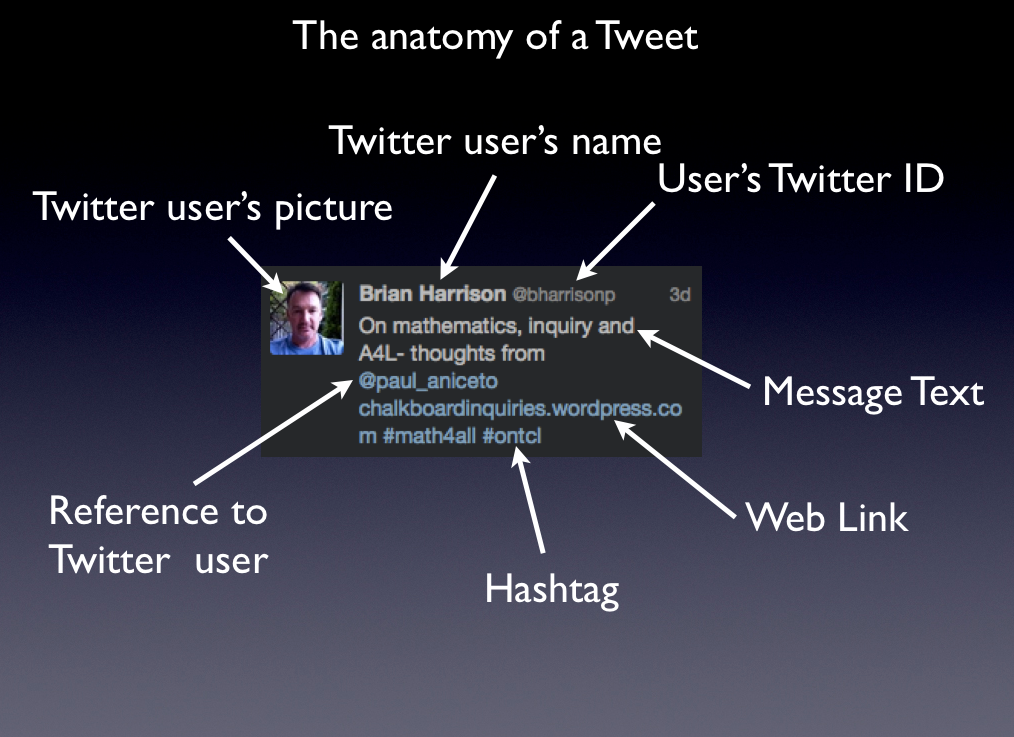
Tweet Anatomy

Digital Footprint 

My Digital Footprint by George Couros
Your Digital Footprint by Diana Graber

Twitter Resources

Twitter Guide Book by Mashable
Twitter Basics (pdf)
Twitter 101 (pdf)
Twitter Essentials
Leveraging Your Twitter Experience

~Mark

Reflections on Ed Camp Hamilton

Saturday May 4th, beautiful sunny weather, no humidity and roughly 150 energized educators at Ancaster Sr. Public School to participate in Ed Camp Hamilton.

edcamp-attending

First, hats off to the organizing committee for planning a great event  — lots of positive energy and opportunity for networking —  take a bow.

I arrived early enough to take advantage of the opportunity to network prior to the official kickoff. It was wonderful to greet friends, meet online acquaintances for the first time and make new connections.

The day followed the traditional ed camp format with a group kickoff to pose questions to form the basis for the days discussion.  The submissions were sorted into groupings and assigned to room locations to facilitate the proceedings of the day.  Each of the discussions I attended was thought provoking:

  •  shift
  • motivating colleagues to change, try new things and take risks when they are reluctant
  • the role of administrators
  • innovation: grass roots, top down, or both
  • what other ingredients are needed for change
  • assessment: do current practices hinder change?
  • the squashing of innovate practice by some of those who fear change and risk taking

Great discussion, no easy answers, nuggets to chew on, things to ponder, take aways to try, ideas to share — awesome!  In addition to the excellent session discussion, three additional conversations are still rattling around in my mind.  One conversation started with Ron Millar and continued with Jenni van Rees  — new ideas for scaling a PD plan for next year.  Hold that thought and perhaps watch for a future blog post.

The second conversation started in the lunch line with Jane Mitchinson and Carlo Fusco, then continued at the lunch table with Ron and Jenni joining us.  We got talking about socialization, the impact of that process and when important conversations become too big and lose focus.  I believe we agreed that one of the hot topics and key elements of change in education right now is the “hot ball” of putting the conditions  of change in place, the shift to technology enabled learning, continued focus on pedagogical improvement and building capacity for change and risk taking. In essence, I believe this synergy  burns brightly because events such as ECOO, the OTRK12 conference,  the Ontario GAFE Summit and this Ed Camp event keep fuelling the flame  for continued learning, sharing and professional reflection.  Sustained energy is SO important right now.

BUT, what happens when the conversations become blurred by the big paint brushes — questions that could take the collective us off our game. Questions that are too big and too general to ever be wrestled to the ground.  Loss of focus would be a major hinderance.  Do people supporting change NOW, have to also be guardians of the focus of the journey?

The third conversation happened after the event – a very engaging conversation with Donna Fry. We talked further about the challenges of creating opportunities for change, and sustaining the energy to keep things going.  Donna has great ideas and big plans for her area — what an amazing educator! I hope I can be a part of the action.

Thanks again to team Ed Camp Hamilton for arranging this successful event.  For those that could not attend, check out the #edcampham twitter stream.  Until the next event, see you online and keep the learning, sharing and reflecting GOING.

Related Resources

Now Thats PD  by  Jane Mitchinson
The revolution will be tweeted … at the Shifting Ideas  blog by Carlo Fusco
Ed Camp Hamilton Reflection by David Fife (www.davidfife.ca)
EdCampHam left me with more questions …. by Karen Wilson

~Mark

Technology Enabled Learning at Millen Woods PS

I recently had a chance to spend some time at Millen Woods PS (link) with principal Gwen McCutcheon and her staff.  The school had a very welcoming atmosphere. There was a definite energy for learning, and yet a calmness at the same time. Impressive!

The visit began with an opportunity to meet with Gwen in her office to discuss some background information and leadership philosophies. Gwen is very interested in how technology can support and enable learning. Gwen states emphatically that she is “NOT a techie”, but has worked hard to establish a culture to leverage the best uses within her school. One of the resources that is shaping Gwen’s thinking is the book Visible Learning. She has noted a few key quotes from the book that really resonated with her, and reads them often. Some of the key points include:

  • teachers need to understand learning through the eyes of the student
  • what works is not just the tool or the structure
  • students learn best when they understand the learning process
  • learning is an:  explicit goal, appropriate challenge or  measuring progress towards meeting a learning goal
  • in this context, effective use of technology makes a difference to student learning
  • technology can add a level of accountability
  • when students explain their thinking, they become their own teachers

Millen Woods P. S. has 60 iPads at this point in time – some from their start up funds 3 years ago, some purchased by the school and 20 from our  central allocation this year.  Principal McCutcheon views iPads as the most versatile piece of equipment in the school. She has been impressed with how well staff have adapted to thinking in a technology enabled framework and using iPads to support small group instruction, rather than taking a 1:1 approach.  She is proud of the way the staff have focused on using technology to enable, support and capture student learning – making student learning visible, exploring critical questions and sharing thinking. Students enjoy the hands on approach and many staff feel that this has increased accountability.  One example of students capturing their work is by using the Explain Everything app.

I enjoyed meeting teacher Stephanie Ringwood and her French immersion class.  I was very impressed with seeing how her students used the iPads to support their learning. Listen to  Stephanie’s perspective  (video) on the shift to using technology in her classroom.

At the time the school opened two years ago, one of the big changes for staff was having the computers dispersed in pods around the school.  While it took some time for all staff to adjust, Gwen feels they have “mad the transformational journey” and see the value in this approach.

As we walked the school, I saw other groups of students working in classrooms, pods and in hallway groups using technology to capture their learning — making movie trailers regarding physical fitness.  I could tell from the way the students interacted with Principal McCutcheon that they were used to seeing her out and about in the school.  I noted that there were some interactive white boards in the school, perhaps in roughly 25% of the classroom.  Gwen feels this number is quite appropriate for the school and that there is no need to have one in every classroom.  I do concur with her views on this as many teachers find it challenging to move past the teacher centered instruction early phases of using them. I also took note of some students working at their literacy skills using electronic books.

As we returned to the office area, the large flat screen TV in the hallway captured my interest.  It is used to display student work the Millen Woods way – students teaching other students and students capturing their learning — AWESOME!

One video example of a student demonstrating their work is evidenced in Roane’s Video (posted with permission).

iPad syncing trays and Mac Mini (side mount) for syncing
iPadtrays

Hallway TV displaying student work
HallTV

Laptop controlling hallway TV
TVsetup

Thank you for sharing your learning journey!

~Mark