Category Archives: 21st century learning

Teaching the Facebook Generation

I came across this post today via Twitter from @pmcash.

The article covers the use of social media tools with in Australian schools. Based on the article, the general approach seems to be cautious about allowing access. Concerns raised include safety, teacher awareness of how to use the tools and online relationships between teachers and students.

In my Board (WRDSB), we have been making great strides in moving forward with the use of social media tools. Facebook and Twitter (and other tools too) are open for use to support curriculum delivery. These tools offer incredible opportunities to connect, collaborate and access real world information and events in real time. Teachers are finding many exciting uses for these technologies within the classroom.

Currently, teachers are using Facebook for:

  • fan pages to distribute classroom resources to students (& parents), raise awareness of issues etc.
  • study and enrichment groups
  • online writing (poetry, character analysis, debates/discussion re current events etc.)
  • opportunities to share student work (within groups)
  • online galleries (artwork, student created music and videos etc.)
  • teacher feedback and peer review
  • ‘ask a question’ homework groups
  • casual writing for learning second languages
  • teaching digital citizenship in a real world context

It is critical that staff and students understand the importance of having their privacy and security settings set up appropriately. This must be part of the education process.

In terms of staff/student relationships in this environment, it is business as usual in many respects. Any online relationship must follow the same professional conduct as any situation whether it is in the classroom, on the playground, on a school trip or in an extra curricular situation. Relationships must be kept at the professional level. No one should put themselves in a risky situation.

These social media tools are powerful — we need to leverage their power to support curricular delivery, while educating staff/students about appropriate use and maintaining the required professionalism within these environments.

~ Mark

Up next: Demonstrating Twitter to our Trustee group on March 7th.


OSLA Web 2.0 Face-off

The last month seems to have blasted by in absolute warp speed. I feel like I have been immersed in a number of great opportunities and events: Educon, OSLA, Brock Tech Ed Day and OTF session.  At the same time my usual patterns of participation in Twitter, PLP etc. have been out of routine. I wanted to take the time to capture of few thoughts even though these events are somewhat in the past.

I really enjoyed being involved in the OSLA Web 2.0 Faceoff presentation. In a true fashion, this entire event was planned online. The group did not actually meet until the setup session the evening prior to the event!

Hosted by Anita Brooks Kirkland, and modelled after a hockey format, 2 Web 2.0 teams led by team captains: Zoe Branigan-Pipe and Doug Peterson, supported by players: Rick Budding, Diana Maliszewski, Roger Nevin, Colleen Rampelt. During the first two periods team presented effective Web. 2.0  tools with details of how they linked to our curriculum.

I enjoyed the the opportunity to work with Carol Koechlin; analyzing the Web 2.0 play. During the playoff, the teams challenged each other to find best curriculum fits for new Web 2.0 tools.

Play by play action was captured by Top Tweep: Becky Rouse. I captured the live Twitter stream into an archive.

Check out the team resources at OSLA Hockey Faceoff. Special thanks to Technical Director Diane Bédard.

~ Mark

WRDSB Futures Forum Project Goes Live

It is hard to believe that after almost 2 years of planning, the WRDSB Futures Forum Project will go live. This has been a real journey involving:

  • ongoing discussions with the Communitech organization in Waterloo to look at a view of a future classroom
  • PLP experience for a centrally based team (including me)
  • The formulation of a new innovative approach to learning within secondary schools with staff from Learning Services and IT Services working collaboratively on the planning
  • 7 of our secondary schools commit to this project
  • PLP experience for teachers and administrators from each school site involved in this project and a library resource team for project support
  • course design, technology components (wireless, netbooks, iPads, web 2.0 tools, Adobe Connect etc.)
  • planning, planning, resource development
  • and we are ready to go live!!!

Background:

The project emerged out of the recognition that although educators and others were striving to engage students in a variety of approaches and learning activities to better prepare for the changing world, these efforts often occurred in isolation without a systemic approach or support.  The project strives to integrate promising practices and learning across schools to meet the needs of all students in a more effective, sustainable and progressive manner.

The Futures Forum Project is an inquiry based, multi-disciplinary, project oriented approach integrating the teaching and learning of grade 10 Academic English, Civics, and Careers expectations (see Appendix A) into a morning block of 220 minutes (2 periods) during semester 2 of the 2010-11 year.

The overall curriculum expectations are addressed through the following components:

1. Guided Inquiries – These involve opportunities for students across participating schools to use technology to interact and work together.

2. Independent Inquiries – These self directed tasks provide students with opportunities to meet course expectations independently and tailor learning based upon their interests and readiness.

3. Portfolios – Portfolios allow students to engage in learning of interest to them and supports sharing with “authentic” audiences.

4. Summative Project – Students demonstrate mastery of Civics, Careers, and English expectations; independent inquiry, personally relevant learning and the of use technology as an effective collaborative and communication tool.

The summative project is focused around a “big question”…“What is my digital footprint?”  It addresses the separate course expectations by requiring students to demonstrate, in a variety of ways, responses to the following specific questions:

  • How am I an informed, participating citizen in a democratic and technological society? (Civics)
  • How can I develop and achieve personal goals for future learning, work, and community involvement in a technology rich society? (Careers)
  • How can I demonstrate I have a range of oral communication, reading, writing, and media literacy skills needed for success in school and life in a technology rich society? (English)

As part of the approach to the project each teacher will work with a network of teachers focused on this same inquiry based, multi-disciplinary, project oriented, and technology mediated approach to learning.   OT Coverage and professional learning are provided to plan and facilitate the use of effective instructional strategies and technology related resources (e.g., PDAs, notebooks, online tools) to develop and deliver the interdisciplinary class addressing expectations of the English, Civics and Careers grade 10 curriculum.

The Futures Forum project is focused on addressing the system success plan goal of improving the ability of students to communicate their thinking in writing by providing job-embedded professional learning opportunities, and access to some technological resources, as part of an inquiry based, multi-disciplinary, project oriented, technology mediated approach to learning.  The project’s focus is on:

  • achieving the system success plan goal of improving the ability of students to communicate their thinking in writing
  • promoting job-embedded professional learning opportunities for administrators, teachers and central staff,
  • increasing access to technological resources,    exploring an inquiry based, multi-disciplinary, project oriented, technology mediated approach
  • addressing grade 10 Academic English or History, Civics, and Careers expectations during semester 2 of the 2010-11 year
  • identifying and consolidating effective instructional strategies (i.e., instruction, assessment and reporting), tools and techniques mediated with technology related resources (e.g., PDAs, notebooks, online/internet networking tools, specifically Facebook, wireless access, etc.)
  • monitoring and reporting on project progress and system learning (e.g., resource requirements, professional learning requirements, promising instructional practices, scalability, sustainability, etc.).

The Project metrics (indicators for assessing the project) include:

  • increased student success rates in grade 10 credit accumulation, specifically for boys.
  • increased student engagement in learning (i.e., more choice, opportunities for inquiry, topics of interest to students, etc.)
  • increased school administrator, teacher, and central staff knowledge and expertise in using technology to engage students and promote learning;
  • increased familiarity and effectiveness in the use of WRDSB research-based strategies, tools and techniques for improving written communication (e.g., student exemplars, anchor charts, non-fiction writing, graphic organizers/frameworks, open-ended critical questions), professional learning networks and professional learning cycles

Futures Forum Participants

School participants include a teacher and vice Principal lead.  Grades 10 teachers teaching academic type English, open type Civics and Careers courses in semester 2 of 2010-11 are participating in the project. Participation includes a commitment to professional learning sessions, co-planning, networking, implementing, reflecting on lessons and assessment tasks, and a willingness to use technology to effectively implement system identified instructional tools and techniques in an inquiry based, multi-disciplinary, project oriented approach to teaching and learning.

Futures Forum teachers maintain a daybook, collect teacher reflections on learning, complete reports requested by central staff, and attend regular meetings with Learning Services staff.   In addition, expectations include:

  • Participation in co-learning with other Futures Forum teachers.
  • Completion of data collection (e.g., survey teachers on what strategies they found most effective) for assessment purposes by central staff.
  • Work with the administration to implement the project.
  • Consider and contribute suggestions to support the project’s focus as determined with Learning Services staff.

Learning Services and Information Technology Services (ITS) staff provide leadership and support in the coordination of the project. They are involved in facilitating professional learning, monitoring project progress, allocating resources as required, supporting access to technology (e.g., students using both board and their own technology) through a wireless classroom environment, collaborating with the vice-principals and assisting in the completion of reports (e.g., status reports, final reports, data analysis).

Technology Components

A Variety of devices  including Netbooks, laptops, smartphones, etc. along with wireless access and the use of specific internet based applications (e.g., Facebook, Desire to Learn – Learning Management System, Ontario Educational Resource Bank, Moodle, Ning) are among the technological tools and vehicle utilized to facilitate learning in the project

Professional Learning and Resource Support

A variety of technologies, regular professional learning sessions and facilitated professional learning network (i.e., PLP – 2 full day face to face and 4 adobe connect mediated by External experts) is used to support staff (teachers, administrator and central staff) involved in the project and promote collaborative learning and networking.  This work in learning teams involves:

  • collaborative planning of instruction including a common assessment task with rubric, and
  • moderated assessment of student work
  • effective instruction/assessment;
  • use of instructional tools and techniques;
  • use of technology mediated applications
  • reporting on and assessing the project.

It is very exciting be at the ‘go live’ point, and I look forward to seeing this project in action.

~ Mark

Note: Some of the above content is from an internal report and is used with permission.


Facebook – new group function in K12

One of my earlier blog posts I made some recommendations for settings for setting up groups for use in the K-12 environment. Since that post, the Facebook group function has changed and I wanted to share what I have learned so far.

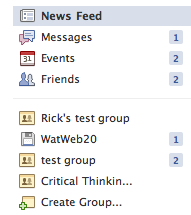
The group function is still accessed from the main page in Facebook.

Select the ‘create group’ option.

Next, enter a name for your group, choose an icon from the drop down list and select the type (open, closed or secret). I recommend ‘closed’ for K-12.

Once the group is created, the new ‘header’ is displayed.

Changes include:

  • the ‘post’ area is not visible by default, it must be selected
  • document creation and editing has been added
  • discussion areas within the groups have been removed

Note: groups created prior to this feature change continue to function the way they did.

Group settings are adjusted through the ‘edit’ and ‘settings’ options.

What Else is New?

  • The new group function also provides the option of defining a group mailing list. In my example, I would name the mailing list after the group (watweb20@groups.facebook.com). Messages posted to this addresses are distributed to group members.
  • Only Facebook friends may be added to a group. The email list option to invite group members has been removed.
  • Invited friends are automatically added to the group. The former request/accept process has been removed.
  • Group members can remove themselves from a group, but must request to rejoin as they can not be reinvited
  • The group owner (administrator)  may also remove group members
  • The display of posts has also changed. When a group member posts on a group wall, the post also shows in your personal newsfeed (not wall). Friends in the group will also see the post in their newsfeed. The ability to see posts is also impacted by the ‘top news’ or ‘recent’ setting.

All in all, the new group function will work well for K-12 usage.  I recommend that users set their security and privacy settings appropriate for professional conduct and interaction with students.

Thank you to @rebrouse and @rickbudd for working with me to test and document our learnings.

Happy collaborating in a social networking environment.

~ Mark

Creating a Facebook group for your K12 class

In my previous blog post, I made reference to a number of strategies to embrace the use of Facebook within the K12 classroom to support learning. One of the most powerful features of Facebook for use in the classroom, is the groups feature.

The process used to setup a Facebook group is straight forward and can be completed in just a minute or two. The steps are:

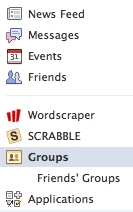
1. Select the Groups link on the left side of your Facebook ‘Home’ page.

2. Click the ‘Create a Group’ button

3. Complete the basic group information.

4. including the category and type information.

5. Click the create groups button to proceed to the group property settings page. I would recommend unchecking the ‘Non-admins can write on the wall’ setting. Unchecking this parameter prevents wall posts leaking out side of the group to Facebook friends of group members.

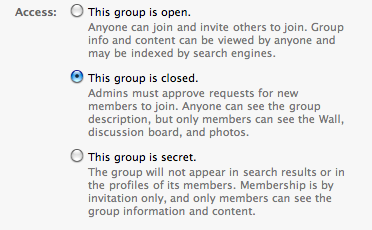
6. The bottom section of the group property settings page governs the visibility and privacy settings for the group.  For K12 purposes, I recommend the closed group setting. This allows the group name to be searched, but keeps the content of the group private to the group membership. With this setup, the group owner can invite members via email addresses and NOT be friends with the members. From the K12 perspective, this allows a teacher to create (own) a group and invite student membership without becoming Facebook friends with the students. In our case, this can be done easily by using our Board generated student email addresses.

Note (20101012): Since researching and experimenting for this blog post, the new groups feature was introduced within the Facebook environment. This feature may impact the functionality described here in terms of the groups members are, or are not, friend relationships. Until this is more clearly understood, I recommend that privacy and security settings are implemented accordingly.

7. Click the ‘Save’ button to activate your settings.

8. Select the ‘invite people to join’ link to send group invites.

Once people accept your group invitation, the collaborating will begin.  Enjoy your Facebook Learning space.

~ Mark

Facebook in the K12 Classroom

Connecting Facebook use to the Classroom

Over the last week, I had a number of opportunities to connect with teachers and have some dialogue about about using Facebook to support learning. Yes, Facebook is a social environment, but it has a huge untapped potential in the areas of engagement, community, sharing, current issues and writing.

I thought I would share this list of activities some of our teachers see as effective uses of Facebook within the learning environment. Many of these are already beginning to happen in our classrooms!

  • conversational writing (French in this case)
  • sharing of poetry writing
  • collaborative math homework support groups – students helping students with teacher support
  • peer review of student created movie trailers
  • short blog style writing posts with opportunity for peer review
  • creating a shared student art gallery
  • discussion of global issues
  • math/science challenge questions
  • use of class groups to provide frequent feedback and positive encouragement (linked to our recent PD session with Dr. D. Reeves)
  • use of teacher fan pages to connect with students re class schedules, homework assignments, test dates etc.
  • school/department pages as another way to connect readers to key events, related news items, promote new library offerings
  • a forum to discuss digital citizenship, online safety and prevention of bullying
  • analyse sample situations in terms of digital citizenship and character development goals

Congratulations to these teachers for their forward thinking about using the power of social media tools in new and powerful ways. I look forward to working with teachers and school Digital Citizenship committee to plan our journey forward.

~ Mark

Kicking off the 2010-2011 School Year

I enter the 2010-2011 school year with great anticipation and excitement.  Many of the projects that were in major planning stages last year will ‘go live’ this year.

  • Effective today, we have wifi hot spots in each secondary school. These hot spots will allow staff and students to use their own equipment for Internet access.
  • Expanded use of web 2.0 and social media tools to support curriculum delivery. Staff and students now have access to Facebook. Facebook and Twitter, along with other resources will be used to extend school community and support curriculum delivery.
  • By mid month, we will role out email for elementary students. In addition to the secondary role out last April, all students fill have a Board assigned email address to support curriculum and communication needs, and identification in other online environments.  All students will be part of our FirstClass system.
  • Launching our Future Forum project (semester 2), developed as our 2009/2010 PLP project
  • Automated processes now reduce manual work to support account management
  • Redesigned and significantly improved drupal based web sites for our secondary schools
  • Moodle hosted setup to deliver Health and Safety content (launched Sept. 2nd)

Significant projects for this year include:

  • expanded development of our Library Learning Commons (LLC) project
  • a complete rewrite of our Technology Acceptable Use procedure to align with Digital Code of Conduct, Digital Citizenship, and Character Development programs
  • iPads & netbooks in the classroom
  • continued involvement in the PLP program
  • a look at e-book strategies
  • expanding our wireless project
  • building on our Digital Citizenship program

Day one went well. We hit our startup targets and hit the road running. It is going to be a great year!

~ Mark

Leadership Day 2010 Results

My last blog post was my submission to  Leadership Day 2010. This week the full list of submissions was posted on Scott McLeod’s blog Dangerously Irrelevant.

This year, there were 114 great entries, organized by the categories outlined below.

Leadershipday2010Leadership & Vision

  • Lists
  • Online Learning
  • Planning & Implementation
  • Professional Development
  • Safety & Security

Standards

Teaching & Learning

  • Tools & Technologies

You may also want to check out the  Twapperkeeper capture of the hashtag #leadershipday10

I would encourage you to check out this collection of posts for some great ideas and thinking. Enjoy the reading and learning.

~ Mark

Leadership Day 2010

A few days ago, I saw this tweet from @gcouros while reviewing the daily action from my PLN.

This certainly caught my attention, so I read the blog post and decided to participate.

Lets be straight up to begin. Administrators are busy people with many responsibilities to juggle. They can’ t ‘know everything’ – and they don’t need to.  I do believe there a some critical elements that are attached to their role in terms school success and staff development that will make a key difference.

School Administrator To Do List

  • walk the walk & talk the talk
  • understand digital literacy and digital citizenship
  • be familiar with, and understand the power of  web 2.0 and social media tools
  • establish a PLN (self directed, job embedded learning) and share the learnings with staff
  • promote technology use as an embedded & key part of the learning process
  • understand appropriate technology use, highlight/showcase it as a part of good teaching practice
  • include technology use in the learning process as part of the teacher feedback and evaluation process
  • require that staff learn about best technology integration strategies as part of ongoing PD/learning plans
  • ensure that technology uses are well connected to Province/State and Board/District level priorities
  • understand the role of technology in establishing and/or improving school and classroom community
  • build a culture, not a ‘one of’ island
  • embrace change
  • be vocal: share, promote and connect with other administrators
  • STAY THE COURSE!

~ Mark

PLP Experience Focuses on Educator Learning

A couple of weeks ago, I received an email inviting me to participate in a set of interviews for a story about how PLP cohorts help educators learn. Having just completed an exciting year participating in the PLP program lead by @snbeach and @willrich45, I was eager to participate.

I took a bit of time to check out Converge, an online publication and located education reporter and writer @reportertanya on Twitter and Linked In, then replied to the email indicating my interest. The next couple of emails exchanged covered some background information and arranging a time to connect via skype for the interview.

On interview day, we connected via skype at the appointed time, bridging California and Ontario, and had a 45 minute video discussion about my experience in the Ontario PLP program, what I felt my key learnings were and what our Board will be doing differently as a result of participating in the PLP project.

Congratulations to:

  • Sheryl Nussbaum-Beach and Will Richardson for designing and running the PLP program to provide an excellent training opportunity for educators, and
  • Tanya Roscorla for her excellent research and article – well done!

Enjoy the published article, Global Communities Rethink Learning at the Converge website.

~ Mark