Category Archives: Technology in Education

Student Voice: A visit to MsJWeir’s Classroom

I recently had the pleasure of visiting Ms. J. Weir’s classroom at WRDSB’s  Southwood S. S. to meet her students and gather some feedback about their online writing project. I was immediately struck by the calm and trusting atmosphere in the classroom. It was obvious that the students were very comfortable in this learning environment — a wonderful tribute to the teacher! The dialogue flowed freely and students were at ease contributing to the conversation.

I posed the following guiding questions to the students to facilitate our discussion regarding the project:

  1. How has writing online changed your learning?
  2. Is writing online what you expected?
  3. What would be the effect of removing the technology?
  4. Describe the pros and cons of back channelling (Today’s Meet and Twitter)
  5. What were the challenges?

The actual discussion happened in a rather free flow manner. I have grouped the responses to follow the question sequence outlined above.

Many students commented about the ability to ‘organize on the fly’ and being ‘in the moment’ when they write online because the process feels more natural.  Capturing ideas and shaping them is much easier electronically. The students also made that point that they felt more ownership for their work.

When asked question 3, the responses were unanimous: removing the technology would be a step backwards, poorer organization, less motivation and anticipated drop in achievement.

In terms of back channelling and online forums, many students commented that the variety of options to contribute to class discussions (Face to Face (F2F), EdmodoToday’s Meet and Twitter) enriched the discussion, drew more students into the conversation(s) and created a much stronger sense of community within the class.  The students all indicated that having the comfort level to participate was a key ingredient to their learning.

In the area of challenges, a few things were identified.  Access to resources is dependent on a wifi connection. We talked about the importance of wifi reliability and high levels of up-time.  I was impressed by the fact that the iPads used for this particular project were set up with a small number of key apps that were aligned with class needs and learning goals.  This was a welcome observation on my part as people often become app focused rather than learning focused. Well done! Students also talked candidly about the need for a level of self discipline. Having wifi enabled devices in the classroom certainly support student learning, and a more personalized component to the learning. Yet, the potential for distraction is still there — it must be managed.

I found this to be an excellent classroom visit. I appreciated the candid conversation with  Ms. J. Weir’s class. The approach to learning in this classroom needs to be shared and replicated.

Related Resources

Ms. J. Weir’s Blog

~Mark
OntCL Twitter Chat primer

On Wednesday April 4th, the Ontario ConnectED Leaders will host their monthly Twitter chat at 8:00 p.m. (eastern daylight time). The topic will be BYOD: leveraging the benefits, getting ready.

Here are a very resources that might help prepare you for the chat topic. I hope to see you in the Twitter chat. Join in with hashtag #ontcl

Leveraging the ‘Instrumented’ Pocket & Backpack by @lisaneale

Intel: Teachers Engage

BYOD in primary

BYOD: What’s in a device?

From Scoopit: A Principal’s memo

From Scoopit: Using student owned devices in the classroom

Chat with PLP’s Periwinkle

~Mark

Note: Cross posted to OntCLC.ca

Google Chromebook: first impressions

Last week I felt a bit like a kid waiting for Christmas. I knew our shipment of Google Chromebooks was on the way, and very soon I would finally get a chance to try one out myself.  “Chrome Day” has now  happened, I have have spent a couple of sessions with a Chromebook.

Out of the box, the Chromebook was dead easy to setup up – no written instructions needed. Simply power up the device, answer a handful of setup questions, connect to wifi and presto. I logged into my Google account and everything was there: bookmarks, docs etc. – easy.  I must admit I was impressed with the ease of this process. I think I was online in less than 5 minutes.

The screen is clear and easy to read. (12″ diameter or roughly 7″ x 10″). Processor speed seems decent, and the battery life is solid so far.

Now that I have tried this ‘unmanaged’ approach, I need to investigate setup this up through the managed interface for comparison. It will be interesting to use a device where literally EVERYTHING is online. My testing will be with an eye to classroom applications and ease of use. Certainly from an IT perspective, the devices offers the browser interface for access to web content and web 2.0 tools for writing, communicating and collaboration with minimal maintenance.  I look forward to learning more about file management in this web only environment.

I will share my learnings and observations in a future post.

Related Resources

Google Chromebook
Samsung
Wikipedia

~Mark

Blearning: #OntCL on Blended Learning

Technology and learning keep evolving, and at a rapid pace these days. As educators, this means there is always something new to explore, new ways to engage students, collaborate and make learning an authentic experience.

The OntCLC live Twitter Chat las Wednesday (March 7th, 2012) provided a great opportunity to share current thinking on Blearning.

What’s Blearning?  Blearning seems to be the evolving new term to mean Blended Learning.  Lisa Neale prepare this blog post as a backgrounder for the discussion:  The What and Why of Blended Learning.

As anticipated, it the live Twitter discussion, yielded some great sharing of ideas, insights and reflections. You can check out the discussion stream at  #OntCL Blended Learning Twitter Stream (March 7, 2012 portion). This is also a great chance to meet and connect with some new educators and build your PLN.

Related Resources:   Ontario ConnectED Leaders Consortium

Next #OntCL Twitter Chat:  April 4th, 2012

The Notability App

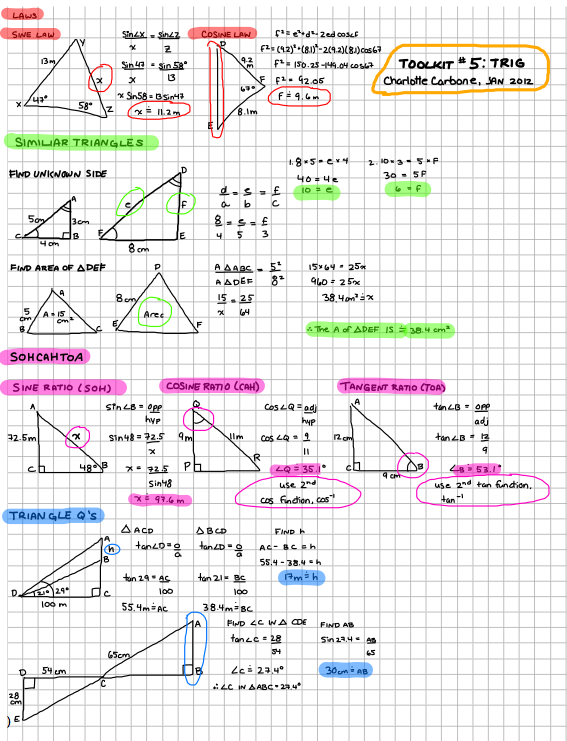
Notability is a great little iPad app that lets you write and/or draw on the iPad screen. This inexpensive app ($0.99) offers a number of features including: advanced word processing, pdf annotation, linked audio recording, auto sync, media insertion and library organization.

The notes below were created by my daughter in preparation for her math exam. I have included screen captures here, as well as a link to the original pdf document.

This is certainly a well priced capable program.

Related Documents:

Notability Trig PDF file

Notability App

~Mark

OntCL Chat Highlights 20120125

Ontario ConnectEd Leaders (OntCL) Chat Highlights from 2012-01-25.

Topic: How are you currently using social media tools in your school/board?


Note: Future Ontario ConnectEd Leaders twitter chats will be scheduled for the first Wednesday evening of each month, 8:00 p.m. to 9:00 p.m. and use the Twitter hash tag #ontcl

~Mark

BYOD: What’s in a device?

I have had two great opportunities to talk about Bring Your Own Device (BYOD) to support student learning — at the Brock U.Teaching with Technology Showcase (Brock U Faculty of Education) and at the Educon 2.4 event.

The discussions covered considerable territory – benefits, challenges and implications for both pre-service and existing teacher training. In my organization, BYOD is certainly a strategy intended to augment access and not replace Board owned equipment. From an IT perspective, building the right infrastructure with sufficient capacity is a critical path forward to support student learning.

There is certainly a wide range of devices that could support learning. I have been pondering the desired functionality needed in any device to support student learning. Here is my initial take on a function list.

Notes/read:  take notes, read common file formats such as pdf and ebook files,

Web enabled: browse web (consume info, research), bookmark, interact with online databases, RSS

Share/Collaborate: write/publish a blog, support wiki use, google docs etc

Digital StoryTelling: capture audio, video, combine with text

Communicate: email, support for standard Social Media tools (FB/Twitter/G+) etc.

Other: good battery life, strong wifi signal

I need your feedback. How thorough is my list? What is missing? Should anything come off the list? What should be added?

Please leave a comment with your ideas, or share an idea with me on Twitter.

~Mark

Great CATC conversation

I attended a technology planning meeting tonight with Rebecca RouseCarolyn Graham and the Smithson Public School CATC (computers across the curriculum) team. Reflecting on the meeting, a few thoughts stayed with me:

  • good energy on the team
  • positive outlook towards change
  • technology change is messy right now, and shifting quickly.  Time is needed in the sandbox to play!
  • static vs dynamic use of technology (static = fixed labs etc., dynamic = technology in the student learning space)
  • technology to enable and enhance learning,  not new technology for technology’s sake
  • discussion focused beyond now and short team –> what does the next 3 years look like at the school?
  • increasing access
  • advantages of mobile technology
  • highlighting new learnings at staff meetings

I hope some of the discussion points listed here, might provide guidance to other sites in their planning process.  We look forward to working with the Smithson staff to develop their plan and support them moving forward with their agenda.

~Mark

Cell Phones in the Classroom Debate

On Sunday afternoon, I received a tweet from @jmuellertate about contributing to a cell phones in the classroom discussion via twitter for a new teacher education class at WLU.  I had to do a little multitasking to contribute, but was happy to contribute to the discussion.

I captured the twitter stream of discussion based on the #cellinclass hashtag. Although many of the Twitter contributors were in favour of leveraging this technology within the classroom settings, @jmuellertate indicated that the faculty of education students tended to be on the cautious or no use end of the scale.

@brendasherry  raised a great point in the follow up discussion tonight: Would these new teachers feel the same if they experienced first hand how cell phone technology could enhance the learning environment?  Great question indeed. Perhaps this topic should be revisited after some of the classroom sessions have been completed.

As for me, I am in favour of leveraging cell phone technology to enhance learning.

~Mark

Student Voice: Technology

Tonight I had the pleasure of attending the WRDSB Student Trustee meeting at Cameron Heights Secondary School. The student trustee team is led by Sajdeep Soomal and Adrienne Fiander under the direction of WRDSB trustee  Kathi Smith and staff advisor  Kevin Donkers (login to view this link).  As I have for the last four years of attending these sessions, I anticipated an engaging evening of discussion around a variety of issues.

Sajdeep and Adrienne had prepared a list of topics for discussion which included:

  • an update on the Board technology plan for the next year
  • use of mobile technology within schools
  • clarification of the WRDSB email policy
  • future directions with YouTube
  • ebooks (eTextbooks)
  • and ideas for Facebook for school related platform.

From my perspective, we had a fascinating discussion. As we covered the topics, the students asked insightful questions about the use of technology. Over the evening, our conversation touched on smart boards in secondary schools, digital citizenship, tablet use, business models,  network management (bandwidth capacity, security, virus protection, data integrity, freedom of information & privacy needs and legal requirements) and our collective responsibility for being  good role models for appropriate, ethical and safe online activity.

Thanks to all for a great evening. I look forward to continued conversations online and my next face to face meeting!

~Mark