Category Archives: Leadership Perspective

Facebook in the K12 Classroom

Connecting Facebook use to the Classroom

Over the last week, I had a number of opportunities to connect with teachers and have some dialogue about about using Facebook to support learning. Yes, Facebook is a social environment, but it has a huge untapped potential in the areas of engagement, community, sharing, current issues and writing.

I thought I would share this list of activities some of our teachers see as effective uses of Facebook within the learning environment. Many of these are already beginning to happen in our classrooms!

  • conversational writing (French in this case)
  • sharing of poetry writing
  • collaborative math homework support groups – students helping students with teacher support
  • peer review of student created movie trailers
  • short blog style writing posts with opportunity for peer review
  • creating a shared student art gallery
  • discussion of global issues
  • math/science challenge questions
  • use of class groups to provide frequent feedback and positive encouragement (linked to our recent PD session with Dr. D. Reeves)
  • use of teacher fan pages to connect with students re class schedules, homework assignments, test dates etc.
  • school/department pages as another way to connect readers to key events, related news items, promote new library offerings
  • a forum to discuss digital citizenship, online safety and prevention of bullying
  • analyse sample situations in terms of digital citizenship and character development goals

Congratulations to these teachers for their forward thinking about using the power of social media tools in new and powerful ways. I look forward to working with teachers and school Digital Citizenship committee to plan our journey forward.

~ Mark

Kicking off the 2010-2011 School Year

I enter the 2010-2011 school year with great anticipation and excitement.  Many of the projects that were in major planning stages last year will ‘go live’ this year.

  • Effective today, we have wifi hot spots in each secondary school. These hot spots will allow staff and students to use their own equipment for Internet access.
  • Expanded use of web 2.0 and social media tools to support curriculum delivery. Staff and students now have access to Facebook. Facebook and Twitter, along with other resources will be used to extend school community and support curriculum delivery.
  • By mid month, we will role out email for elementary students. In addition to the secondary role out last April, all students fill have a Board assigned email address to support curriculum and communication needs, and identification in other online environments.  All students will be part of our FirstClass system.
  • Launching our Future Forum project (semester 2), developed as our 2009/2010 PLP project
  • Automated processes now reduce manual work to support account management
  • Redesigned and significantly improved drupal based web sites for our secondary schools
  • Moodle hosted setup to deliver Health and Safety content (launched Sept. 2nd)

Significant projects for this year include:

  • expanded development of our Library Learning Commons (LLC) project
  • a complete rewrite of our Technology Acceptable Use procedure to align with Digital Code of Conduct, Digital Citizenship, and Character Development programs
  • iPads & netbooks in the classroom
  • continued involvement in the PLP program
  • a look at e-book strategies
  • expanding our wireless project
  • building on our Digital Citizenship program

Day one went well. We hit our startup targets and hit the road running. It is going to be a great year!

~ Mark

Leadership Day 2010 Results

My last blog post was my submission to  Leadership Day 2010. This week the full list of submissions was posted on Scott McLeod’s blog Dangerously Irrelevant.

This year, there were 114 great entries, organized by the categories outlined below.

Leadershipday2010Leadership & Vision

  • Lists
  • Online Learning
  • Planning & Implementation
  • Professional Development
  • Safety & Security

Standards

Teaching & Learning

  • Tools & Technologies

You may also want to check out the  Twapperkeeper capture of the hashtag #leadershipday10

I would encourage you to check out this collection of posts for some great ideas and thinking. Enjoy the reading and learning.

~ Mark

Leadership Day 2010

A few days ago, I saw this tweet from @gcouros while reviewing the daily action from my PLN.

This certainly caught my attention, so I read the blog post and decided to participate.

Lets be straight up to begin. Administrators are busy people with many responsibilities to juggle. They can’ t ‘know everything’ – and they don’t need to.  I do believe there a some critical elements that are attached to their role in terms school success and staff development that will make a key difference.

School Administrator To Do List

  • walk the walk & talk the talk
  • understand digital literacy and digital citizenship
  • be familiar with, and understand the power of  web 2.0 and social media tools
  • establish a PLN (self directed, job embedded learning) and share the learnings with staff
  • promote technology use as an embedded & key part of the learning process
  • understand appropriate technology use, highlight/showcase it as a part of good teaching practice
  • include technology use in the learning process as part of the teacher feedback and evaluation process
  • require that staff learn about best technology integration strategies as part of ongoing PD/learning plans
  • ensure that technology uses are well connected to Province/State and Board/District level priorities
  • understand the role of technology in establishing and/or improving school and classroom community
  • build a culture, not a ‘one of’ island
  • embrace change
  • be vocal: share, promote and connect with other administrators
  • STAY THE COURSE!

~ Mark

PLP Experience Focuses on Educator Learning

A couple of weeks ago, I received an email inviting me to participate in a set of interviews for a story about how PLP cohorts help educators learn. Having just completed an exciting year participating in the PLP program lead by @snbeach and @willrich45, I was eager to participate.

I took a bit of time to check out Converge, an online publication and located education reporter and writer @reportertanya on Twitter and Linked In, then replied to the email indicating my interest. The next couple of emails exchanged covered some background information and arranging a time to connect via skype for the interview.

On interview day, we connected via skype at the appointed time, bridging California and Ontario, and had a 45 minute video discussion about my experience in the Ontario PLP program, what I felt my key learnings were and what our Board will be doing differently as a result of participating in the PLP project.

Congratulations to:

  • Sheryl Nussbaum-Beach and Will Richardson for designing and running the PLP program to provide an excellent training opportunity for educators, and
  • Tanya Roscorla for her excellent research and article – well done!

Enjoy the published article, Global Communities Rethink Learning at the Converge website.

~ Mark

Round Table Reflections

Last week, I had the honour of attending a round table discussion on the topic of 21st Century Teaching and Learning in a Digital World, along with approximately 30 others,  as arranged by the Ministry of Education. I wanted to share a personal reflection on the day.

Setting the stage: After a brief welcome and overview of the day, participants were invited to briefly introduce themselves and share a significant insight or practice they have on the topic of 21st Century Teaching and Learning in a Digital World.

When my turn came, I spoke to the following points regarding insights and/or best practices:

1.    Technology use must be embedded into the learning process and aligned with high yield teaching strategies  (examples: graphic organizers, anchor charts, open ended critical questions, non fiction writing, exemplars)

2.   Link digital citizenship to the character development programs, and distinguish between appropriate use tools and poor choices of behaviour

3.    Embrace the strengths of social media tools  to support student learning where appropriate

4.   The importance of having a student voice in the planning process

5.    Enable and empower learners and the teaching process

6.    Invest in infrastructure, and support use of using personally owned mobile devices

7.    Expectations regarding the effective use of technology needs to be set at the provincial level, reflected in strategic plans. School success plans  should also specify appropriate use of technology to support learning.

Alignment: The next part of the discussion required us to look at how 21st Century Teaching and Learning in a Digital World related to the three key goals: improving student achievement, closing the gap and increasing public confidence of education.

Throughout the discussion, I thought a number of good points were made by the group including:

a) We need progressive and aggressive change at the systemic level to alter the culture and address the gap in effective technology use

b) Building capacity in school administrators

c) Teacher training needs to change, and include the strategy of gradual release of responsibility

d) Model effective use of technology, and make use of mentors

e) Assessment practices are inherently paper based

Recap: At the end of our session, 8 emerging themes were identified as follows:

1. infrastructure

2. access, equity and use of personal devices

3. privacy, rules of use, digital citizenship

4. teacher practice and preparation

5. development of, and use of digital content

6. effective sharing of resources

7. change assessment practices

8. continued focus on the business of learning – continued improvement

Next Steps: The notes of the day will be formally documented, and a plan will be determined to share the findings and announce next steps.  I found this to be a great experience. I would be delighted to have continued involvement in this planning process should the opportunity come about.

~ Mark


Digital Citizenship Symposium

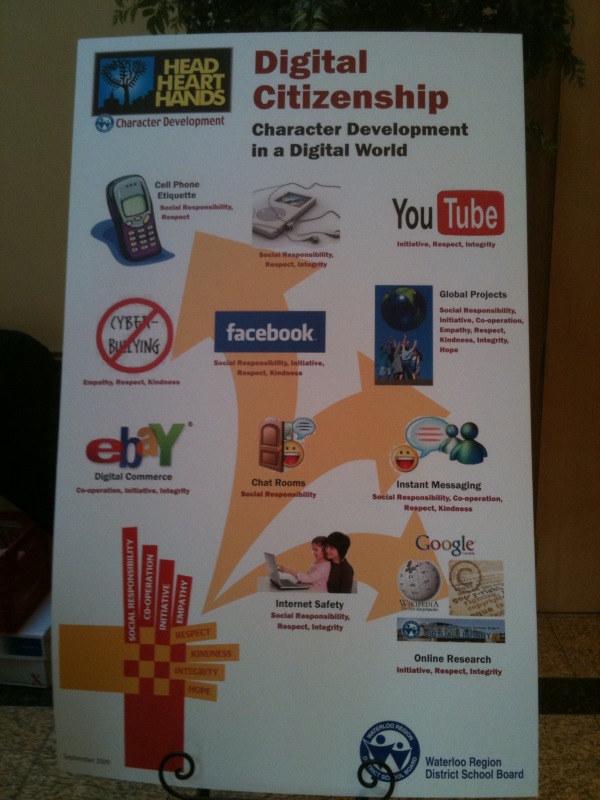
Tuesday March 30th, 2010 was a special day – the day our Board held their first Character Development/Digital Citizenship Symposium. The ballroom at St. George’s Hall was buzzing with energy. The room was filled with administrators, teachers and students. We were about to share a day focused on Digital Citizenship in the context of Character Development and ultimately moving the agenda forward.

Showcasing our Digital Citizenship poster, in the case a giant one by the registration desk.

The Character Development – Digital Citizenship Program

8:00-8:30 Registration

8:30-8:45 Welcome

8:45 -10:00 Keynote Speaker  – Jesse Brown

10:00 – 10:15 Break

10:15 – 11:00 Morning: Session A – 21st Century Tools of Learning

  • Option 1 Social Media – Networking Tools
  • Option 2 Equity of Access – Adaptive Technologies
  • Option 3 Digital Literacy and e-learning
  • Option 4 Tools for Student Engagement
  • Option 5 Multimedia Projects – Original Work

11:00 – 11:15 Break

11:15 – 12:00 Morning: Session B – Classroom Applications

  • Option 1 Digital Citizenship in the Classroom
  • Option 2 Bitstrips – Literacy
  • Option 3 Creating a Collaborative Online Community
  • Option 4 Digital Citizenship in the Classroom -Ministry Project
  • Option 5 Building Community – Blogging

12:00 – 1:00 Lunch

1:00 – 1:45  Session C ” Your Digital Footprint “ – Panel Discussion

1:45 – 2:00 Break

2:00 – 2:45 Afternoon : Session D ” Where do we go from here?”

  • Positive Impact of Technology – The New A.U.P.

2:45 -3:00 Day Program – Closing

Evening Session for Parents and Community members

6:45 – 7:00 Welcome

7:00 – 8:00 Keynote – Jesse Brown

Jesse Brown, owner of Bitstrips for Schools, recently licensed for use in Ontario schools and host of TVO podcast “Search Engine” kicked off the day with a keynote presentation that tackled three questions:

  • Do cell phones belong in classrooms?
  • Do teachers belong on Facebook?
  • Does the internet make us stupid?

After exploring the ins and outs of these questions, the day moved to the break out sessions. I attended Steve Rensink’s session on using Web 2.0 tools in the classroom and Susan Watt’s session on Digital Citizenship in the Classroom. Both sessions were well done and provided opportunities for all to extend their learning.

The afternoon’s activities started with a panel discussion, which I had the privilege of hosting. The panelists included two secondary school students, a teacher, an administrator and a business representative from Opentext.  The discussion started by allowing each panelist to present their views about how integrity, respect and social responsibility (3 of our 8 key character attributes) relate to Digital Citizenship. Picking up on key points made early in the discussion, I also explored two additional points with the panel:

  • Explain the important differences when interacting in a face to face situation vs. an online environment, and
  • With the ease of copying, sharing and distributing content, give your views on academic honesty.

The final session of the day was prepared by Harry Niezen, Ron Millar and Anita Brooks-Kirkland, our ICT consultants. Seating arrangements for this session grouped students with students, teachers with teachers and administrators with administrators to explore a series of questions focusing on the future of our Acceptable Use Policy (AUP). Each table had a recorder so that the ideas and view points expressed could be captured, reviewed and considered in the rewrite of our AUP which will begin as a followup to this event.

All in all this was a successful event. The day closed with Susan Watt relating some classroom experiences from her point of view as our Technology Support Teacher and me announcing the launch of our new student email system and additional access to social media tools (including Facebook as of September) and our intent to embed their use in curriculum delivery. I think the highlight of the day for me was seeing all attendees – students, staff and administrators seated side by side and learning together. I feel fortunate to have been a part of this important WRDSB event. Congratulations to the event organizing team!!!

Additional Resources

Did you know? (4.0)

Twapperkeeper

The day as captured on Twitter

Social Media policy framework reference

Event Wiki

~ Mark

IT’s about the students – Reflections

As one would expect, many of the Ontario Association of School Board Officials (OASBO) ICT meeting discussions centre around core IT challenges such as work load, work flow, infrastructure, drive imaging, costs, sustainability, integration challenges etc. and the list goes on. These discussions are valuable and critical for learning, planning, and some sense of provincial alignment. Over the course of the last few months, more and more of these discussions cross into the instructional realm. There is an increasing understanding that all of these core IT functions are intertwined with important instructional ICT needs.

This year I had the pleasure and opportunity to contribute to the planning process of the OASBO ICT Winter Workshop. In order to move the collective IT and ICT agendas forward, there is a need for critical understanding of each other’s (traditional IT and instructional ICT) needs. To this end, the decision was made to begin incorporating an ICT instructional strand into the annual winter workshop.

21st Century Classroom – IT’s about the Students!, this year’s workshop was held Feb. 25th, 2010. Mary Jean Gallagher, Chief Student Achievement Officer and Assistant Deputy Minister – Student Achievement Division of the Ontario Ministry of Education delivered the keynote address. I thought the core message of her address was right on the money.

Mary Jean began by reviewing educational goals of  the provincial government and goals the Ministry of Education. She continued by making the point that IT is a strategic part of every thing we do in both the learning and business sides of education. From a philosophical point of view, there are perhaps only two roles in education:  the front lines work of teaching in the classroom and figuring out how to make this happen easier and more effectively.

In IT, our work certainly falls to the second category. The work that has been done to facilitate data driven decision making is absolutely critical as it drives the analysis and planning processes. This work includes assessment data collection, the OnSIS process and reporting. The impressive result of this work is that, based on international standards, Ontario students have collectively made significant gains over the last few years – and yes, Ontario is being noticed in these international circles. It is important to note that these international tests do not have 100% alignment with EQAO testing. As a result, these improvements are not seen as strongly in the EQAO results. The bottom line – this could not happen without the detailed work of IT supporting the process.

On the instructional agenda, student achievement in the 21st century is all about the work we do together: Dream, Inspire, Achieve. Fundamentally, technology must:

  • be embedded in strong instructional practice
  • enable more powerful pedagogy
  • drive changes to instruction and assessment practices

The important question is how do we make this happen?

  • we need to have more events like this one to keep the discussion alive
  • IT personnel need to embrace conversations of change and accommodating needs
  • teachers and ICT need to clearly define their strategic needs
  • IT needs to deliver on the enablers, such as wireless, guest network access (etc.)
  • collectively, we need to establish an approach to funding, sustainability, support and PD/training

The balance of the winter workshop day had at least one ICT session available within each breakout session, and most importantly, provided opportunities to cross fertilize the IT/ICT discussions. Feedback about the format from participants was extremely positive. During the debriefing session at the business meeting the following day, a motion was made to continue with the instructional ICT strand as a key component of future OASBO ICT workshops.

From my point of view, this was a very successful event with an excellent keynote address and forward thinking discussions. I look forward to keeping this discussion going!

~ Mark

Building community at #ABEL

Last Friday I had the pleasure of attending the Mobilizing 21st Centruy Teaching & Learning Leadership Symposium hosted at York University by the ABELearn program. The timetable for the day was:

  • ‘Unleashing the Passion’ Keynote by Sheryl Nussbaum-Beach
  • How Does It Work? – Tools, Strategies and Results – a Carousel of break out sessions
  • ‘Teacher Professional Learning for the 21st century’  Keynote by Ron Owston
  • Dimensions of Change: Leveraging the Wisdom of the Crowd (facilitated discussion and action planning)

During the Carousel of breakout sessions, I chose to attend the discussion titled ‘Building Capacity: A Shared Leadership Approach’. This session was an open round table discussion. A quick round of introductions revealed a diverse group of roles represented including teachers, eLearning leaders, ICT consultants, school administrators and CIOs.

The range of ideas and comments put forward hit the predictable topic list: getting more teachers on board, training, costs, access and funding. While many good points were made, I was quite fascinated by the discussion from one point of view. It was very interesting to see how many people focused on ‘getting something going’ in their own classroom, school or program. This approach certainly does create an energy at the grass roots level and is arguably important in the context of change at the local site level.

However, this approach does not guarantee a coordinated change at the system level. A few of the participants, including me, also spoke in support of the need for a system perspective on planned change as well. Key areas from a system point of view would include setting expectations, a focus on embedded technology use of specific curriculum needs (e.g. non fiction writing), staff development program support and IT support. Once these points were made, the group generally seemed to express agreement that this aspect of moving forward is a key ingredient.

All in all, this was a fantastic learning opportunity. I look forward to reviewing the content, actions and ongoing discussion in session wiki that will be set up.

~ Mark

The X100e – first impressions

Last fall, I wrote a blog post titled Are Netbooks Ready for Primetime. At the time of writing, it seemed to me that the answer was yes, no and maybe depending on needs and environment.

Certainly, in the time frame of 4 to 6 months ago, many netbooks were running XP home for their OS and consequently were challenging to use in a managed domain based environment. I spend some time testing the Lenovo Ideapad. In many respects this was a great machine, and it showed me the potential of a netbook sized machine for travel and web 2.0 uses. I did not like the keyboard layout and found the keyboard a little to small. The Ideapad also used XP home.

This week I have had an opportunity to try out the new ThinkPad X100e model. This unit is clearly a step up from a true netbook in that it is a smaller ThinkPad with many of the solid design features you would expect from the ThinkPad model line. The clunky keyboard design of the IdeaPad was gone. The keys are nicely sized and shaped, and the overall keyboard layout is very clean from my perspective. The unit I tried came with Windows 7, and worked like a charm – easy to use, no setup issues and the wireless connected easily and worked without issue. I also understand that the X100e unit can be configured to use XP pro, so this gives some options within the managed enterprise environment.

IdeaPad (left) and X100e (right)

IdeaPad keyboard layout

X100e keyboard layout

The unit comes with a number of options including:

  • Windows 7 home/pro (Eng/Fr)
  • 1/2/3/4 GB RAM
  • Eng/Fr keyboard
  • 160/250/320 GB hard drive
  • bluetooth
  • Microsoft software bundles.

Given the Windows 7/XP options, improved keyboard layout and price point, I think the X100e unit could find a real niche in the K-12 education environment – a little more than a traditional netbook, a little less than an expensive laptop. I will look forward to hear what others think about this exciting product.

~ Mark