Category Archives: 21st century learning

Leadership: Points of Reflection

At a recent learning opportunity through the Abel program, I had the opportunity to hear Mary Jean Gallagher speak about leadership. As anticipated, it was a great presentation.

The session began with Mary Jean comparing developments from different time periods and the relative impact. She recalled the first main frame computers, and  Commodore 64’s on the scene and wonderment people had about how things would change. What would happen?

Technology is in a constant state of flux. How will leadership respond to technological change: Does a new technology present a promise  or a threat?

Questions to consider:  How do we embrace new technology in a time when people are concerned about ubiquitous  access and equity, AND  in the same context of parent concerns of  access, identity and privacy AND in the same context of: it is easier to be risk averse rather than push ahead.

It is human nature to pull back. How do we get people engaged in the change process? Perhaps a key role of a leader is to distress the comfortable, and comfort the distressed.  Todays leaders need to add disonance to our organizations sometimes and be less risk averse. Leaders don’t have to know everything, and that is OK. Leaders do need to model in visible ways. Leaders need to help organizations set policies that help organizations move forward by enabling rather than avoiding.

Her presentation concluded by identifying points for leaders to ponder:

  • Are you intentional about what you do?
  • Do you role model in visible ways?
  • Do you intentionally position things for change?
  • Where do you lean: towards anchors or change?
  • Are you reflective?
  • Do you engage with wider collaboration?
  • Do you model learning and inquiry?

I hope you find these points for reflection valuable. Enjoy your reflecting and learning — and happy leap year day.

~Mark

Cell Phones in the Classroom Debate

On Sunday afternoon, I received a tweet from @jmuellertate about contributing to a cell phones in the classroom discussion via twitter for a new teacher education class at WLU.  I had to do a little multitasking to contribute, but was happy to contribute to the discussion.

I captured the twitter stream of discussion based on the #cellinclass hashtag. Although many of the Twitter contributors were in favour of leveraging this technology within the classroom settings, @jmuellertate indicated that the faculty of education students tended to be on the cautious or no use end of the scale.

@brendasherry  raised a great point in the follow up discussion tonight: Would these new teachers feel the same if they experienced first hand how cell phone technology could enhance the learning environment?  Great question indeed. Perhaps this topic should be revisited after some of the classroom sessions have been completed.

As for me, I am in favour of leveraging cell phone technology to enhance learning.

~Mark

App selection for JK/SK students

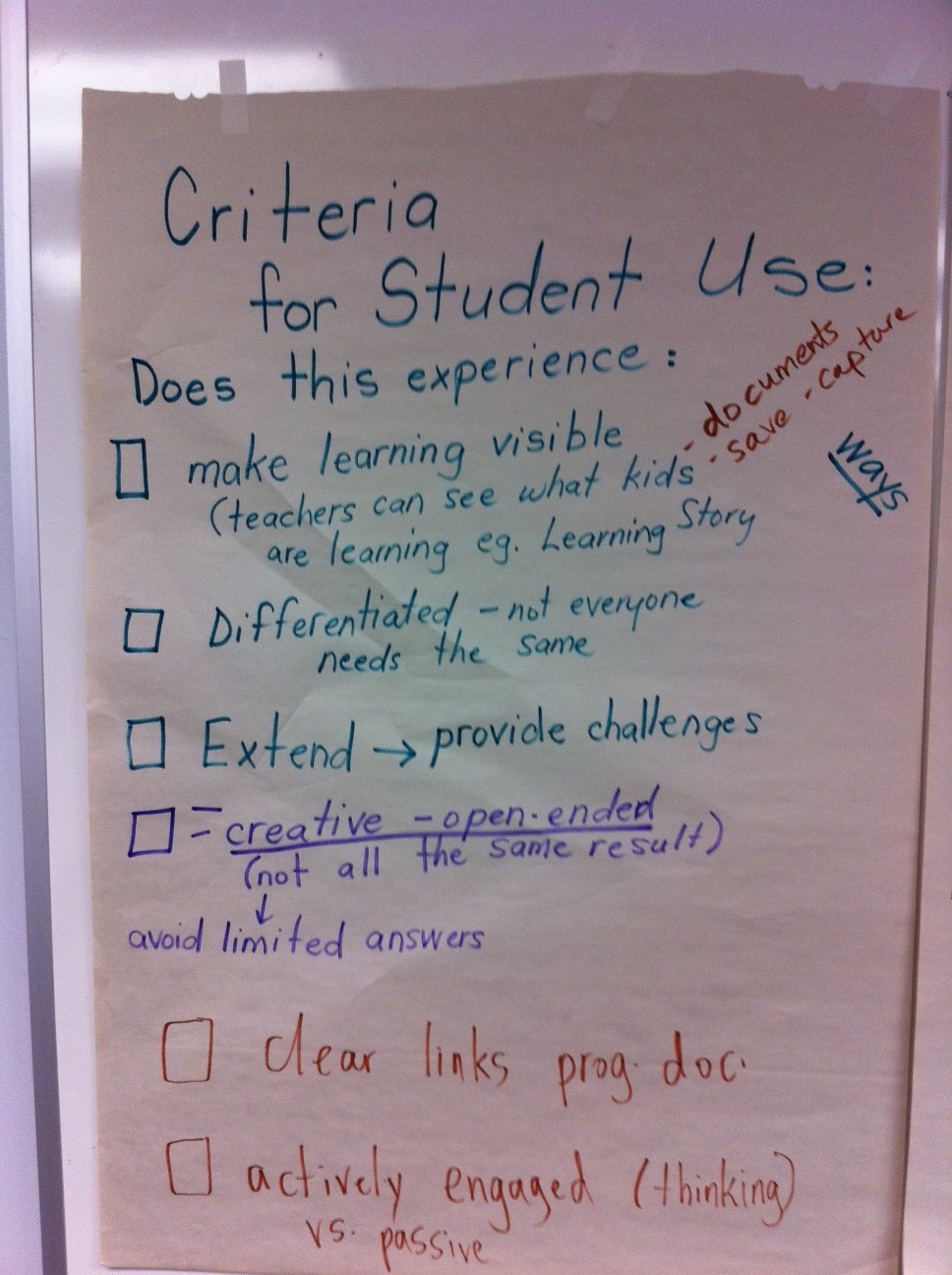
Just prior to the end of the school year, we held a meeting of the group the teachers involved in our JK/SK iPad project.  The meeting was a great sharing of  learnings to date. Much of the discussion centred around criteria for choosing apps for students of this age/grade level. Here is what they had to say.


Chart 1

Chart 2

~Mark

iPads for JK/SK students

Earlier this month I had a chance to visit Central Public School (website) with Rebecca Rouse (@rebrouse) to have a first hand experience observing our JK/SK students using iPads. Central P. S. is one of 5 Waterloo Region District School Board sites participating in a focused study on the impact of the use of  iPads to support early reading and early literacy development in our students.

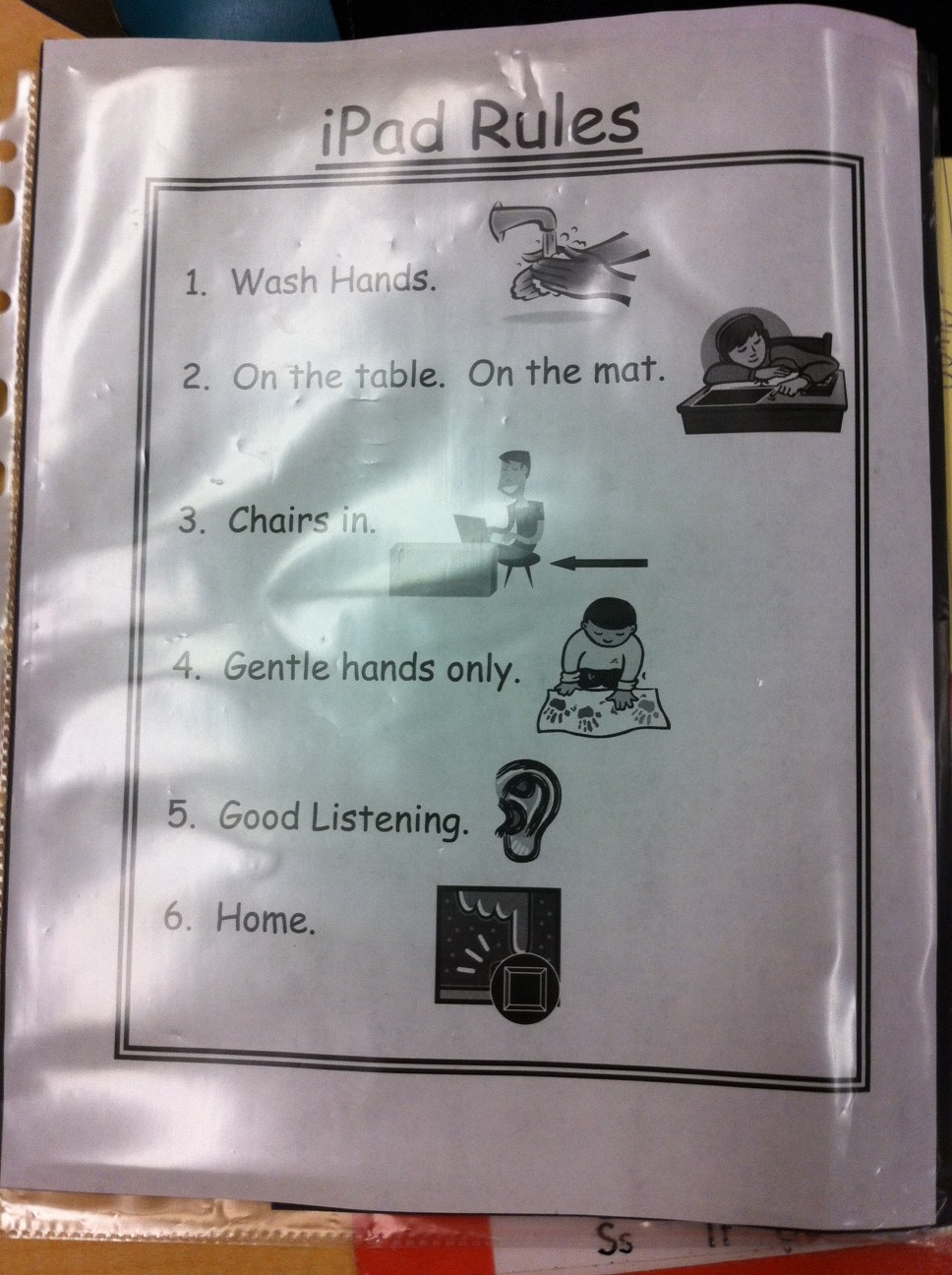
Upon arriving at the classroom, we initially stayed off to the side to observe without interupting the natural flow of the classroom. A kindergarten classroom is a busy space, and I was immediately struck by my initial observations. There was certainly an air of energy and excitement in the classroom. Students were checking with staff to see when it was their turn to move to the iPad station. Clearly, they were motivated and did not want to miss their turn.  I was very impressed with preparation and organization of teachers Brenda Fowler Mandy Serpa. They had really thought through the physical logistics of managing the iPads within this busy environment. iPads were numbered via the screen background for easy tracking. Cases were used for protection during storage and transportation from room to room. A picture book of app (application) icons was created to assist the students in locating the correct software. Screens were cleaned regularly to maintain the sharp image and reduce germs. I also noted how careful the students handled the technology – impressive!  With guidance from the staff, students used a variety of apps (applications) for word recognition, spelling, personal exploration and story creation.

Eventually we joined the student table and sat next to the students. I asked one student what he thought about using the iPads. Without a pause, he enthusiastically stated that iPads were ‘fun and creative’. All of the students were eager to share their work and successes with us.

Teacher Observations:  After watching the students in action with the iPads at the learning centre in the classroom, teachers shared their observations from the first month of the project.

  • lesson preparation time had become more streamlined (less paper based)
  • time spent on learning activities increased
  • students spent more time on task during guided reading sessions
  • there has been a significant increase in student engagement levels
  • reading skills are developing more rapidly compared to a more traditional approach
  • the built in audio support enhances student learning
  • a notable increase in student confidence
  • students are eager to demonstrate something new they have learned
  • 5 iPads is a good number of devices for managing the student group
  • students were keen to assist each other with problem solving
iPad Rules

Spelling words

Sample App Icon Card

iPad Centre

This project has certainly had a positive start. Thank you to Principal Jennifer Crits and teachers Brenda Fowler and Mandy Serpa for sharing their experiences to date.
If the results of this proof of concept project  show a strong correlation to improved early reading and early literacy then we revise how we allocate technology for all JK/SK programs.
~Mark

Digital Storytelling Resources

Today I had the pleasure of tuning in to a webcast presentation by Alan Levine about digital story telling resources. I ideas were great and the chat window was action packed with comments, ideas and positive feedback. I wanted to share a list of a few of the resources that were highlighted.

Dipity
Vuvox
Glogster
Zooburst
Google Maps
Pixton
ToonDoo
Flickr
Blabberize
Jaycut
Animato
Slideboom
Vcasmo
Prezi

This is a great set of tools to support digital story telling. Visit Alan’s blog and wiki to get the full story and lots of good ideas. Everyone has a story to tell. Give one of these great tools a spin today then do something fun. innovative and engaging with your students!

Thank you to Sheryl and the PLP Network team for setting up this learning opportunity with Alan.

Related Resources

Alan’s 50 ways
Alan’s wiki
Bitstrips for School (licensed for use for Ontario publicly funded schools by OSAPAC)

~Mark

CDN PLP – Culminating Session

On Friday May 20th we held our culminating day for this year’s PLP  and  Futures Forum session. From my point of view, the day was a wonderful success — an opportunity to passionately share about our learnings, celebrate our collective successes and begin the scaling process by introducing next year’s Futures Forum teachers to the process. I captured much of the morning presentations with my Livescribe pen. I have uploaded many of the recordings and linked to the sections by topic as per the list below.

Futures Forum Course Design

The Power of Blogging

Online Magazine

Civics Mirror

Careers

Going Forward

Related Links

Futures Forum PD Wiki
Futures Forum Online Magazine
Twitter Stream #wrdsbffp

~Mark

The OCT Advisory – my view

On Monday April 11th, the long awaited press release of the Ontario College of Teachers (OCT) electronic communication and social media advisory was released. I was attending the OCT live presentation on Tuesday in Toronto, and viewed the advisory print document and watched the video to be well informed for the session.

My initial impression of the print document was that it was a well written, solid framework to guide educators into this new territory. I was very impressed with the video production as it captured a positive spirit for leveraging these new tools within our education system. I did feel that some additional clarification was required in the area of Facebook use, and planned my comments and questions for the live session.

It was interesting to watch the press and media take on the documents and follow the reactions via Twitter. As one would expect, reaction varied widely, tending towards the ‘too cautious’ end of the scale. Tuesday morning, I was able to have a conversation with Chris Vollum, an excellent speaker who has significant experience presenting social media sessions to school and parent audiences across the province and at many WRDSB schools. Chris, who was interviewed as part of the video, had a positive reaction and felt the overall message was positive. I also had a good phone discussion with Jane Mitchinson who has provided extensive leadership in technology and social media use within our Board.

The session was well organized, with the agenda organized as: presentation, table discussion and Q&A.  I captured some of the important highlights and shared them on Twitter:

  • Opening remarks: OK to use social media in responsibly and ethically — key factors: care, trust, integrity and respect
  • The intent of the advisory is to clarify responsibilities while capitalizing on the potential of these tools
  • Social media tools can be appropriate, useful and powerful
  • OCT: ‘off duty’ use of social media tools matters – what does appropriate use look like?
  • Online behavior by teachers should reflect the same professional ethics as used in the school setting
  • Private vs. Professional: onus on members, off duty conduct matters, exercise caution, act professionally at all times
  • The internet is part of a teacher’s off duty realm
  • Any online presence should respect professional integrity, even in the somewhat less formal social media environment
  • Reviewing some examples of professional misconduct -I note that these examples would be inappropriate online or offline
  • Teachers: model good behavior, advocate proper use (digital citizenship) be courteous and professional at all times
  • Facebook – caution re ‘friending’ – but no distinguishing of friend=contact, it is all about the security and privacy settings – education!!
  • My comment: follow the Grandma rule— if you don’t want your Grandma to find out, don’t put it on Facebook
  • You can’t judge social media from outside
  • Board hosted email should be used for communications with parents (not personal email addresses)

The table discussions were interesting. We were given 4 scenario questions to consider. All were great questions  with pros and cons and certainly generated excellent discussion around the different viewpoints — risk factor(s), legal implications, empathy, professional approach.

In some ways, I enjoyed the Q&A best. Many good questions were asked, and gave further indication that there are multiple factors to consider in almost all situations. I did take the opportunity to raise a few points during the discussion:

  • Digital citizenship and character development programs are essential for teachers and students
  • Staff and students need authentic experiences with social media tools in a real world context
  • Your digital footprint represents your online presence – how google-able are you?
  • Your digital legacy is your digital reputation – how will other perceive you and remember you?
  • Social media tools offer many opportunities for connecting, collaborating and sharing – embrace & capitalize
I did ask specific clarification around the ‘teachers should not friend students’ point.  In the Facebook environment, a ‘friend’ is a contact. How any 2 contacts interact is dependent on security and privacy settings, and the relationship — a professional context suitable to the educational environment.  I sited examples where teachers might ‘friend’ students, but have suitably locked down profiles and interact with students in a Facebook group setting.  Panel members who addressed my question indicated that there is no issue with this if it is done properly with appropriate settings and professional conduct. We all recognized and acknowledged  the need for people to know, understand and use appropriate settings (Digital Citizenship).
I took the time to meet the panel members after the session. I appreciate the work done on this document, and the importance of the framework established and congratulate the team that worked on the preparation of this document.
What if I could change one thing? – The one thing that I wish could be changed is the manner in which this was handled by the media. They really grabbed a couple of small pieces of information and cast a giant negative spin on things — so much for fact finding and balanced reporting. Unfortunately, this is all some people will remember.
Next steps: Embrace change! Given the great potential of these tools, it is important that those comfortable in leading, continue to learn and share best practices and experiences. Boards and federations need to make sure Digital Citizenship and Character Development programs and other training supports are in place. Pre-service teacher programs should provide a good grounding in Web 2.0 and social media tools. Teachers need to be familiar and comfortable with these tools before using them with students.
Related Links:

OCT Backgrounder
OCT Advisory
OCT Social Media video
Viewpoint: Pipedreams (blog)
Viewpoint: Off the Record (blog)
Viewpoint: The Clever Sheep (blog)
Viewpoint: Jane Mitchinson (blog)
Viewpoint: People for Education
People for Education’s Online Community

~ Mark
A Surprise Conversation

You never know when an interesting social media conversation will break out.

Last Sunday, our woodwind quintet, the Venturi Winds, performed a concert at the Wellington County Museum & Archives building. Following the program we decided to go out for a light dinner along with a few family members who attended the event.

Seated at the table and previewing menus, the unsuspecting conversation started. One person, who operates their own business, begins to tell the story of needing to terminate an employee for continually spending company time on their personal cell phone. They turn to me and ask “What you you do in the schools? Do you allow cell phones in the classroom?”

I provide some background on our digital citizenship program indicating that it is important to:

  • recognize that value of mobile devices to support certain aspects of curriculum delivery
  • teach appropriate, ethical and safe use for a particular situation
  • and teach self regulation

Many of our schools have designated some ‘cell phone safe’ zones where students may use their phones. Classroom use is generally at the discretion of the teacher. Everyone could see the value in our approach, and that providing some real world context to these experiences was of value.

The conversation deepens. “What about laptops? What about Facebook? (etc.)? Are these allowed in the classroom? These are distractions.”

I provide some additional information about our program and approach. True enough, these could be distractions, but mobile technology and social media tools provide:

  • ways to interact with the world in real time
  • access to information
  • collaboration opportunities
  • authentic audience opportunities and experiences to students

I went on to explain the use of blogs, wikis, ning, Google docs, Facebook etc. and how the use of these tools can support important curriculum goals such as non fiction writing (e.g. journals, poetry, peer review of projects …). The conversation went on to talk about the role of the teacher shifting from the ‘sage on the stage’ to the learning coach who facilitates inquiry and project based learning.

All in all, a great conversation that stretched out over most of the meal time.  The conversation did eventually drift to other topics. Finally  a question came up about time zones and daylight savings time.

My solution: “If you had a smart phone, you could look that up right now.” – and I did. What a great segue to the power of access to information via mobile devices. Our time together concluded with a good laugh from the group.

~ Mark


A Visit to @ecmackenzie’s classroom

One of the highlights of this week was my visit to @ecmackenzie ‘s classroom. Students in Ms. MacKenzie’s class has been working on producing book trailer videos over the last few weeks. The new twist in this year’s project is that students are sharing their video via a Facebook group. With the group structure, students can enjoy and peer comment and receive teacher feedback.

The Facebook group was created by Ms. MacKenzie. She sent a group invite to herself to establish the first member of the group. Once this was done, students were invited to search for the group and request access. Using this methodology, suitable professional boundaries are maintained with regard to the teacher/student online environment.

As an honourary member of their Facebook group, I have enjoyed watching the videos as the students completed their projects and posted their work. I was impressed by a number of aspects of this project.

  • Dialogue and comments within the group showed a solid level of respect among the participants
  • It was clear that there had been discussions about Digital Citizenship
  • Based on viewing the movie trailers, students had received excellent instruction regarding use of copyright free images and source siting
  • I was very impressed by the level of creativity demonstrated in the student projects
  • There is potential to share work to parents using this model

I really enjoyed meeting the students face to face after watching their work. Following the video viewing session, I talked to the students about some of our key ITS initiatives to support learning – our dual boot Macintosh environment, wireless hotspots with bring your own device options, and social media and collaboration tools available.

I appreciated the student feedback regarding our progress on these initiatives. Their comments included:

  • Facebook access was very valuable for sharing and collaborating (class project, homework, receiving school information)
  • From their view, Facebook provides a one stop shopping approach to obtaining school related information
  • Access to web based resources & internet searching is a critical part of researching – wifi access allows more effective use of class time
  • Facebook is a familiar tool. Using it eliminates the need to use (and learn) extra tools that may not be required
  • Bring your own device wifi takes advantage of personal technology that contain one’s collection of information and frees up school computing resources for others to use
  • Expansion of wireless access for greater classroom coverage would be a significant advantage

The students also raised the issue to electronic textbooks. Clearly, they see a shift to e-books as a good thing. Key discussion ideas identified were:

  • easy portability (many books on a single device)
  • makes it easy to have all your resources with you (ebooks, internet access, bookmarks etc.)
  • no need for ebook to be more expense, business models should make this an affordable transition

Summary: an excellent teacher + motivated and respectful class + innovative project = first rate educational experience

Thank you for the opportunity to participate in your project and visit your classroom.

~ Mark

Twitter at the Board Table

Tonight I had the wonderful opportunity to participate in a presentation to the WRDSB Trustees. The focus of the presentation was to provide in-servicing regarding the many diverse program opportunities and supports for secondary school students. Main goals included a demonstration of using social media tools in a classroom context and to showcase work from our Futures Forum Project.

@kimkeena provided a nice over view of many of our secondary program offerings, with a focus on eLearning and Futures Forum opportunities.

My role was to provide an explanation of Twitter in less than 5 minutes, then introduce a brief activity. Click here to view the slide deck of my Twitter explanation effort. Students were seated a various tables with our Trustees. After sharing their thoughts describing how learning in our Futures Forum classes was different from their experience in traditional classrooms, their thoughts were shared via Twitter using the hashtag #wrdsbtss.  I demonstrated a live Twitter feed using Twitterfall to capture and display tweets from the group.

Next, @kempscott demonstrated a Google Docs collaborative writing example. The evening closed with a student speaking about his experience in one of our alternative learning programs.

All in all, a great evening and wonderful opportunity to share our student learning experiences with our Trustees.

~ Mark