All posts by markwcarbone

I have 36 years experience in K-12 education. I have been fortunate to work in many different roles including teacher, department head, ICT consultant, IT Manager and CIO. Personal interests include performing in the Venturi Winds woodwind quintet, the Cambridge Symphony and the KW Community Orchestra as well as composing and arranging music. Connect, Learn, Reflect & Share - make a difference today!

Facebook screen effect

Very curious!

Step 1: Log into Facebook

Step 2: press the following key sequence (one at a time):

up arrow, up arrow, down arrow down arrow, left arrow, right arrow, left arrow, right arrow, b, a, <Enter>

Step 3:

In Windows, right click on the screen to open the options window, then click away from the options window to close it

In OSX, control click on the screen to open the options window, then click away from the options window to close it

Step 4: Now when you press up or down arrow, or click the pointer a set of coloured circles will appear on the screen – weird.

Step 5: Simply log out of Facebook to cancel this effect.

Thanks to my daughter for sharing this strange find with me. You never know what you will learn.

~ Mark


IT Strategy Day

I recently had the opportunity to attend the semi-annual IT Strategy day hosted by ECNO, the Educational Computing Network of Ontario. The structure of the day provides an opportunity to tackle key questions in a group work setting with chance to report and comment on each groups report. It is very valuable to work in this multi-board format as there is a lot of ‘knowledge and thinking power’ around the table. The topic for this session was right on the money – Sustainability and Renewal.

What does sustainability mean from an IT perspective?

  • sufficient fiscal and human resources
  • multi year approach
  • development of staff skill sets
  • knowledge transfer among staff
  • succession planning
  • alignment with learning and student success
  • analysis and prioritization

Key Question: Given current budget constraints, and a potential for budget reductions:

  • what are the true priorities that must be addressed?
  • what is important over the next two year window?
  • what strategies are useful in engaging with senior officials for informed decision making?

The discussion identified the following actions, frameworks, comments and questions:

  • determine what  the direct impact on IT be in a budget reduction situation
  • determine the impact of resourcing (staff)
  • alignment of staff and skill sets to the needed roles and skill sets is a major challenge given the complex staffing and contractual arrangements that are in place
  • reduction of overtime budgets creates a major challenge
  • lieu time is more of a rob Peter to pay Paul game and not really an asset
  • impact of lease vs buy
  • long term negative impact of ‘money bombs’ from one time grants

As you can see from the list, the decisions would definitely complicated in the event of a major budget reduction, not easy to make, and potentially different strategies would be used Board to Board.

What key elements and factors would be part of a critical services matrix? My discussion summary notes included the following points:

  • restructuring is critical to meet needs, alignment of tasks and priorities
  • prepare for the future (wireless, NAC, mobile/guest devices)
  • put the right tool set in place
  • what are you not going to do? (you can’t sustain everything)

The final exercise of the day required each group to identify the top 5 barriers and identify a strategy or two to deal with the barrier. Rather than report on the specific discussion we had, I will leave this as a reflective question for you to ponder as it relates to your own situation. It is a worthwhile exercise. Feel free to leave a comment/suggestion.

Thanks to the ECNO organization for arranging a quality day for some heads up strategic thinking. Thank you to the participants for sharing their knowledge, expertise and insights.

~ Mark

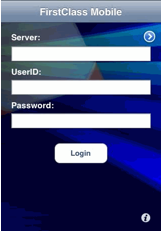
iPhone: tech tip for FirstClass mobile client

I have been using the FirstClass client software on my iPod touch for a little while now. The software is very functional and easy to use for the most part. Setting up the calendar was clunky – not obvious, needed research and makes you ask why???

Activating the calendar requires a couple of steps.

1. Select the ‘i’ on the lower right corner of the main screen to access the settings options.

2. Tap the version number 3 times. The ‘alarm on’ message will appear indicating that calendars and contacts are now visible on the mobile client.


Last week I upgraded my old cell phone to an iPhone. The transition between devices worked well – kept my same family phone plan, added a data package, transferred the contact list from the phone and presto – ready for action with the iPhone.

I synced the iPhone to the same laptop as I sync my iPod Touch to. A separate profile was created and off I went. After a little use, I noticed that the number of available screens within FirstClass was not the same between the devices. Further checking showed that the number of icons available differed as well. Hmmm.

A closer comparison showed that the calendar feature was not active in the client setup synced over to my iPhone and the version number was not there to tap and activate the calendar feature. I deleted the installation, downloaded a fresh copy over the internet and went through the configuration settings again. Now the iPod Touch and iPhone versions are functioning the same and  everything is humming along as I expected.

~ Mark

Reflections on ECOO 2009

ECOO 2009 was an amazing conference – no question about that. Hats off to @brendasherry and the conference organization team.

One of the things I noticed this year was the amount of pre ECOO conversations (& hype). Twitter was buzzing with anticipation, discussion and people organizing to connect at the event. Twitter was the perfect vehicle to host the shared discussion and organization.

My learning opportunities included:

  • Understanding Digital Kids – Ian Jukes
  • Adobe ePortfolio software – S. Addler
  • Why Ban Them – Use Them – Paul Hatala
  • Understanding Social Media and Why it Matters – Alec Couros
  • Rethinking Teaching and Learning in a Networked World – Alec Couros
  • 2 sessions of duty at the OSAPAC booth

Learning Highlights:

  • the brains of students today are wired differently
  • we read based on a Z pattern, today’s students read in an F pattern
  • colour is read before black and white
  • pictures, colour, sound and video are all processed before text
  • Think about the impact of this on print, textbook, and web design
  • How do we use this information to improve learning?
  • Adobe ePortfolio is a powerful package that certainly lives up to expectations – lots of potential in K-12
  • iPods in the Classroom, effective use includes
    • internet research
    • collaboration (e.g. First Class)
    • Evernote and delicious for bookmarking
    • Google Docs and gflash as study aids
    • calendar and alarms for time management
    • to do lists
    • polling/voting
    • podcasting
  • many concerns fall into the student behaviour area – deal with the behaviours, not ban the devices
  • capitalize on equipment that many students already own
  • Understanding Social media
    • great sessions that challenged participants to think about key issues
    • What defines offensive content?
    • Who is it offensive too?
    • Cyber bullying
    • Real time data, valuable in search and context
    • What does friendship and community mean in today’s world?
    • There is definitely a shift in today’s world, including a blurring of private and public space
    • A new key element in this environment is reputation management
    • We need to understand what our kids are looking at and leverage new tools effectively in the educational environment
    • We need to build trust.

We had excellent attendance at the  OSAPAC booth with quality conversations about provincially licensed software, challenges teachers experience, needs, potential future directions.

The conference is well structured so there is plenty of opportunity to connect and learn outside of the main sessions too. Highlights for me were the in depth conversations with Alec Couros, Doug Peterson and Zoe Pipe concerning the ins and outs of copyright on the web, content filtering and social networking tools to improve student learning and staff development. All of these topics are relevant, complex and interesting. The conversations were rich and without time constraints. I really appreciated these opportunities and the valuable learning that happened as a result.

All of the meal times and hallway connections rounded out a great conference experience. I am already looking forward to ECOO 2010.

Related Reading about ECOO 2009

@msjweir   ECOO 2009!
@dougpete   The Power of Conferences
@redfearn   Inspire Connect Teach – ecoo 2009
@brendasherry   ECOO 2009 Reflections
@aliringbull   Mind Blown at ECOO in a Good Way
@marclijour    Impressed by ECOO 2009
ECOO feedback and planning wiki: ECOO Connections

~ Mark

Have you checked your digital footprint?

On mornings when I eat breakfast by myself, I usually do a little reading to get the day started. Gone are the newspapers and magazines. My reading is done on the computer. How much reading get done depends on my ‘blast off’ timeframe, but I always do some. On a typical day,  I would

  • check work email for any time sensitive items
  • log into Twitter, read new tweets and usually I will post something about my upcoming day as well
  • next stop, read the daily blog post at  Off the Record – a great start to the day.
  • then, time permitting,  check headlines and areas of interest on web based major newspapers
  • on weekend mornings, I also catch up on the wide selection of  blogs I read

Recently I was reading a Twitter post about Library Learning Commons. I decided to Google the person referred to in the tweet to obtain a little more information, which was easily obtained. Then, a fleeting thought zips through my mind … I haven’t Googled myself lately, I wonder what comes up.

So, I Google my name, then my name and location, and finally my name and role.  Well, I was amazed at what was listed among the Google listings. I new from trying this exercise earlier from a digital footprint perspective that there are many Mark Carbone’s that come up in searches. Looking at the listings specifically about me, I expected to see references to:

  • my blog
  • Twitter
  • ISTE and other educational forums on Ning that I participate in
  • and maybe Facebook

I was surprised to see a number of other references that referred to participation in other online forums. Surprised meaning you don’t think about the quantity and depth of checking and indexing that occurs in the online world. Some examples include:

  • Listings of comments that I posted on various blogs (via BackType.com)
  • Linked In
  • Comments on public Facebook pages (music groups in this case)
  • My Twitter activity was fed to a CIO dashboard listing of CIO’s on Twitter

Reflecting on this, I guess I should have anticipated some of these ‘extra references’. After all, there is a public component to many of these web 2.0 services. One doesn’t necessarily think that their actions (comments) will become searchable items accessible by today’s powerful search engines. Based on what I observed, my digital footprint has definitely expanded since I last reviewed it. With my level of participation, this is it be expected, and arguably a good thing.

New to social networking? When using social networking tools as part of your activities, you will want to be aware that your activities my not be as private or as limited as you may think. Social networking tools and today’s search engines are very powerful. Your online activity becomes part of a more permanent digital imprint that is part of society now. Enjoy, learn and benefit from what these tools can offer. At the same time, this points to the need for safe, ethical, responsible online activity and good digital citizenship.

~ Mark

Twitter users bring perspective to classroom activity

Last month I had the pleasure of attending at trip to Lawfield Elementary School. I wrote about some of the things I learned and observed from my visit in a earlier blog post. One of the highlights for me was meeting teacher Zoe Branigan-Pipe. We had a brief opportunity for an engaging dialogue that day about the integration of technology and social media tools into classroom activities, and since then have been following each other’s activity on Twitter.

This past week, an interesting sequence of events occurred. One of  Zoe’s students wrote a blog post about a recent assessment activity in which the students were permitted to collaborate prior to submitting their answers. The student’s blog post was considering this experience from two points of view:

1. Is this cheating?  Should we be approaching assessment in this way?
2. Is this collaborating?

You could tell from the blog post that the student was really struggling with ‘what felt right’, and was clearly surprised by the collaborating opportunity.

Later that evening, Zoe posted a comment on Twitter asking her educator based PLN group to have a look at the student’s blog post and provide some feedback (comments). Within a couple of hours, at least 12 people, myself included, read and posted comments on the student blog. The common theme of the posts were:

  • knowledge is important, but it is also important to develop other work and life skills too
  • collaboration skills are needed and used in the workplace
  • development of collaboration skills is important for future success
  • take advantage of opportunities to participate in collaboration and consensus building opportunities

I have not had an opportunity to touch base with Zoe to find out more about the student’s reaction to the comments, but I will have an opportunity to do so within the next few days. I thought this was a great example of a teacher using their PLN group to provide real life context to a classroom situation via social networking tools. Well done!

~ Mark

Social Networks: What’s cooking?

Social media tools are having an impact in many ways in all age groups of society from pre-teens to ‘experienced’: retirees — it could be a lifelong activity, literally!   Let’s take a look at some current information.

KIDS/TEENS

In a recent surveys of teens,  38 percent of respondents ages 12 to 14 said they had an online profile of some sort. Sixty-one percent of those in the study, ages 12 (jumping in earlier than the suggested age requirement) to 17, said they use social-networking sites to send messages to friends, and 42 percent said they do so every day. Although social networking sites have a minimum age requirement of 13, there is no easy way to check or enforce this criteria. It really operates on the honour system.

In my mind, this trend raises some important questions in terms of use from the parent point of view:

  • Are these sites being used in an appropriate manner?
  • Do parents/guardians actively monitor what their children are doing?
  • How are the children learning about safe online practices?
  • Do the children know to protect their personal information?
  • Are there daily time limits placed on usage?

As a parent, what is your level of involvement? See the Social Networks and Kids: How Young is too Young?  article at  CNN.

ADULTS and the WORKPLACE

In October 2009, the USA Today reported that that 54% of companies completely block Facebook, another 35% apply some form of access limits, leaving only 11% that don’t put any limitations on Facebook use in the work force.

Dr. Brent Coker, of the Department of Management and Marketing at The University of Melbourne, reports that  “People who do surf the Internet for fun at work – within a reasonable limit of less than 20% of their total time in the office – are more productive by about 9% than those who don’t.”

Point for consideration: Is surfing the net really any different than daydreaming or chatting at the water cooler? Some employees may benefit from a little surf time. Not everyone has the same needs in terms of being productive – that is for sure. Hmmm, maybe this is true for students in schools too!

View the full ‘Companies Ban Social Media = Bad Idea’ article at Socialnomics.net. Additional information from the  Australian Social Media study can be found at the University of Melbourne website.

What is happening at your organization? Leave a comment or  send a tweet.

SENIORS/Retirees

Facebook statistics show an increasing number of users in the 50+ age group – boomer connecting with high school friends and keeping in touch with their children. There is a major social connection occurring with users in this age group.

Related Reading:

Ivy Bean: Tweeting at the ripe old age of 104

Social Isolation and New Technology

SCHOOLS

Teachers and administrators are learning more about social networking tools – the good and bad. The bad is usually connected to student bullying issues. Staff at Boards of education are thoughtfully working through some of the key issues:

  • safe, ethical and responsible online activities
  • Digital Citizenship and Character Development programs
  • incorporating social media tools into curriculum delivery in meaningful ways
  • thinking about content filtering in an appropriate K-12 context

The agenda is definitely moving ahead – that is a good thing.  Teachers are developing online Personal Learning Networks (PLNs) through social media tools such as Twitter, Ning groups and blog reading/blogging. Many are really engaged in learning something new every day.  Certainly, this is an exciting time to be in education.

It will be interesting to see how this all unfolds. In the meantime, one can keep learning and participating! See you online 🙂

~ Mark
Connecting in the Workplace

Today our Business Services team held their semi annual PD session.  Over the last couple of years we have had a very focused agenda on team building, customer service and managing change to support our planned department reorganizations and workflow analysis.

Today we had the pleasure of hearing Mike Moore’s presentation: Connecting in the Workplace. Mike really connects with people and has a great message. He has learned a lot by observing people in his world wide travel to deliver his message. It is obvious he absolutely loves what he does! I won’t spoil any of Mike’s stories by referring to details here.

Mike’s presentation is centered around a few key ideas:

  • the fun factor is important, have fun at work
  • embrace and enjoy a little humour
  • take pride in yourself and value what you do
  • dignity is an equalizer

There are challenges at the personal, team and organizational level. Attitude is your dominate thought at any given moment – choose to make it a positive thought.

  • guard against destructive humour
  • find comedy in chaos
  • QTIP (quit taking it personally)
  • Turn Negatives
    • stress
    • turnover
    • absenteeism
    • low moral
    • low productivity
  • into Positives
    • communication
    • humour
    • attitude
    • recognition
    • mutual respect

Mike connects with the audience quickly and presents in a very personal way that puts one at ease. He keeps you smiling and laughing with his message and illustrative true stories. He throws in a couple of musical moments too to keep you engaged.

All in all, a great presentation. I would have listened longer!  See Mike Moore’s  website for more details about his presentations.

~ Mark