Category Archives: Technology in Education

Technology Enabled Learning at Millen Woods PS

I recently had a chance to spend some time at Millen Woods PS (link) with principal Gwen McCutcheon and her staff.  The school had a very welcoming atmosphere. There was a definite energy for learning, and yet a calmness at the same time. Impressive!

The visit began with an opportunity to meet with Gwen in her office to discuss some background information and leadership philosophies. Gwen is very interested in how technology can support and enable learning. Gwen states emphatically that she is “NOT a techie”, but has worked hard to establish a culture to leverage the best uses within her school. One of the resources that is shaping Gwen’s thinking is the book Visible Learning. She has noted a few key quotes from the book that really resonated with her, and reads them often. Some of the key points include:

  • teachers need to understand learning through the eyes of the student
  • what works is not just the tool or the structure
  • students learn best when they understand the learning process
  • learning is an:  explicit goal, appropriate challenge or  measuring progress towards meeting a learning goal
  • in this context, effective use of technology makes a difference to student learning
  • technology can add a level of accountability
  • when students explain their thinking, they become their own teachers

Millen Woods P. S. has 60 iPads at this point in time – some from their start up funds 3 years ago, some purchased by the school and 20 from our  central allocation this year.  Principal McCutcheon views iPads as the most versatile piece of equipment in the school. She has been impressed with how well staff have adapted to thinking in a technology enabled framework and using iPads to support small group instruction, rather than taking a 1:1 approach.  She is proud of the way the staff have focused on using technology to enable, support and capture student learning – making student learning visible, exploring critical questions and sharing thinking. Students enjoy the hands on approach and many staff feel that this has increased accountability.  One example of students capturing their work is by using the Explain Everything app.

I enjoyed meeting teacher Stephanie Ringwood and her French immersion class.  I was very impressed with seeing how her students used the iPads to support their learning. Listen to  Stephanie’s perspective  (video) on the shift to using technology in her classroom.

At the time the school opened two years ago, one of the big changes for staff was having the computers dispersed in pods around the school.  While it took some time for all staff to adjust, Gwen feels they have “mad the transformational journey” and see the value in this approach.

As we walked the school, I saw other groups of students working in classrooms, pods and in hallway groups using technology to capture their learning — making movie trailers regarding physical fitness.  I could tell from the way the students interacted with Principal McCutcheon that they were used to seeing her out and about in the school.  I noted that there were some interactive white boards in the school, perhaps in roughly 25% of the classroom.  Gwen feels this number is quite appropriate for the school and that there is no need to have one in every classroom.  I do concur with her views on this as many teachers find it challenging to move past the teacher centered instruction early phases of using them. I also took note of some students working at their literacy skills using electronic books.

As we returned to the office area, the large flat screen TV in the hallway captured my interest.  It is used to display student work the Millen Woods way – students teaching other students and students capturing their learning — AWESOME!

One video example of a student demonstrating their work is evidenced in Roane’s Video (posted with permission).

iPad syncing trays and Mac Mini (side mount) for syncing
iPadtrays

Hallway TV displaying student work
HallTV

Laptop controlling hallway TV
TVsetup

Thank you for sharing your learning journey!

~Mark

ECOO12 – BYOD Panel Discussion

At the recent ECOO12 Conference held  Toronto ON, I had the opportunity to co-host a panel discussion with Ed Doadt, principal at Waterloo Oxford District Secondary School. The panel discussion, which was scheduled at Friday October 26th, 2012   9:45 a.m. – 10:45 a.m.  (EDT), focused on the topic of “bring your own device” to school (K-12). The panelists covered a broad range of roles from school administrator, CIO (IT), teacher, student, and Education Officer.

Panelists (listed in seating order)

  • John Shanks, UGDSB
  • Urs Bill, Ministry of Education
  • Tim Hawes, OCDSB
  • James Bond, WRDSB
  • Liz Arbuckle, WRDSB
  • Charlotte Carbone, WRDSB
  • Lisa Unger, UGDSB

Guiding Questions for the discussion

1. Panel Intros: name, role, where is your organization re BYOD  0=leave device at home, 10 = widespread use by students and speakers

2. All – biggest pro, biggest con OK

3. All – Responsible use, digital citizenship promotion

4. IT comment – privacy, infrastructure, bandwidth, some – device management

5. All – How do you feel about open device testing? Where do you see this going?

6. Admin, Student – What skills do you look for in a new hire?

7. Time permitting, audience questions/comments

8. Wrap up

Resources

The session was well attended, the discussion interesting and the audience participation in the back channel was great!  Resources from this session are linked below.

BYOD panel discussion audio recording from the Quest Radio 1-24  broadcast.
BYOD panel discussion  participant back channel transcript   from  www.todaysmeet.com

~Mark & Ed

ECOO12 Chromebook Treasure Hunt

Chromebook  Treasure Hunt

Presentation Slides

~Mark & Ron

Resources: Apple Institute Presentation 2012

Presentation slides

From Idea to Reality

From the Field: Educators in Action

Additional Resources

TPACK: Technological Pedagogical Content Knowledge

The WRDSB Responsible Use Procedure (RUP)

The WRDSB Library Learning Commons

~Mark

Resources for Pre Service Teacher session

From Idea to Reality

Administrator Perspective

From the Field: Educators in Action

Ontario College of  Teachers

OCT Backgrounder
OCT Advisory
OCT Social Media video
My View

Session Notes

Todaysmeet chat
Panel Discussion Notes

Additional Resources

TPACK: Technological Pedagogical Content Knowledge

The WRDSB Responsible Use Procedure (RUP)

The WRDSB Library Learning Commons

Book: Stratoshpere by Michael Fullan

Book: from Fear to Facebook by Matt Levinson

Book: Digital Citizenship in Schools by Mike Ribble and Gerald Bailey

Book: The Connected Educator – Learning and Leading in a Digital World by Sheryl Nussbaum-Beach and Lani Ritter Hall

~Mark

Fan Fiction For Class?

Here is a simple, yet powerful (Facebook) comment from my daughter, a grade 11 student.

What I know as a parent: My daughter is very passionate about this. She spends hours thinking, planning, writing and revising. When all is well, the posting moment happens with great excitement. Next there is the monitoring: who of my followers  read it? any new readers or followers? Throw in a little advertising via social media tools (twitter and tumblr in this case). Wow! a few new readers and some great feedback. Well – better get going on my next post!!!

Lots of great enthusiasm here – passion, creativity, motivation, self directed learning, standards, authentic audience, and a social element to learning.

And now, to call the question: is there a spot for fan fiction writing in the curriculum?????

~Mark

Resources for PLP Live

Resources for PLP Live

TPACK: Technological Pedagogical Content Knowledge

From Idea to Reality

Administrator Perspective

From the Field: Educators in Action

I'm a PLPeep!

~Mark

iO Dock review

I finally had an opportunity to try the Alesis iO dock dock for the iPad. The iO dock is a docking station that provides a full state of audio input/output connections for XLR and 1/4″ connectors. The unit also has MIDI in, out and USB connections as well as a video out. The iPad simply slides in, and you can use your favourite recording application. The unit fits both iPad 1 and iPad 2 designs through the use of an adjustable sleeve that fits under the iPad 2.

The iO Dock and GarageBand

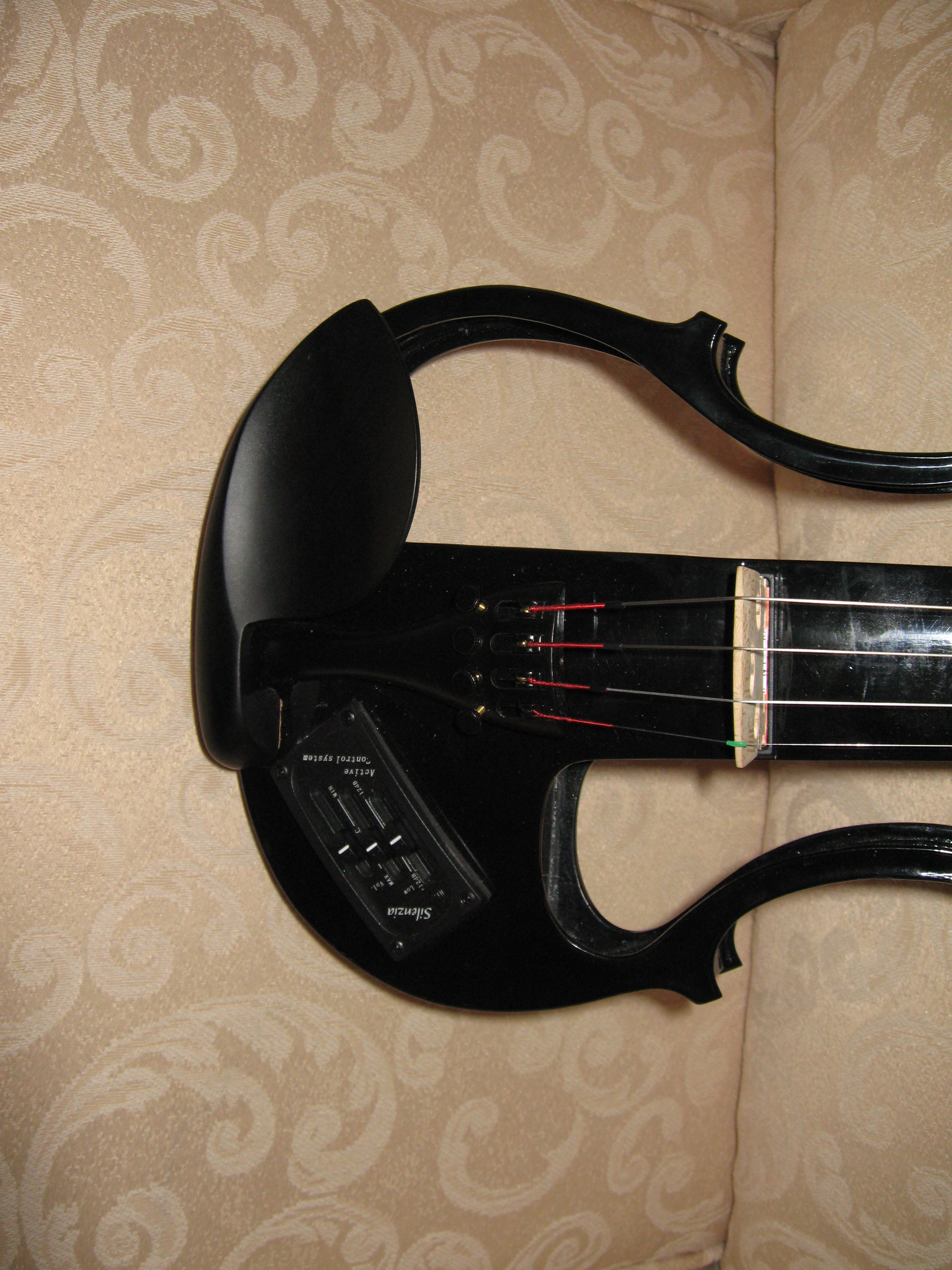
Last weekend I worked with 2 of our family musicians to produce a sample recording as a ‘test run’.  The recording was created with a mic’d guitar, electric violin (see below) and a Mackie mixer directly interfaced with the iO dock. Enjoy this personalized arrangement as the fruits of our session. Listen here.

Meet the electric violin:

:::::

There are many different recording apps available on iTunes. Here are 3 that I have used:  Recorder,  Blue FiRe  and  GarageBand .   This particular project was done with Blue FiRe.  The Recorder app has an nice process for easy process to transfer the recorded files through a local wifi browser connection.

Perhaps the iO dock has a place in your studio or classroom.

~Mark

CATC Camp 2012

Each summer, for the past 21 years, the Waterloo Region District School Board has run a 3 day self directed, professional development session focused on technology enabled learning. The event is known as  CATC By the Water. CATC is our acronym for Computers Across the Curriculum. In our Board, CATC is part of the language and culture.

We had a lot of positive feedback on the framework provided to start the day, so I thought I would share a few highlights here.

Framework Overview

Welcome to CATC Camp 2012 and a special welcome to new campers this year. You are in for a great 3 days. What makes this great is that you are in charge of your own learning and we have an awesome facilitator team to support you. I wanted to touch on a few points to provide a framework to help you keep your thinking and learning aligned with Board goals.

  • a new strategic plan will be released in the fall, with technology enabled learning being one of the focuses
  • one aspect of this is a large expansion of the formal Ministry of Education e-learning courses
  • Ministry of Education  blended courses will also be offered
  • the Futures Forum project will be expanded in each secondary school
  • we will embrace online writing projects in grade nine English programs
  • a draft document outlining success steps for a 5 year digital learning plan has been initiated

What do we mean by technology enabled learning? 

  • technology as a natural part of the learning environment (not ‘over there’)
  • usage to support and improve learning, not teaching technology for technology’s sake
  • aligned use of technology with our main suite of products (blogs, wikis, GDocs, FBk, Twitter, YouTube, OSAPAC, Desire2Learn)
  • instructional uses of technology that align with our identified 5 high yield strategies AND communication & collaboration
  • consideration of the 4 any’s: anytime, anywhere, anything, anyone learning
  • student engagement
  • authentic audience
  • consideration of TPack (Technology, Pedagogy and Content) – finding the sweet spot

To this end, the recently passed (June) Board budget included funds for mobile equipment for each school and additional classroom supports. We will establish a plan to address wifi in portables over the next 2 to 3 years, and start to address this need during the 2012/13 school year. Related internet and infrastructure upgrades are under way to support student learning and achievement.

Things for you to consider as you learn:

  • familiarize yourself with the new Responsible Use Procedure (RUP)
  • consider how you will role model ethical use of technology for your students
  • determine how will you promote digital citizenship within your classroom
  • now that we have wifi access in all school instructional areas, how will you leverage this in your classroom?
  • how will you use both desktop and mobile devices available in your school?
  • have you thought about taking advantage of BYOD?

Spend some time pondering possibilities. Thank you for being here. Have a fantastic learning experience.

~Mark

Stratosphere: The ISTE discussion

One of the ISTE sessions I hoped to attend was Michael Fullan’s presentation about his new book Stratosphere. The session seating filled to capacity  quickly and I did not make it in. Subsequently, I wanted to learn what happened at the session and am sharing the following resources related to the session.

Book: Stratosphere: Integrating Technology, Pedagogy, and Change Knowledge by Dr. Michael Fullan.

Mindshare Learning Book Review: Stratosphere by Michael Fullan

Mindshare Learning Video Interview with Michael Fullan

Tweet capture of session

Notes from Tyler Amidon

I look forward to hearing Michael’s keynote at ECOO 2012.

~Mark