Podcasting: a versatile curriculum tool

There are many good fits for podcasting in the curriculum. Podcasts and vodcasts may be used for presenting poetry, non fictional writing/reports, interviews, story telling, cumulative work, audio note taking (idea generating, debating etc.), book reports, lesson recaps, homework assignments and reading aloud (second language learners).

Podcasting is a great learning tool because it is easily adaptable to many curriculum settings and learner age levels. Podcasts can be easily created with standard computer equipment so success is not based on extra funding.

The Podcast Collection by Judy Scharf, hosted on the Curriki website, provides a good set of resources that covers:

  • what is a podcast
  • benefits of podcasting
  • practical tips for creating successful podcasts (‘road’ tested with a real class!)
  • podcast hosting options
  • uploading to iTunes
  • rubrics
  • assessment ideas
  • sample projects

This Podcast Collection received an exemplary rating from Curriki.

Additional Resources

Gary Stager:  Educational Podcasting
Kenton County Schools:  Podcast Resources
Wes Fryer:  Teach Digital
Podcasting Resources:  Podcast Info

Get your podcasting ideas flowing and try a podcast project to meet your curriculum needs.

~ Mark

A New Twist on the Mobius Strip ~ Music

A few years ago, I formed a music duo with a friend. We called ourselves Rosin and Reeds after our instrumentation – violin and clarinet,  and had a lot of fun playing together. Much of the music we played, we arranged since there is not a wealth of original music for this combination of instruments. We had the good fortune of performing live at some interesting venues.

Tonight I had a real flashback to the ‘duo days’. One of the pieces we enjoyed performing, composed by Mozart, was written in a particular way. There was actually only one page of music for a single melody line. We had two copies of the original part. The duet part was created by taking the page of music and turning it upsidedown (top to bottom). In essence, one player played the original melody while the second player was playing the original melody retrograde (backwards)  and inverted (upsidedown).

I came across a YouTube video tonight that demonstrated these same composing techniques (original solo, duet, retrograde, inversion) in a very effective visual format – pitch and rhythm punctuated with moving trackers, followed by all the variations and an interesting twist. A literal twist – a musical mobius strip.

JSB Mobius Strip

I will be sharing this video resource with the music teachers I know. Have a look and listen –  Crab Canon on a Möbius Strip by J. S. Bach on YouTube. Enjoy the music, enjoy the visuals.

~ Mark

Social Media Map

As educators we are always on the look out for a new and clean way to explain concepts to other people. I came across this diagram a little while ago and thought it was an interesting way to explain the relationships of Social Media Tools.

The diagram, as you can see from the thumbnail thumbnail below, is laid out somewhat like a railway track system with colour coding used to represent categories of social media tools by function.

SocialMediaMap

The key in the lower left explains the function categories as:

  • syndication
  • collaboration
  • communication
  • interaction

Each function area shows a number of application types, which correspond to entries on the map. The original map, by Jay Ball,  is posted in an online slide show.  Click here to view the original B2B Social Media Map. I thought this was a fresh approach to explaining social media and the relationships between some of the applications. This is well worth a look in my view – another teaching trick in the back pocket.

~ Mark

Skype for iPhone/iPod Touch

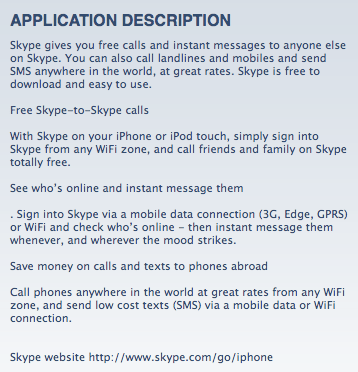
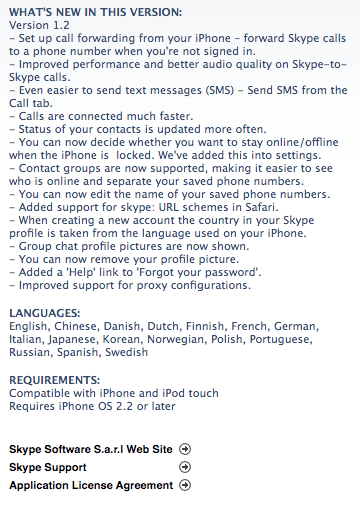
Goods news, and further to my August 12th post Skype in the Classroom, it is out – Skype for the iPhone and iPod Touch is now available in Canada. The free application is available on the Canadian iTunes store. A quick search for Skype will locate the application for you.

Skype allows you to make free wifi calls to other Skype users anywhere in the world. If you have paid for the Skype ‘out’ feature, you can call landlines and cell phones over wifi in the geographic area you paid to access. I have been using the North America package and it works great! See the Skype web site for details. Have an iPod Touch? – just add a mic or earphones/mic combo and you are good to go!

Now, think about all the curriculum applications!

Product details as listed on iTunes:

Picture 3
Picture 1
Picture 2

Have fun!

~ Mark

Online forums for iPods in the Classroom

As momentum continues to build for the use of mobile handheld device in the classroom, it is important for teachers, IT leaders and administrators to share:

  • projects and activities
  • curriculum context
  • instructional strategies
  • learnings: what worked, what should be changed, what to avoid
  • best applications
  • best practice for maintaining a class set of iPods

One of the areas that interests me is the overall direction that people tend to take with these projects. In my mind, many of the available applications fall into the ‘drill and kill’ repetition category. Extensive use of drill based software in is opposition to the ISTE nets standards being adopted in many Boards. The ISTE Nets standards for students promote foundational ICT skills in the areas of:

  • Creativity and Innovation
  • Communication and Collaboration
  • Research and Information Fluency
  • Critical Thinking, Problem Solving and Decision Making
  • Digital Citizenship
  • Technology Operations and Concepts

I hope that professional collaboration and sharing will keep the use of  mobile tools in the classroom pointed in a positive learning direction. Certainly, having a room full of students with mobile learning devices in hand will fundamentally change the way one teaches. Perhaps learning about what this new teaching model looks like and defining best practices in this arena are a key component of moving forward. Lets not repeat mistakes and reinvent the wheel over and over. Share and collaborate!!!

I have list four online forums that I initially started reading in the summer. I have joined each one and now read them regularly. I hope you find some of the information and collaboration opportunities worthwhile.

Links

iPod Teachers
iPods in the Classroom
iPod for Educators
iPod Touch Schoolwide Implementation on Classroom 2.0

~ Mark

Strategic IT: what’s on deck for 09/10

A new school year launches into high gear today as all of our students return to class. Based on our successes and planning last year, I fully anticipate an exciting 2009/2010 school year. Predictably, there will be thousands of things that happen in every IT department from day to day operations, planned projects and dealing with that unexpected situation or challenge that jumps out to push back against even the most thorough plan.

An overview of major projects on deck for our Board includes:

  • maintaining and refining our new active directory domain structure
  • expanded use of our new enterprise management tool (imaging, software & patch deployment)
  • deploying our OSX/XP dual boot Macs with blade server back end
  • school network upgrades
  • starting our network access control project
  • starting our new wireless project
  • new library resources and process
  • greater use of Adobe Connect
  • moving forward with Digital Citizenship initiatives
  • iPods in the classroom projects
  • hosted web pages for teachers

Of course, this list does cover all of the work, but sets a solid agenda to keep moving major initiatives forward, particularly in the instructional area. I will share updates as we work our way through the project list.

On a more personal note, I will be

  • participating in an inter-Board  PLN project with Will Richardson
  • further developing my PLN
  • completing some course work
  • collaborating with education professionals

Best wishes to you for a successful school year.

~ Mark

A New Journey

This Labour Day weekend brings about a big change for our family as my oldest daughter starts university. Preparations for today have been occurring over the last number of months with a more intensive focus over the last 6 weeks or so.

Stephanie,


Study Hard

Learn Well

Make New First Impressions

Enjoy New Friends

Have Fun

Dream

Believe

Achieve

Be Yourself

Make a Difference


I am proud of you Stephanie. Live your dreams.

Love,

Dad

Links: 2009-09-06

Links: 2009 09 06 — Interesting Finds of the Week


1.  15 Great Gmail Sidebar Gadgets

2.  Cool websites, software and internet tips

3.  Publish and Share PDFs Online

4.  DropBox: backup, sync and sharing made easy

5.  50 Things Being ‘killed’ by the Internet

Enjoy the reading and learning!

~ Mark

Impact: Media multitasking

Media Multitasking:

Over the last week, I have come across a number of references to multitasking. In each case the viewpoints were exploring the impact of multitasking:

  • helpful or harmful?
  • productive or unproductive?
  • impact on concentration, learning
  • long term impact

I notice the rise of multitasking in myself. More often than not, I will have my laptop in hand while keeping an eye on a TV show or be flipping between various computer applications or tasks (or all of the above :-)). I think the tasks at hand are determining

  • when to multitask
  • identifying when it proves beneficial
  • how much
  • how long
  • what tasks

Certainly, I know from personal experience as you likely do, that there is a point of fragmentation that brings you to a state of inefficiency. In a more pressing state of fragmentation, one may be making errors as well. Being aware is this means I am being mindful of my work, work quality and productivity.

As we go further and further down this road of embracing more technology, and learning the incredible benefits that it can bring, we need to be mindful of using in the best possible ways. This means balanced life style and productive use  in work , social networking or entertainment. Putting my educator hat on, we need to address this issue as part of a healthy lifestyle and learning environment with our students. There are times for single focused concentration and times for multitasking. Making the right choice in a situation is important, and a good thing to learn.

This topic is definitely food for thought.

Related Reading

CNN:  Multitasking May be Harmful

US News:  Chronic Media Multitasking

Reuters:  Multitasking Doesn’t Work

Computer Weekly:  Media Multitasking Hurts Work Performance

Smart Brief:  SmartBrief News Release

~ Mark

Twitter: showing the global perspective

Explaining Twitter to the non Twitter is somewhat of a challenge. The concept is different than other tools, and the language associated with Twitter is also very unique, not to mention all of the associated short forms etc.

As an educator and Twitter enthusiast, I am always thinking about good analogies and strategies to explain Twitter and its benefits. A demo is good too. A typical discussion or demo includes: get your free account, public/private, friends/followers, checking profiles of other Twitter users, posting tweets (messages), replying, retweeting etc..

Further into the process there is discussion about how to use Twitter effectively which leads to searches, hash tags and the PLN aspect of Twitter. Then you can step it up a notch and manage Twitter feeds through a 3rd party application such as HootSuite or Seesmic Desktop. (see my earlier post PLN:Harnessing the power of Twitter). Oh yes, and be sure to include information about using Twitter with your mobile device.

The power of Twitter is often demonstrated by posting a Tweet and showing people how quickly you will get responses from your followers which works really effectively if you have a large number of followers – all good. I have been thinking about how to best illustrate the global aspect of Twitter. I have finally landed on two ideas for this.

You could show the Twitter public timeline which is the collection of all public tweets.
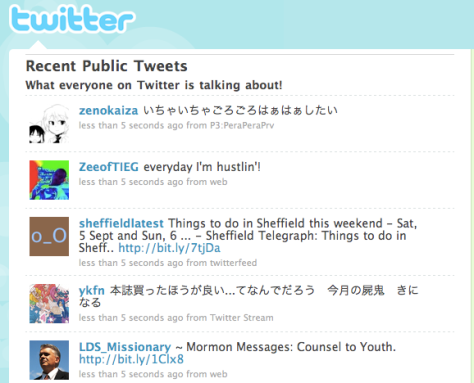
Twitter-PL

While this shows a range of Twitter users and posts, it looks very similar to your own Twitter feed so in this regard it is a weak illustration and does not truly capture the global aspect of Twitter.

Another approach is to show TwitSpy, which shows the Twitter public timeline in a way that displays the location and profile picture of the user on a Google map along with the tweet. In my mind, this is a much more powerful demonstration to illustrate the global aspect of the Twitter community.
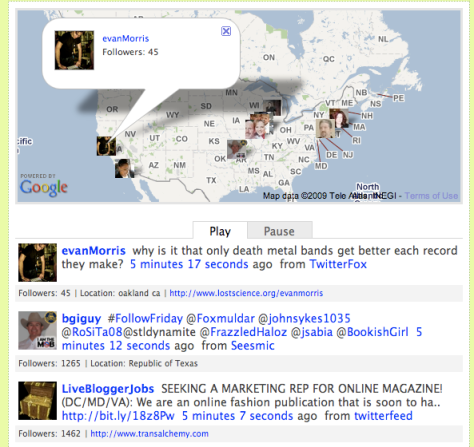
TwitSpy1

TwitSpy2

In these last two examples, you see the languages, profile pictures and global locations – much more effective!  It is fascinating to watch the TwitSpy display as the counties pop up on the screen: Canada, India, USA, England, China … – a true global community.

Note: If you are going to do a demonstration of the Twitter public timeline or TwitSpy, remember that the timeline shows all public tweets. You can not control the tweets, users, languages or more importantly, the content – in this area, you take your chances.

Related Links

Not a Twitter user? Get your account today at Twitter.com

Twitter public timeline

TwitSpy

See you online.

~ Mark

Connect, Learn, Reflect, Share: Make a Difference Today