Category Archives: Technology in Education

Social Networks: What’s cooking?

Social media tools are having an impact in many ways in all age groups of society from pre-teens to ‘experienced’: retirees — it could be a lifelong activity, literally!   Let’s take a look at some current information.

KIDS/TEENS

In a recent surveys of teens,  38 percent of respondents ages 12 to 14 said they had an online profile of some sort. Sixty-one percent of those in the study, ages 12 (jumping in earlier than the suggested age requirement) to 17, said they use social-networking sites to send messages to friends, and 42 percent said they do so every day. Although social networking sites have a minimum age requirement of 13, there is no easy way to check or enforce this criteria. It really operates on the honour system.

In my mind, this trend raises some important questions in terms of use from the parent point of view:

  • Are these sites being used in an appropriate manner?
  • Do parents/guardians actively monitor what their children are doing?
  • How are the children learning about safe online practices?
  • Do the children know to protect their personal information?
  • Are there daily time limits placed on usage?

As a parent, what is your level of involvement? See the Social Networks and Kids: How Young is too Young?  article at  CNN.

ADULTS and the WORKPLACE

In October 2009, the USA Today reported that that 54% of companies completely block Facebook, another 35% apply some form of access limits, leaving only 11% that don’t put any limitations on Facebook use in the work force.

Dr. Brent Coker, of the Department of Management and Marketing at The University of Melbourne, reports that  “People who do surf the Internet for fun at work – within a reasonable limit of less than 20% of their total time in the office – are more productive by about 9% than those who don’t.”

Point for consideration: Is surfing the net really any different than daydreaming or chatting at the water cooler? Some employees may benefit from a little surf time. Not everyone has the same needs in terms of being productive – that is for sure. Hmmm, maybe this is true for students in schools too!

View the full ‘Companies Ban Social Media = Bad Idea’ article at Socialnomics.net. Additional information from the  Australian Social Media study can be found at the University of Melbourne website.

What is happening at your organization? Leave a comment or  send a tweet.

SENIORS/Retirees

Facebook statistics show an increasing number of users in the 50+ age group – boomer connecting with high school friends and keeping in touch with their children. There is a major social connection occurring with users in this age group.

Related Reading:

Ivy Bean: Tweeting at the ripe old age of 104

Social Isolation and New Technology

SCHOOLS

Teachers and administrators are learning more about social networking tools – the good and bad. The bad is usually connected to student bullying issues. Staff at Boards of education are thoughtfully working through some of the key issues:

  • safe, ethical and responsible online activities
  • Digital Citizenship and Character Development programs
  • incorporating social media tools into curriculum delivery in meaningful ways
  • thinking about content filtering in an appropriate K-12 context

The agenda is definitely moving ahead – that is a good thing.  Teachers are developing online Personal Learning Networks (PLNs) through social media tools such as Twitter, Ning groups and blog reading/blogging. Many are really engaged in learning something new every day.  Certainly, this is an exciting time to be in education.

It will be interesting to see how this all unfolds. In the meantime, one can keep learning and participating! See you online 🙂

~ Mark

Twitter experience becoming richer

From where I sit, Twitter use seems to be changing and evolving. When I first started using Twitter, it seemed that most Tweets could easily be placed into a few predictable categories:

  • general comments: updates regarding your current activity
  • web announcements: updated my blog at … or bookmarking site …. or read about something at …..
  • resource announcements: great smartboard resource at …..
  • asking a question

Some examples of these type of posts are:

Picture 5

Picture 7

Picture 6

Picture 8

My observation is that people are now ‘more connected’ through Twitter. By that I mean that I see evidence of more ongoing dialogue within groups of users. Requests for information are responded to. People are connecting for specific purposes.

For example:

Picture 3

Picture 4

Picture 1

Picture 2

To my way of thinking, this shows development in how Twitter is used. I feel there is a much greater sense of community – at least in the people in interact with. Users also have a better sense of harnessing the power of search terms and hash tags. Twitter is such a powerful tool to develop one’s PLP network. I feel fortunate to have a great PLP team to learn from and I look forward to the online dialogue that is an important part of every day!

~ Mark

A Visit to Lawfield Elementary School

As we look to renovate and build new schools, consideration is always given to updating standards to make sure that the instructional learning needs are met in an effect manner. We are taking time to learn what is happening in other areas. I recently had an opportunity to attend a site visit to Lawfield Elementary School in Hamilton with a team from our Board.

Initially, we gathered in the library to meet with Principal Bill DeMille, who provided an overview of some of the school initiatives. A couple of things struck me as Bill was making his comments. He clearly has a vision and understanding of

  • the features and functionality a school facility should have to support 21st century learning
  • skills a teacher needs in today’s learning environment
  • the impact of technology on student engagement
  • the importance of creating a learning environment where teachers are encouraged and supported to try new things

Things I noted at the school included:

  • a large display screen in the front hall of the school running a list of events and activities
  • teachers are expected to digitally capture events (pictures or video) for inclusion in the front hall monitor display
  • sound system throughout the school to facilitate audio enhancement of teacher voices
  • iPods are being used in  listening centre structure, or through the sound system
  • interactive white boards in each teaching environment with specific uses for shared reading, anchor charts and exemplars
  • wired and wireless internet connections
  • movement away from traditional desks to table clusters around jiffy poles supplying hydro and internet connections to student work area
  • shift to shared laptops in the classroom, long term goal for mainly mobile technology and fewer desktops

Photo Gallery

audiogear2
Sound System
ceilingmountdp
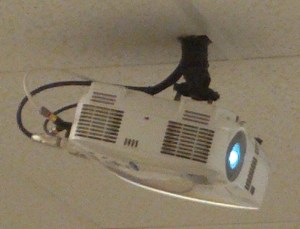
Ceiling mounted data projectors
Desks2
Table clusters
SmartBoard2
Interactive Whiteboard and teacher table
TeacherTools2
Teaching Tools: Document camera, iPhone & laptops
classroomtools
Embedded technology in the learning environment

Thank you to Principal Bill DeMille and his staff for sharing their educational environment and plans with us.

~ Mark

Backchannel Service

Backchannel is the practice of using networked computers to maintain a real-time online conversation alongside live spoken remarks. (see full Wikipedia article). Backchanneling provides an excellent way to capture audience reactions during a presentation. There are a number of Backchannel services available. I recently had the opportunity to participate in a session where the Today’sMeet service was used.

From the website:

TodaysMeet

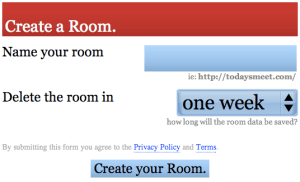
Setting up your free temporary Backchannel space is easy: name the room, choose an expiry period, activate your room. TodaysMeet does not require any personal information for registration purposes. The URL to your room is ‘open’ to any user who knows the address. The URL is not published or distributed in any way by the company, so in a sense, does have a degree of privacy.
BackChannel

Depending on your audience, you may have to encourage the audience participation. In our case, we were using the Backchannel to submit questions to a presenter who was video conferenced into our workshop session.  The whole process work well, was free and certainly added to our learning experience.

Give the Backchannel concept a spin. I am sure you will find it a useful tool.

Related Links:

Website: Today’sMeet
Today’sMeet terms of use
Today’sMeet FAQs

~ Mark

Digital Citizenship Symposium

Our Board received some great news this week. The grant proposal that was submitted for work in the Character Development area has been accepted!!!

A formal working group will be struck shortly to work on this project. The intent is to focus on Digital Citizenship. At this point in time, preliminary discussions are revolving around the idea of preparing a 2 day symposium event which might include:

  • keynote speakers
  • sessions for students, staff and parents
  • ongoing activities such as workshops and/or contests beyond the actual event
  • continuation of the student input to technology planning day we started last year
  • community outreach

Anticipating the team members who will work on this event, I know the ideas, creativity and final product will be very rewarding and worthwhile. I was thinking, if details could be worked out,  it would be really nice if we could extend an invite to the Ontario PLP Cohort to connect in online for the key note sessions via Adobe Connect .

Lots to do, lots to think about – that is for sure.

~ Mark


History of the Internet: Reflections

Last Friday,  The Guardian published a series of interesting articles about the history of the Internet. On October 29th, 1969 the first two computers were connected between the University of California and the Stanford  Research Institute (several hundred miles) through an IMP (interface message processor) allowing the 2 users to login and type back and forth. While the actual date of the birth of the internet is debatable, this event arguably set the stage for everything that has followed.

There is some great reading in the publication and it certainly caused a trip down memory lane for me. Here are some of the things I remember using computers since the ‘early days’:

  • learning to program on a Sinclair computer, made by Timex
  • writing software for students on a Commodore PET
  • teaching introductory programming to grade 10 math students
  • the Icons – the first networked computers we had a school (10 MG file server)
  • learning to connect remotely to the file server (crashed more than it worked in those days)
  • music software on the Atari and Amiga computer systems (with MIDI capability)
  • buying my first 300 baud modem (and I still like hearing that ‘connect’ sound)
  • doing a WLU hosted stock market simulation with students (involved up/downloading)
  • WEIR – the Writers in Electronic Residence project
  • 1200 baud modems
  • the CHIMO communications system
  • the first library PAC machines, DOS interface
  • the first text based Mozilla browser
  • groups of computers sharing a single modem connection
  • all night long downloads, praying the connection was not interrupted
  • hosting and running a Bulletin Board System (BBS), an early email exchange system
  • writing software for my brother’s surveying company and using those early email methods to send the code
  • the early MACs, PCs, the first GUI interfaces
  • and the list goes on ….

One could write a list the size of a book, but I won’t.  Many of us are familiar with the portion of the journey over the last dozen years or so. Reading the publication somehow jolted my memories of the early telecommunication days – exciting times for sure. In those days, a lot of energy was spent just getting things to work. Who knew that we would end up where we are today:  a global community, fibre optic networking, web 2.0, free computer to computer video/audio connections, amazing collaboration tools, overwhelming information online which is doubling rapidly …. truly amazing.

Best of all, we have access to these amazing tools and a global community to impact on the educational process. Independent of your age, you are living at time when the opportunity to learn, connect and collaborate is nothing short of amazing. Embrace it!

~ Mark

K12 Content Filtering: centralized or distributed?

Content filtering is always an interesting topic for discussion because it is so multifaceted. In my earlier post I listed the points below as part of the discussion arena. In my context, the framework is K-12 education.

  • filter or not?
  • if you do, how much?
  • if you do, is it done centrally or at the school level?
  • how do you align content filtering with educational resource selection processes for print, video etc.?
  • block or allow social networking?
  • keep students safe
  • sufficient band width
  • how do you define ‘educational content’ in a way that makes sense in a K-12 context?
  • should content filtering be more age or grade appropriate?

There are no easy answers. It is easy to find valid reasons to sit on either side of the fence for each point. More importantly, there is a growing need to keep learning about what is right, what is doable and keeping the agenda moving forward in an appropriate fashion for K-12 education. Further reflection on this post has two aspects of content filtering churning around in my mind.

1. Copyright: Content filtering must respect copyright and your country/jurisdictions laws and regulations. This whole aspect of internet use is blurry in the global community. At face value, what you see in your browser is relatively consistent from your vantage point on the globe. The internet seems like ‘one place’. The reality is the servers, and therefore content are in different countries. What you are able to do with content (copy, download , redistribute, use in a school classroom setting etc.) will likely vary, depending on your regulations and these need to be respected.

2. Equitable access: A couple of weeks ago, I was having a meeting with @socmediatrust (Twitter) discussing Digital Citizenship and his work at schools presenting Internet safety sessions to students and parent groups. At some point in the conversation, we landed on content filtering. As mentioned above, there are many approaches to dealing with this. The focus of our discussion was bullet #3 – centralized or distributed to the school level systems. This led to an interesting talk framed around consistency and equity of access.

Providing content filtering from a centrally run system provides equitable access to resources deemed suitable for use by all students/staff/sites within a system. To me, this makes the most sense. Deem the content that is acceptable for use in a particular system through a fair mechanism to select and align content with educational needs. Then you can work away at fine tuning needs in a strategic way.  I can see value in having a ‘sliding scale’ effect for content filtering so it is adjusted for age levels – maybe something along the lines of  tightly controlled (young students), medium access (maybe grades six to eight) and more open for high school. Validate readiness for each level with a strong Digital Citizenship program to teach ethical, responsible, safe use and digital literacies.

Now, imagine a system where access is controlled at the school level. This could potentially be a dogs breakfast so to speak. Two (or more) schools serving the same age group of students may be serving up completely different content and access to web tools. This leads me to many questions about equity of access, lack of consistent approach within a large system, lack of consistent expectations and use by staff and students and awkward to dialog with parents when the rules (access) varies from site to site. As curriculum leaders, do school administrators bring their own ‘rules of access’ with them as they move site to site over their careers?  Hmmm.

My View: It seems to me, at least at this point in my thinking, the distributed model leaves more questions than answers. I would cast my vote for a centrally run system that allows for the ‘sliding scale’ fine tuning approach that is well aligned with curriculum needs and resource selection processes.

~ Mark

Presenting on the Web – session 2

Further to my earlier post this week about my live web presenting session, we had additional successes with our Thursday night session with our computer contact group. What did we do differently?

1. I changed the setup in the presenting area in my office, which was the remote site.  We adjusted the lighting to make the room slightly darker and eliminated some backlight which caused a little glare in the first round.

2. I relocated my speaking notes from my desk to a raised vertical stand tucked in closely to my laptop to minimize my eye movement. The net effect allowed me to look more directly at the camera so the setup was more like a newscast arrangement.

3. In the meeting room end, we turned the MacBook laptop around so the web cam was facing the audience. This certainly gives you a better sense of connection with the audience as the presenter. We are able to do a better job adjusting the mic settings to allow me to hear questions from the audience more clearly.

All in all, a much better experience. The next meeting with this group is scheduled for February. At that time, we will offer a chance for some of the 100+  attendees over the two session to join us in an online meeting. If winter driving is a factor, we should have improved attendance with the online option – bonus!!!

~ Mark