Category Archives: Leadership Perspective

Are Netbooks Ready For Primetime?

The right answer is yes, no and maybe. It all depends on your point of view.

End User: If you need a nice small travel laptop for work or learning that runs mainly web based applications, your answer might be a resounding YES! Many of the netbooks available today have plenty of ‘horse power’ to run a few key applications and perform well when running web 2.0 applications. I have been ‘road testing’ one of the Lenovo IdeaPads. I loaded it up with a few apps including open office, skype, the first class client, MSN, iTunes, Adobe Reader and Smart Ideas, a graphic organizer. Other than these apps, everything else is web based. Other than the quirkiness of the keyboard <SHIFT> key and <ENTER> layout (or my slow adaptability to a new layout) and the screen being a little small as far as real estate goes for some applications, the IdeaPad performed well and behaved in a stable manner.

Point to ponder: Would you give up your desktop or full sized laptop for a netbook?  Personally, I would not be ready to make this type of a switch at this point in time. At least for the type of work I do, there are too many times where have a full screen to facilitate multi window operation of some sort, more serious document editing or something more intensive such as audio and/or video editing. I would find the small screen and extending timeframes working with tight key arrangement on the keyboard less than idea. Perfect for travel, but I am keeping another computer or full size laptop.

Enterprise needs: I am changing hats now. Let’s look at this from the IT Management viewpoint. In the setting of our school board, interest in netbooks (or the promise of the Mac tablet) is on the rise. From a planning point of view, the price point is certainly positioned to allow you the opportunity to buy more equipment for the same level of funding. On the assumption you could match the application suite and access to the equipment to maximize the use, netbooks look pretty attractive. But, before you rush away to buy a large number of netbooks, there is another side to consider.

Many current netbooks ship with Windows XP Home with no supported upgrade or conversion path to Windows XP Pro. The XP Home version limits you to local machine and workgroup access.  Using the netbook in a network domain environment with group policies and defined security permissions is not an option. In addition, many enterprise level tools for imaging, patching, software updating and application package distribution rely on a domain based structure to properly manage the computers.  This is where I think we are stuck yet. If you can manage the netbooks, at least easily, then this is a double edged sword. The price point and web usage is there, but you are limited in maintaining and supporting the machines. You can’t say you don’t need to support the machines – just wait until you have a few messed up and now some class in not functioning properly. They staff and students will want support to fix the computers or restore them to a usable state.

Things look more promising with Windows 7 on the horizon. Then again, how many large organizations are ready to roll with a Windows 7 deployment backed up with an organization wide support model?

My View: At least at this point in time, I stand by my yes, no and maybe answer. I do believe netbooks are here to stay, and will be valuable learning tools. It is just a little to early in the game. I will be interested to see how things unfold over the next few months because I think we are close.

Related Reading:

Test Freaks:  Netbook reviews and ratings

PC World:  Road Warriors Guide to Netbooks

Sync Blog:  Should your child have a netbook?

~ Mark

21st century teaching

What is 21st century learning? Many of you have thought about this, read about this, engaged in dialog both face to face and online, and maybe blogged about this. Me too.

We had a meeting yesterday where we were looking at, and discussing that ‘age old’ question. There is no real need to rehash this again here. Besides, we are a decade into this century already! I did want to share a couple of interesting points from our discussion tonight.

Relative to times in the past, say 10 or more years ago, it was much easier to predict what a few years out looked like. Today, given the rate change in technology, job markets, communication tools etc. it is impossible to think what things will be like in 6 months or a year out, let alone 5 or 10 years out. I think the challenge of trying to articulate that future vision with clarity gives us a sense of being stalled in the journey to address the answer to ‘What is 21st century learning?’

However, maybe we are asking the wrong question. Maybe the question is: What does 21st century teaching look like? Imagine you have a class of students in front of you equipped with mobile learning devices – students with different devices. Some might have iPhones or Blackberrys. Perhaps others have netbooks or notebooks. Oh yes, some have iPod Touches, and throw in a couple of tablet PCs to round out the class. Now, that you have your class in with 1:1 web enabled devices in front of you, let’s think about these questions.

  • How does this change my teaching strategies?
  • How does this change my planning strategies? (lessons, units, short term, long term)
  • How do I facilitate learning in this environment where information is abundant and instantly accessible?
  • How do I manage students who will essentially be able to do many more learning activities in an environment where the learning can easily be personalized?

We discussed three key areas in thinking about this question: enablers, core tools, optional tools and innovation.

Enablers are required to provide access – wireless networking, network access control (Board/company owned and guest access coexisting), sufficient equipment, sufficient bandwidth. Core tools – perhaps the identification of a smaller set of web 2.0 tools that are used and integrated in a more systemic way. Innovation – the use of other technologies and strategies beyond the selected core tools for effective learning.

In some ways, we are perhaps back at the sand box stage. We don’t really know the right mix of technologies and instructional strategies to achieve the greatest success in the learning arena. To my way of thinking, investing energy into exploring the ‘what does 21st century teaching look like?’ question is a key aspect of really moving things forward in a planned and sustainable way. Of course, professional development and sharing of best practice are also critical ingredients. This must be looked at in a holistic manner. Success, at least in the meaningful systemic way, will not be achieved by addressing limited aspects of this agenda.

Food for thought and more thinking to go.

~ Mark

Leadership: Managing Digital Distractions

One of the traits of a good leader is the ability to demonstrate individualized consideration for staff. Individualized consideration references the ability to treat and understand each employee as an individual. Putting this into practical terms, it means knowing employee strengths and weaknesses, how to challenge them on a personal level, and giving your undivided attention when interacting with them.

Now put this idea into your typical day. There will be lots going on — time constraints, multiple meetings scheduled back to back, demands on your time to make decisions etc. – you know the groove. People don’t meet for the sake of meeting (I hope). There must be some task at hand: project planning, issue resolution, budget, staffing etc.. and you are in attendance for a reason.

Reflection: In todays world we have many electronic communication tools that we use to support our work tasks. How do you manage these tools when you are with other staff?

  • Do you have the ability to focus on the task at hand and give your undivided attention to person/people with you?
  • Are you distracted by the devices and messaging tools as your disposal (smartphone/cell phone, landline, pager, computer or voicemail)?
  • If you are distracted, why are you? Do you need to be on ‘red alert’ for every incoming message?
  • Have you considered the message you send to the staff if you consistently put them second to these unpredictable interruptions?
  • Where have you placed them on the ‘importance’ scale?

Ironically, I came across the Hierarchy of Digital Distractions diagram (below) last week on the same day I was involved in a discussion about focusing on employees as individuals at a course. I doubt anyone would argue the convenience and benefits of using these tools in todays busy and complex work environment. And yes, there will be some exceptions when you do need to take a call. Does the incoming text/email/alert/call etc. always have to take priority?

Challenge: Consider the questions outlined above, and reflect upon whether your current practice could use a change.

digital distractions

Click here to view the original full size Hierarchy of Digital Distractions pyramid.

~ Mark

Mazes and Team Building

As part of a leadership course I am taking, we had an opportunity to use an electronic maze to illustrate some interesting points about team building.

The electric maze, or learning field, was a set of 48 squares arranged 6 x 8 embedded in a large floor mat. Each square was programmed to be ‘safe’ (off) or ‘alarmed’ (on).  Each of the two groups was allowed 10 minutes of strategy planning to set their tactics. The goals were to determine a safe path across the mat and then have each of the team members (6 in our case) cross the mat along the safe path. Team members were not allowed to talk after the 10 minute strategy session was complete. Each team was given an amount of ‘money’ which was used to pay for infractions such as stepping on an alarmed square, skipping a square or talking.

Playing the game itself was very enjoyable. Afterwards, it was interesting to reflect on the various assumptions and strategies of the different groups.

Success factors

  • team effort
  • observing
  • cooperation
  • remembering successes (correct moves)
  • remembering failures (additional learning)
  • assessing risk

Assumptions by some groups

  • the event was a competition
  • winning was the end goal (team members across and most money)

Reality Check

In fact, winning was not defined. The task was just assigned. In reflection, all groups realized that by working together the challenge could have been solved more easily if the groups worked together, collaborated and shared information and collective learning.

How often does the real life version of this event happen? How often do we miss opportunities to truly get something accomplished in an timely, efficient,  and perhaps more cost effective manner? Take the opportunity to analyze, plan work flow and  capitalize on the TOTAL resources available to deliver  a solid end result with a stronger team.

~ Mark

A Student Voice in K12 Technology Planning

During the 08/09 school year we moved to a new technology planning model. In our old structure we had separate groups to look at administrative and instructional needs. The plans and considerations produced by the two groups did not align and reflected needs and priorities that were often competing. This certainly did not make it easy get projects defined and moving.

The new structure introduces reflects a more integrated team approach, with members representing administrative business areas, elementary and secondary school principals, ICT consultants, learning services members HR and key ITS staff – 13 members in all. We have also adopted a new governance model to prepare and determine priorities at the system levels.

We wanted to add a component to this new structure to include a student voice. Last April we held our first student technology day. The format of the day included teachers and students from a sampling of our secondary schools. The computer contact teacher at each school brought 3 to 5 students with them so that the students outnumbered the adults. We also asked the teachers to select students to reflect male/female balance and a mix of grades.

We set the afternoon up to have discussion on two topics with feedback time from each group. The first discussion topic centred around digital citizenship. The second topic was positioned as a task. We asked students this question: If you could change 2 or 3 things about technology use in our system, what would you change? and why?

I was impressed with the quality of ideas and mature approach in which the students expressed their ideas. The students sent a very clear message about how they felt things should move forward. They recommended:

  • have wireless access in all schools
  • have the ability to use their own equipment in our computing environment
  • make use of cell phones/smart phones as part of the learning environment
  • have access to their files from home

This exercise was a good validation of the discussions of the Technology Steering Committee and you will see project reflecting these needs in our 09/10 project list priorities.

Now I am considering how best to keep a student voice in this process this year and communicate the outcome of last year’s efforts. I would be interested to hear from other people about the approach used in your Boards/jurisdictions so feel free to leave a comment, send a tweet, email or URL.

~ Mark

Online forums for iPods in the Classroom

As momentum continues to build for the use of mobile handheld device in the classroom, it is important for teachers, IT leaders and administrators to share:

  • projects and activities
  • curriculum context
  • instructional strategies
  • learnings: what worked, what should be changed, what to avoid
  • best applications
  • best practice for maintaining a class set of iPods

One of the areas that interests me is the overall direction that people tend to take with these projects. In my mind, many of the available applications fall into the ‘drill and kill’ repetition category. Extensive use of drill based software in is opposition to the ISTE nets standards being adopted in many Boards. The ISTE Nets standards for students promote foundational ICT skills in the areas of:

  • Creativity and Innovation
  • Communication and Collaboration
  • Research and Information Fluency
  • Critical Thinking, Problem Solving and Decision Making
  • Digital Citizenship
  • Technology Operations and Concepts

I hope that professional collaboration and sharing will keep the use of  mobile tools in the classroom pointed in a positive learning direction. Certainly, having a room full of students with mobile learning devices in hand will fundamentally change the way one teaches. Perhaps learning about what this new teaching model looks like and defining best practices in this arena are a key component of moving forward. Lets not repeat mistakes and reinvent the wheel over and over. Share and collaborate!!!

I have list four online forums that I initially started reading in the summer. I have joined each one and now read them regularly. I hope you find some of the information and collaboration opportunities worthwhile.

Links

iPod Teachers
iPods in the Classroom
iPod for Educators
iPod Touch Schoolwide Implementation on Classroom 2.0

~ Mark

Strategic IT: what’s on deck for 09/10

A new school year launches into high gear today as all of our students return to class. Based on our successes and planning last year, I fully anticipate an exciting 2009/2010 school year. Predictably, there will be thousands of things that happen in every IT department from day to day operations, planned projects and dealing with that unexpected situation or challenge that jumps out to push back against even the most thorough plan.

An overview of major projects on deck for our Board includes:

  • maintaining and refining our new active directory domain structure
  • expanded use of our new enterprise management tool (imaging, software & patch deployment)
  • deploying our OSX/XP dual boot Macs with blade server back end
  • school network upgrades
  • starting our network access control project
  • starting our new wireless project
  • new library resources and process
  • greater use of Adobe Connect
  • moving forward with Digital Citizenship initiatives
  • iPods in the classroom projects
  • hosted web pages for teachers

Of course, this list does cover all of the work, but sets a solid agenda to keep moving major initiatives forward, particularly in the instructional area. I will share updates as we work our way through the project list.

On a more personal note, I will be

  • participating in an inter-Board  PLN project with Will Richardson
  • further developing my PLN
  • completing some course work
  • collaborating with education professionals

Best wishes to you for a successful school year.

~ Mark

Twitter: showing the global perspective

Explaining Twitter to the non Twitter is somewhat of a challenge. The concept is different than other tools, and the language associated with Twitter is also very unique, not to mention all of the associated short forms etc.

As an educator and Twitter enthusiast, I am always thinking about good analogies and strategies to explain Twitter and its benefits. A demo is good too. A typical discussion or demo includes: get your free account, public/private, friends/followers, checking profiles of other Twitter users, posting tweets (messages), replying, retweeting etc..

Further into the process there is discussion about how to use Twitter effectively which leads to searches, hash tags and the PLN aspect of Twitter. Then you can step it up a notch and manage Twitter feeds through a 3rd party application such as HootSuite or Seesmic Desktop. (see my earlier post PLN:Harnessing the power of Twitter). Oh yes, and be sure to include information about using Twitter with your mobile device.

The power of Twitter is often demonstrated by posting a Tweet and showing people how quickly you will get responses from your followers which works really effectively if you have a large number of followers – all good. I have been thinking about how to best illustrate the global aspect of Twitter. I have finally landed on two ideas for this.

You could show the Twitter public timeline which is the collection of all public tweets.

Twitter-PL

While this shows a range of Twitter users and posts, it looks very similar to your own Twitter feed so in this regard it is a weak illustration and does not truly capture the global aspect of Twitter.

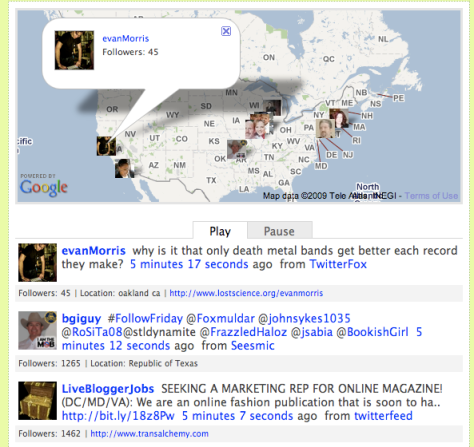
Another approach is to show TwitSpy, which shows the Twitter public timeline in a way that displays the location and profile picture of the user on a Google map along with the tweet. In my mind, this is a much more powerful demonstration to illustrate the global aspect of the Twitter community.

TwitSpy1

TwitSpy2

In these last two examples, you see the languages, profile pictures and global locations – much more effective!  It is fascinating to watch the TwitSpy display as the counties pop up on the screen: Canada, India, USA, England, China … – a true global community.

Note: If you are going to do a demonstration of the Twitter public timeline or TwitSpy, remember that the timeline shows all public tweets. You can not control the tweets, users, languages or more importantly, the content – in this area, you take your chances.

Related Links

Not a Twitter user? Get your account today at Twitter.com

Twitter public timeline

TwitSpy

See you online.

~ Mark

Engaged students: Have we lost the team?

This is certainly an exciting time in education. We have achieved much, we know more,  the learning environment is potentially richer than ever before.  Yet, as I continue to read about key educational strategies and issues, I note one disconnect.

Student engagement! It is talked about, and it should be. It is the focus of teachers and curriculum planning, and it should be. What bothers me is that it is often talked about in isolation.

In an earlier blog post where I weighed in on a 20th/21st century learning discussion I ended my comments with the following statement:

Our journey is all about the learner. Creating the best possible learning environment covers the ‘whole playing field’ – curriculum design, building design, teacher training, assessment, changing with the times, best use of technology and steady, reflective incremental improvement. After all, we are life long learners!

I will stick by this. Teachers, mentors, Boards of Education should play a critical role in engaging students. Why do we talk about this in isolation of parent/guardian roles and responsibilities, and personal ownership.

I had the wonderful experience of having my children study music in the Suzuki string method. Dr. Suzuki designed his entire curriculum, ‘talent education’ in his terms, a clear foundation of student, parent and teacher roles responsibilities were laid out right from the beginning. After finishing 12 years in the program, that foundation is centre of everything that happens. I believe this foundation is one of the keys to the success of the program. In parallel to the education systems, teaching training, resources, curriculum design etc. also play the same key functions. I have great admiration for the work of Dr. Suzuki and all of the wonderful teachers who deliver this excellent music curriculum to students.

Let’s not lose the team aspect of engaged learners in our systems. We must continue to excel in all of the areas that we control in the education systems. Team: students, teachers and parents – fully engaged learning communities.

Related Reading

Dr. Shinichi Suzuki
Introduction to Suzuki
Nurtured by Love

~ Mark

Classroom: Twitter in Action

In my August 19th blog post, Classroom: Student use of Twitter, I ended my post with the following comment:

“Communication strategies and student engagement are often given as reasons for looking at Twitter use in the classroom. I believe the skillful teacher will find the right fit for Twitter as a curriculum support tool.”

Last night I found a good example of a skillful teacher using Twitter in the classroom. How appropriate that I found this example through Twitter!

In the video, The Twitter Experiment – UT Dallas, Dr. Monica Rankin, Professor of History at the University of Texas at Dallas, School of Arts and Humanities, who has been using Twitter in her classroom talks about her approach and initial observations of this new tool. Dr. Rankin acknowledges that Twitter use in her classroom is experimental, and that it is important to ‘play in the mess’ to figure out the most effective use for her classroom, students and subject matter.

While acknowledging the 140 character limit of a Twitter message, both Dr. Rankin and students interviewed identified a number of advantages to incorporating Twitter into the classroom setting. Comments included:

  • greater participation of students
  • accommodation of more input/comments than could have been spoken in class
  • shy students that may not have spoken in class were involved in the discussion
  • the discussion continued outside of class time
  • the instructor participated in ongoing discussions even when duties took her away from the university

I noted that students accessed Twitter with a variety of different technologies: desktops, laptops, netbooks and smartphones. Students that did not have access to technology were accommodated  by having their hand written Tweets entered on their behalf after class.

The YouTube video,  The Twitter Experiment – UT Dallas (apprx 5 1/2 minutes) is well worth the watch.

~ Mark