Category Archives: Digital Citizenship

Facebook security and privacy basics for K12

One of the important aspects of using Facebook in the K12 environment is having appropriate security and privacy settings. Whether you are teaching digital citizenship or using Facebook as a collaboration and communication tool, it is important to understand and review your security and privacy settings.

After logging into Facebook, click the ‘account’ tab and choose privacy to view the screen below. Next, select the ‘view settings’ option.
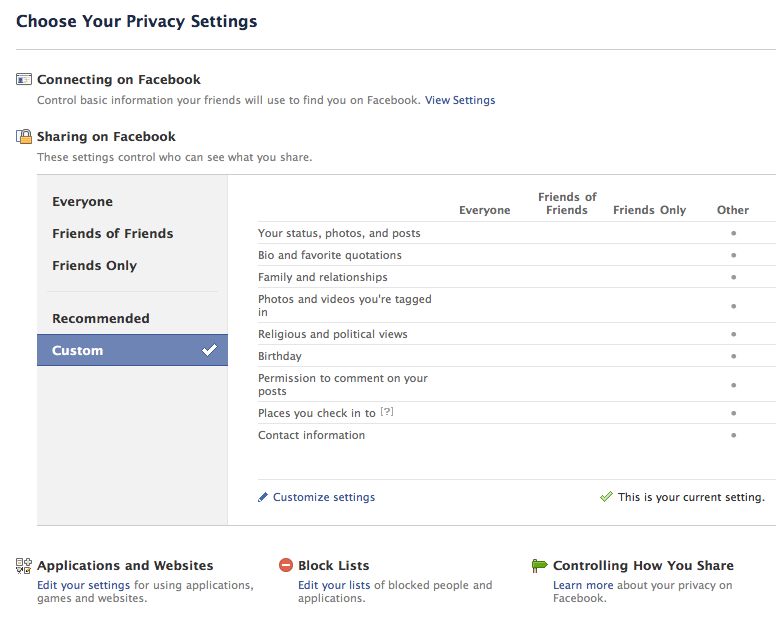

The top 3 settings (below) govern the settings for your visibility on Facebook, that is, how easy it is for people to find you. Narrowing down the permissions (friends of friends, friends)  in these settings places increasing limitations on who can locate you. Leaving these settings at ‘everyone’ makes it easy for people to find you.

There are settings for all other aspects of Facebook. Facebook security and privacy settings allow for control over most aspects of this environment. The greatest control is implemented by organizing your contacts (friends)  into ‘lists’. Once your lists are created (through the manage friends option), use can further control access to Facebook features by adding these list names to the ‘exclude’ section within the option panel. This feature is particularly helpful in the K12 space where administrators, teachers and students may be collaborating together within the Facebook space.
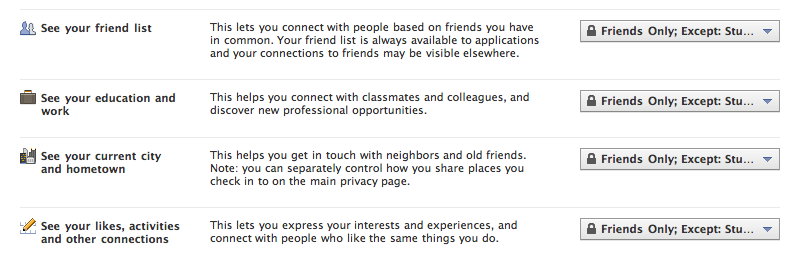
Many Facebook users like to make their friends/contacts aware of a personal or professional web resources such as a web site, blog or wiki etc. Access to the listing of your web resource is controlled by the website option as listed below.

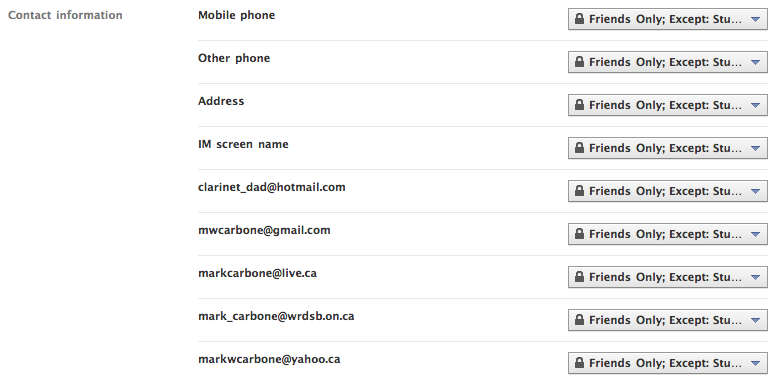
The screen shot below shows a small sample of the other security options available.

Facebook users have complete flexibility over how much contact information is shared, if any. I have personally found it helpful to include my professional email address  so that potential contacts can use that address as a search option.
I would certainly recommend a thorough review of the various options in the applications section since many applications require some access to your profile in order to function.
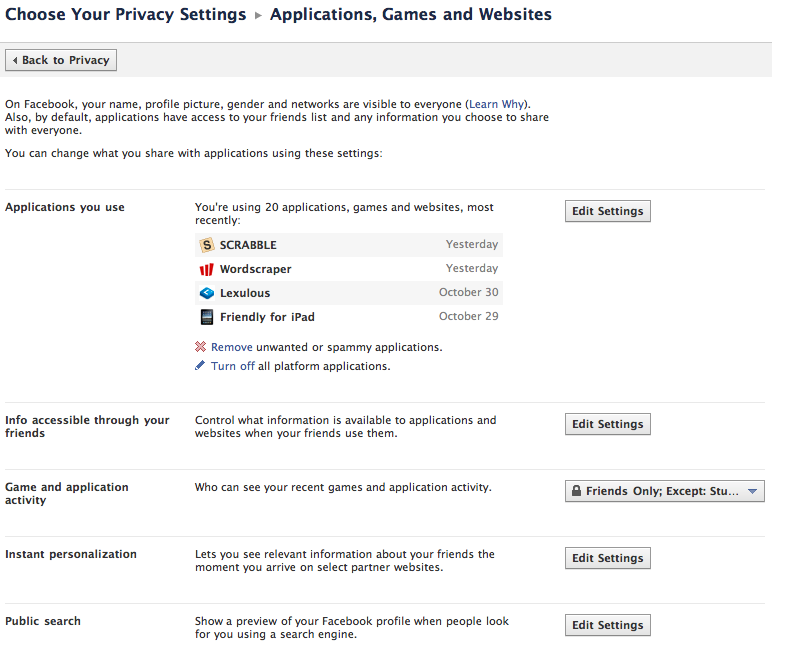
Facebook uses strategies to personalize your experience by tracking what you click, much in the same way an Internet browser does using the cookie function. It is important to decide whether or not you want this information to be potentially available outside of the Facebook environment. A greater level of privacy is maintained by unchecking the ‘enable instant personalization on partner websites’ option. This is on be default.

Finally, there is an option to completely turn off public search results. Turning this off (by unchecking the option) means your Facebook profile, as you defined it, will not display in Facebook searches. Essentially, turning this off means people can not find you, you must find them.

Note: There are additional settings to block interactions with specified Facebook users.

I hope this security/privacy overview provides some insights to using Facebook in a professional manner within the K12 environment.

~ Mark
Facebook – new group function in K12

One of my earlier blog posts I made some recommendations for settings for setting up groups for use in the K-12 environment. Since that post, the Facebook group function has changed and I wanted to share what I have learned so far.

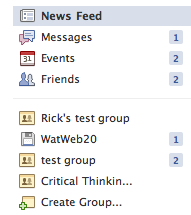
The group function is still accessed from the main page in Facebook.

Select the ‘create group’ option.

Next, enter a name for your group, choose an icon from the drop down list and select the type (open, closed or secret). I recommend ‘closed’ for K-12.

Once the group is created, the new ‘header’ is displayed.

Changes include:

  • the ‘post’ area is not visible by default, it must be selected
  • document creation and editing has been added
  • discussion areas within the groups have been removed

Note: groups created prior to this feature change continue to function the way they did.

Group settings are adjusted through the ‘edit’ and ‘settings’ options.

What Else is New?

  • The new group function also provides the option of defining a group mailing list. In my example, I would name the mailing list after the group (watweb20@groups.facebook.com). Messages posted to this addresses are distributed to group members.
  • Only Facebook friends may be added to a group. The email list option to invite group members has been removed.
  • Invited friends are automatically added to the group. The former request/accept process has been removed.
  • Group members can remove themselves from a group, but must request to rejoin as they can not be reinvited
  • The group owner (administrator)  may also remove group members
  • The display of posts has also changed. When a group member posts on a group wall, the post also shows in your personal newsfeed (not wall). Friends in the group will also see the post in their newsfeed. The ability to see posts is also impacted by the ‘top news’ or ‘recent’ setting.

All in all, the new group function will work well for K-12 usage.  I recommend that users set their security and privacy settings appropriate for professional conduct and interaction with students.

Thank you to @rebrouse and @rickbudd for working with me to test and document our learnings.

Happy collaborating in a social networking environment.

~ Mark

Digital Footprint – Reflections

As I reflect about the Digital Footprint concept, I find my thinking about this changing over time. I am gravitating to relating to this notion in two components.

1. The ‘size’ of the digital footprint reflects how much your name is ‘out there’ – fairly easily to search, and shows in a variety of contexts (twitter, blogs, comments etc.) — a frequency factor of sorts.

2. Your digital legacy — the ‘quality’ of the foot print, the lasting impression of who you are, what you stand for and how you contributed to the online environment. What will people think about you based on being ‘googled’ or ‘binged’?

And now a question: What are your thoughts regarding this way of thinking about your digital footprint?

~ Mark

Facebook in the K12 Classroom

Connecting Facebook use to the Classroom

Over the last week, I had a number of opportunities to connect with teachers and have some dialogue about about using Facebook to support learning. Yes, Facebook is a social environment, but it has a huge untapped potential in the areas of engagement, community, sharing, current issues and writing.

I thought I would share this list of activities some of our teachers see as effective uses of Facebook within the learning environment. Many of these are already beginning to happen in our classrooms!

  • conversational writing (French in this case)
  • sharing of poetry writing
  • collaborative math homework support groups – students helping students with teacher support
  • peer review of student created movie trailers
  • short blog style writing posts with opportunity for peer review
  • creating a shared student art gallery
  • discussion of global issues
  • math/science challenge questions
  • use of class groups to provide frequent feedback and positive encouragement (linked to our recent PD session with Dr. D. Reeves)
  • use of teacher fan pages to connect with students re class schedules, homework assignments, test dates etc.
  • school/department pages as another way to connect readers to key events, related news items, promote new library offerings
  • a forum to discuss digital citizenship, online safety and prevention of bullying
  • analyse sample situations in terms of digital citizenship and character development goals

Congratulations to these teachers for their forward thinking about using the power of social media tools in new and powerful ways. I look forward to working with teachers and school Digital Citizenship committee to plan our journey forward.

~ Mark

Facebook in K12 – Resources

Links: 2010-09-18  — Facebook in the Classroom


Synthesize the Concepts

Iowa city are now using the social media website inside the classroom

The Science Behind Feeling Good While Social Networking

Ideas for Social Media Guidelines

Social Media Guidelines – More Thoughts

Suggestions: Facebook guidelines for students, parents and schools

ST. CHARLES Community College Facebook Guidelines

Use Facebook to Support School Homework

Note: These resources have also been posted in my ‘Facebook in the Classroom’ user group on Facebook.

~ Mark

Kicking off the 2010-2011 School Year

I enter the 2010-2011 school year with great anticipation and excitement.  Many of the projects that were in major planning stages last year will ‘go live’ this year.

  • Effective today, we have wifi hot spots in each secondary school. These hot spots will allow staff and students to use their own equipment for Internet access.
  • Expanded use of web 2.0 and social media tools to support curriculum delivery. Staff and students now have access to Facebook. Facebook and Twitter, along with other resources will be used to extend school community and support curriculum delivery.
  • By mid month, we will role out email for elementary students. In addition to the secondary role out last April, all students fill have a Board assigned email address to support curriculum and communication needs, and identification in other online environments.  All students will be part of our FirstClass system.
  • Launching our Future Forum project (semester 2), developed as our 2009/2010 PLP project
  • Automated processes now reduce manual work to support account management
  • Redesigned and significantly improved drupal based web sites for our secondary schools
  • Moodle hosted setup to deliver Health and Safety content (launched Sept. 2nd)

Significant projects for this year include:

  • expanded development of our Library Learning Commons (LLC) project
  • a complete rewrite of our Technology Acceptable Use procedure to align with Digital Code of Conduct, Digital Citizenship, and Character Development programs
  • iPads & netbooks in the classroom
  • continued involvement in the PLP program
  • a look at e-book strategies
  • expanding our wireless project
  • building on our Digital Citizenship program

Day one went well. We hit our startup targets and hit the road running. It is going to be a great year!

~ Mark

Off to camp?

I was listening to the CBC Metro Morning radio broadcast one day last week on the way into work. The topic that morning was ‘Camping & Technology’ – that is, sending kids of to summer camp for a week or two. Although I did not hear the entire show, it seemed that the discussion centred around a couple of main points.

  1. Should the kids have technology at a camp session?
  2. Needs/expectations: parent & student/child perspectives

I found the discussion quite interesting. The camp facilitators were focused on delivering face to face activities, which in turn fostered relationship & team building and problem solving skills among the children. There is no argument from me regarding the need for this.  The camp facilitators had taken the stance – keep the technology (cell phones, smart phones, mp3 players (iPods etc.)) out of the camp environment. On the other side of the coin, a number of the parents had expressed concern about this because removing the technology also removed their ability to communicate with their child/children – something they valued and wanted. Now, hold this thought.

In a sense, there are two polarized approaches here: keep the technology out because we don’t want to deal with it or allow it. This example of the  polarization around the use of handheld technology is really no different than the situation in many schools around the globe: keep it out because we don’t want to deal with it v.s. bring it, and use it as part of the learning process where appropriate.

It seems to me that the answer is not in maintaining these polarized view points, but looking at things from a Digital Citizenship and Character Development point of view. Embrace the challenge of finding that middle ground that allows the use of technology in suitable ways, whether it is camp or school. The Digital Citizenship approach allows for some discussion around appropriate use, meaning context and timing etc.

Back to the camp debate – From my point of view, the ‘solution’ seems obvious. Allow the students to bring the technology and have that digital citizenship discussion around appropriate use and expectations for the camp environment. A child should be able to:

  • have a great camp experience which includes the F2F focus
  • maintain contract with their parents at certain times of the day (not in an interruptive manner)
  • share the experience online with family and friends

I hope a useful compromise is achieved. Happy camping.

~ Mark