Category Archives: 21st century learning

Social Networks: What’s cooking?

Social media tools are having an impact in many ways in all age groups of society from pre-teens to ‘experienced’: retirees — it could be a lifelong activity, literally!   Let’s take a look at some current information.

KIDS/TEENS

In a recent surveys of teens,  38 percent of respondents ages 12 to 14 said they had an online profile of some sort. Sixty-one percent of those in the study, ages 12 (jumping in earlier than the suggested age requirement) to 17, said they use social-networking sites to send messages to friends, and 42 percent said they do so every day. Although social networking sites have a minimum age requirement of 13, there is no easy way to check or enforce this criteria. It really operates on the honour system.

In my mind, this trend raises some important questions in terms of use from the parent point of view:

  • Are these sites being used in an appropriate manner?
  • Do parents/guardians actively monitor what their children are doing?
  • How are the children learning about safe online practices?
  • Do the children know to protect their personal information?
  • Are there daily time limits placed on usage?

As a parent, what is your level of involvement? See the Social Networks and Kids: How Young is too Young?  article at  CNN.

ADULTS and the WORKPLACE

In October 2009, the USA Today reported that that 54% of companies completely block Facebook, another 35% apply some form of access limits, leaving only 11% that don’t put any limitations on Facebook use in the work force.

Dr. Brent Coker, of the Department of Management and Marketing at The University of Melbourne, reports that  “People who do surf the Internet for fun at work – within a reasonable limit of less than 20% of their total time in the office – are more productive by about 9% than those who don’t.”

Point for consideration: Is surfing the net really any different than daydreaming or chatting at the water cooler? Some employees may benefit from a little surf time. Not everyone has the same needs in terms of being productive – that is for sure. Hmmm, maybe this is true for students in schools too!

View the full ‘Companies Ban Social Media = Bad Idea’ article at Socialnomics.net. Additional information from the  Australian Social Media study can be found at the University of Melbourne website.

What is happening at your organization? Leave a comment or  send a tweet.

SENIORS/Retirees

Facebook statistics show an increasing number of users in the 50+ age group – boomer connecting with high school friends and keeping in touch with their children. There is a major social connection occurring with users in this age group.

Related Reading:

Ivy Bean: Tweeting at the ripe old age of 104

Social Isolation and New Technology

SCHOOLS

Teachers and administrators are learning more about social networking tools – the good and bad. The bad is usually connected to student bullying issues. Staff at Boards of education are thoughtfully working through some of the key issues:

  • safe, ethical and responsible online activities
  • Digital Citizenship and Character Development programs
  • incorporating social media tools into curriculum delivery in meaningful ways
  • thinking about content filtering in an appropriate K-12 context

The agenda is definitely moving ahead – that is a good thing.  Teachers are developing online Personal Learning Networks (PLNs) through social media tools such as Twitter, Ning groups and blog reading/blogging. Many are really engaged in learning something new every day.  Certainly, this is an exciting time to be in education.

It will be interesting to see how this all unfolds. In the meantime, one can keep learning and participating! See you online 🙂

~ Mark

Twitter experience becoming richer

From where I sit, Twitter use seems to be changing and evolving. When I first started using Twitter, it seemed that most Tweets could easily be placed into a few predictable categories:

  • general comments: updates regarding your current activity
  • web announcements: updated my blog at … or bookmarking site …. or read about something at …..
  • resource announcements: great smartboard resource at …..
  • asking a question

Some examples of these type of posts are:

Picture 5

Picture 7

Picture 6

Picture 8

My observation is that people are now ‘more connected’ through Twitter. By that I mean that I see evidence of more ongoing dialogue within groups of users. Requests for information are responded to. People are connecting for specific purposes.

For example:

Picture 3

Picture 4

Picture 1

Picture 2

To my way of thinking, this shows development in how Twitter is used. I feel there is a much greater sense of community – at least in the people in interact with. Users also have a better sense of harnessing the power of search terms and hash tags. Twitter is such a powerful tool to develop one’s PLP network. I feel fortunate to have a great PLP team to learn from and I look forward to the online dialogue that is an important part of every day!

~ Mark

A Visit to Lawfield Elementary School

As we look to renovate and build new schools, consideration is always given to updating standards to make sure that the instructional learning needs are met in an effect manner. We are taking time to learn what is happening in other areas. I recently had an opportunity to attend a site visit to Lawfield Elementary School in Hamilton with a team from our Board.

Initially, we gathered in the library to meet with Principal Bill DeMille, who provided an overview of some of the school initiatives. A couple of things struck me as Bill was making his comments. He clearly has a vision and understanding of

  • the features and functionality a school facility should have to support 21st century learning
  • skills a teacher needs in today’s learning environment
  • the impact of technology on student engagement
  • the importance of creating a learning environment where teachers are encouraged and supported to try new things

Things I noted at the school included:

  • a large display screen in the front hall of the school running a list of events and activities
  • teachers are expected to digitally capture events (pictures or video) for inclusion in the front hall monitor display
  • sound system throughout the school to facilitate audio enhancement of teacher voices
  • iPods are being used in  listening centre structure, or through the sound system
  • interactive white boards in each teaching environment with specific uses for shared reading, anchor charts and exemplars
  • wired and wireless internet connections
  • movement away from traditional desks to table clusters around jiffy poles supplying hydro and internet connections to student work area
  • shift to shared laptops in the classroom, long term goal for mainly mobile technology and fewer desktops

Photo Gallery

audiogear2
Sound System
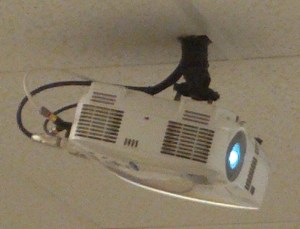
ceilingmountdp
Ceiling mounted data projectors
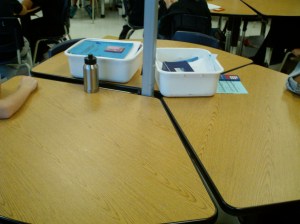
Desks2
Table clusters
SmartBoard2
Interactive Whiteboard and teacher table
TeacherTools2
Teaching Tools: Document camera, iPhone & laptops
classroomtools
Embedded technology in the learning environment

Thank you to Principal Bill DeMille and his staff for sharing their educational environment and plans with us.

~ Mark

Ontario PLP Kickoff Event

This evening I am taking a few minutes to reflect on the exciting day I had. Today was the launch of the Ontario PLP Cohort with Will Richardson and Sheryl Nussbaum-Beach. From the moment you entered the meeting room at WECDSB,  you could feel the energy and excitement has people found the team tables, plugged in laptops and connected to the wireless internet access. It was great to meet some people face to face that I had only worked with online!

The day was a ‘power’ session designed to make us all feel ‘whelmed’ – close to overwhelmed, but not quite! Sheryl presented first taking us through exercises to define networking and community as it pertains to our roles and the online world. Teams were provided opportunities to dialog about setting their expectations and assumptions about their ongoing working sessions. She beautifully set the stage for Will to present and challenge us as why the status quo will not do justice to preparing students for the world in which they will live and work. The presentations were well designed and delivered with impact.

The balance of the day was a mini ‘boot camp’ to get the 100 participants oriented to the online tools required to complete our work over the next year. We took tours of Wikispaces, Twitter, Delicious and Ning. After each tour, we had working time to register accounts, set defaults and get oriented to using the various tools. We will use #ontarioplp as our Twitter hash tag.

The wrap-up session included establishing our rules of engagement, booking Elluminate session times and reaffirming our individual commitment to participant and get the maximum learning, sharing and contributing over the next few months.

I am very excited to be a part of this project and learning with educators from Canada and the U.S.A.  We have a great team from our Board and I look forward to moving our thinking about learning, systemic change and the role of teaching forward.

Thank you Sheryl and Will for a great day.

~ Mark

iPod Touch Classroom Project

Last Friday we  held the kickoff meeting for our iPods in the Classroom project.

iTouch

The meeting provided an opportunity to bring teachers, administrators and central staff together to talk about the purpose of the project, complete some initial training, look at logistics and set next steps and timelines in place. The purpose of this project is multifaceted. Our comprehensive approach will:

  • Investigate the impact on teaching preparation, roles and instruction in a setting where each student will have a wifi enabled mobile device
  • Use iPods as an integrated learning tool in alignment with our identified instructional strategies and high yield tools
  • Align the use of the mobile devices to technology integration frameworks including:
  • Infuse a Digital Citizenship component concerning appropriate use, expectations, responsibilities and security with an eye to aligning to our existing Acceptable Use Procedure
  • Learn about the logistics of using mobile devices: charging, syncing, content management, device reliability etc.
  • Look at the use related resources: video cables (iPod to TV/data projector), document cameras, listening centre hardware (linking and daisy chaining audio)
  • Support the professional learning with research based evidence of the impact on student engagement, learning improvement and student assessment

The selected schools will provide an opportunity to examine the use of the iPod in the following environments:

  • a technology focused JK-6 school
  • a JK-8 school with an emphasis on grades 6-8
  • a congregated enrichment class

The day provided a good opportunity to familiarize staff with the operation of the iPod Touch units and explore some of the potential applications to be used. Alignment with our Board’s key learning strategies and the technology frameworks will keep us away from using the ‘drill and kill’ style applications.

A highlight in the training was conferencing in an Apple Education Expert to instruct over our Adobe Connect web conferencing system, licensed for use in Ontario schools. We anticipate using the web conferencing throughout the project to facilitate sharing between teachers at the selected schools. I am hopeful we can establish a protocol to use the conferencing to facilitate viewing a live ‘model classroom’ environment once the appropriate understandings re privacy and protocols have been put in place.

It was a great day and we are excited to have this initiative moving forward. I will share what we learn in future blog posts.

~ Mark

Technology and higher order thinking

As we continue the journey of developing the best instructional practices around integrating technology to support learning and focus on the collection of literacy skills students need to learn, there has been a positive shift away from the ‘drill and kill’ software application use to a more thoughtful integrated approach to technology integration. Many educational institutions, including mine, are embracing the ISTE Standards for Students to guide the thinking and planning process.

ISTE Nets S

As we investigate and learn more about mobile technologies, I feel it is important to keep this focus. Many of the applications available for mobile devices fall into the ‘drill and kill’ arena from my point of view. While it is important to move forward into this mobile learning world, the journey must continue to be planned in a thoughtful manner to embrace the correct type of engagement and support to the learning process.

The links below offer a variety of ideas centered around using technology, mobile or not, to engage students in using higher order thinking skills. I hope this information helps you to reflect on your current practices and plan your go forward steps in a strategic manner.

Resources

Education World:  a techtorial

Using technology to promote higher order thinking skills

Eric Web Portal:  Developing Higher-Order Thinking Skills through the Use of Technology.

Book:  Beyond Hardware

Slideshare:  Integrating Technology, Higher-Order Thinking, and Student-Centered Learning

Slideshare:  Using technology for higher order thinking.

Ed/ITLib Digital Library:  Assessing Higher Order Thinking in Video Games

eLearn: Case Studies Threading, Tagging, and Higher-Order Thinking

~ Mark

Cell Phones as a Learning Tool

Since mid summer, I have had a running search in Twitter to follow the postings about cell phones in schools. After reading the comments for two months now, the only observation that I can make is that the ‘camps’ are clearly divided.

In some educational organizations, there is a centrally determined policy that is followed by all schools. In other cases, the use of cell phones (or not), is determined at the local school level. Approaches typically fall into two main categories – cell phones are banned, or cell phones are permissible during non class times. A small number of schools allow unrestricted use.

The opinion of teachers is equally divided. Based on my Twitter observations, there seems to be growing interest in the use of cell phones as a mobile learning tool. While it is easy to argue that a cell phone is more likely to be a distraction in the classroom, teachers are finding effective ways to integrate their use in curriculum delivery. My personal view is that cell phones, and other mobile technologies, can be used as effective learning tools. As with many things in education, it all comes down to context, appropriate use and finding the ways in which the device can be used in the learning environment in a positive manner. Teachers willing to take a chance to explore a new approach or integrate a new tool are often rewarded with success.

Reading and Resources

Journal Star:  Should cell Phones be allowed in schools?

Tech Learning:  Cell Phones Welcome Here

K-12 Cellphone  Projects

Slideshow:  K-12 Mobile Learning

Ed Week:  Emerging Mobile Technologies for the K-12 Classroom

The  Mobile Learner blog.

EduCause:  Handheld and Mobile Computing Resources

Text message based  polling.

ISTE Books:  Toys to Tools – Connecting Student Cell Phones to Education

Your opinion? Where do you stand?  Leave a comment, send an email or post on Twitter.

~ Mark

‘Habitudes’ in the Workplace

Synchronicity is an amazing thing.

This past summer, I became aware of the work Angela Maiers was doing through Twitter. I visited Angela’s  website and found a write up on her book – Classroom Habitudes. After reading the summery of the contents, I ordered an e-copy to read. Classroom Habitudes looks at learning by exploring the Habitudes — behaviours, habits and attitudes — that will ensure student success inside and outside classroom walls.  The Habitudes are:

  • Imagination
  • Curiosity
  • Self-Awareness
  • Perseverance
  • Courage
  • Adaptibility

I was extremely impressed by the book and ordered a number of copies to share with various staff members with the intent of stimulating some thinking about work we are doing with technology integration, new library resources and iPod in the classroom projects.

Recently, I read the book again and was thinking that these Habitudes also qualities that I want in my staff. At a recent leadership program I completed, one of the areas studied looked at the importance of knowing your staff well, relating to them on a personal level and knowing how to ‘stretch’ them a little in pursuit of learning and career goals. Stretching, or challenging them to think out of box as they investigate solutions to problems or look at process improvement in new ways, is a key ingredient in the growth process.

This week, I made a few notes about writing a blog post about the notion of these Habitudes in the workplace, a natural extension of student success outside the classroom walls and put things in the perspective of life long learning. Today, I sat down to do some blog reading and write this post. As a faithful reader of Doug Peterson’s blog Off the Record,  I started reading Doug’s blog first. I was amazed to see a link to a post titled Habitudes of Professional Learning Communities.  Talk about SYNCHRONICITY!

In today’s world and workplaces, rapid change and the need to adapt are givens. We are life long learners and 21st century learning applies to adults too. In my view, the Habitudes are just as important in the workplace as they are in the classroom. As leaders, it is important to find ways to continue to nurture these characteristics in our staff. It is great to see how many people are thinking about, setting and leading opportunities for  personal learning and growth plans and professional learning networks.

~ Mark