Category Archives: Technology in Education

Strategic IT: what’s on deck for 09/10

A new school year launches into high gear today as all of our students return to class. Based on our successes and planning last year, I fully anticipate an exciting 2009/2010 school year. Predictably, there will be thousands of things that happen in every IT department from day to day operations, planned projects and dealing with that unexpected situation or challenge that jumps out to push back against even the most thorough plan.

An overview of major projects on deck for our Board includes:

  • maintaining and refining our new active directory domain structure
  • expanded use of our new enterprise management tool (imaging, software & patch deployment)
  • deploying our OSX/XP dual boot Macs with blade server back end
  • school network upgrades
  • starting our network access control project
  • starting our new wireless project
  • new library resources and process
  • greater use of Adobe Connect
  • moving forward with Digital Citizenship initiatives
  • iPods in the classroom projects
  • hosted web pages for teachers

Of course, this list does cover all of the work, but sets a solid agenda to keep moving major initiatives forward, particularly in the instructional area. I will share updates as we work our way through the project list.

On a more personal note, I will be

  • participating in an inter-Board  PLN project with Will Richardson
  • further developing my PLN
  • completing some course work
  • collaborating with education professionals

Best wishes to you for a successful school year.

~ Mark

Impact: Media multitasking

Media Multitasking:

Over the last week, I have come across a number of references to multitasking. In each case the viewpoints were exploring the impact of multitasking:

  • helpful or harmful?
  • productive or unproductive?
  • impact on concentration, learning
  • long term impact

I notice the rise of multitasking in myself. More often than not, I will have my laptop in hand while keeping an eye on a TV show or be flipping between various computer applications or tasks (or all of the above :-)). I think the tasks at hand are determining

  • when to multitask
  • identifying when it proves beneficial
  • how much
  • how long
  • what tasks

Certainly, I know from personal experience as you likely do, that there is a point of fragmentation that brings you to a state of inefficiency. In a more pressing state of fragmentation, one may be making errors as well. Being aware is this means I am being mindful of my work, work quality and productivity.

As we go further and further down this road of embracing more technology, and learning the incredible benefits that it can bring, we need to be mindful of using in the best possible ways. This means balanced life style and productive use  in work , social networking or entertainment. Putting my educator hat on, we need to address this issue as part of a healthy lifestyle and learning environment with our students. There are times for single focused concentration and times for multitasking. Making the right choice in a situation is important, and a good thing to learn.

This topic is definitely food for thought.

Related Reading

CNN:  Multitasking May be Harmful

US News:  Chronic Media Multitasking

Reuters:  Multitasking Doesn’t Work

Computer Weekly:  Media Multitasking Hurts Work Performance

Smart Brief:  SmartBrief News Release

~ Mark

Twitter: showing the global perspective

Explaining Twitter to the non Twitter is somewhat of a challenge. The concept is different than other tools, and the language associated with Twitter is also very unique, not to mention all of the associated short forms etc.

As an educator and Twitter enthusiast, I am always thinking about good analogies and strategies to explain Twitter and its benefits. A demo is good too. A typical discussion or demo includes: get your free account, public/private, friends/followers, checking profiles of other Twitter users, posting tweets (messages), replying, retweeting etc..

Further into the process there is discussion about how to use Twitter effectively which leads to searches, hash tags and the PLN aspect of Twitter. Then you can step it up a notch and manage Twitter feeds through a 3rd party application such as HootSuite or Seesmic Desktop. (see my earlier post PLN:Harnessing the power of Twitter). Oh yes, and be sure to include information about using Twitter with your mobile device.

The power of Twitter is often demonstrated by posting a Tweet and showing people how quickly you will get responses from your followers which works really effectively if you have a large number of followers – all good. I have been thinking about how to best illustrate the global aspect of Twitter. I have finally landed on two ideas for this.

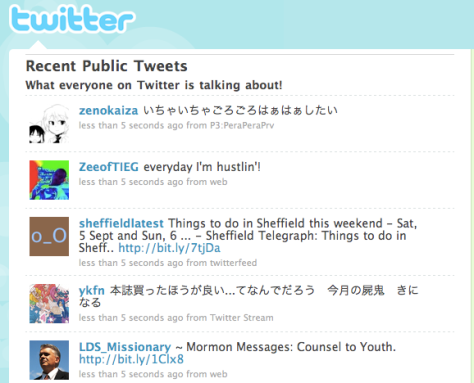
You could show the Twitter public timeline which is the collection of all public tweets.

Twitter-PL

While this shows a range of Twitter users and posts, it looks very similar to your own Twitter feed so in this regard it is a weak illustration and does not truly capture the global aspect of Twitter.

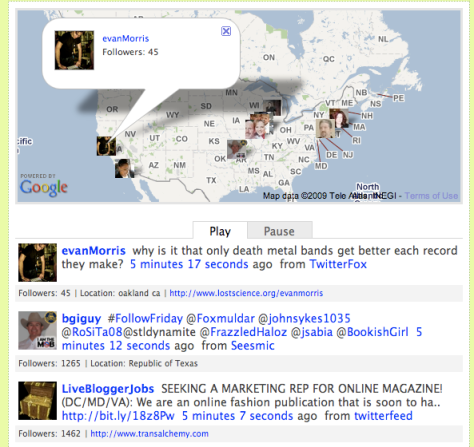
Another approach is to show TwitSpy, which shows the Twitter public timeline in a way that displays the location and profile picture of the user on a Google map along with the tweet. In my mind, this is a much more powerful demonstration to illustrate the global aspect of the Twitter community.

TwitSpy1

TwitSpy2

In these last two examples, you see the languages, profile pictures and global locations – much more effective!  It is fascinating to watch the TwitSpy display as the counties pop up on the screen: Canada, India, USA, England, China … – a true global community.

Note: If you are going to do a demonstration of the Twitter public timeline or TwitSpy, remember that the timeline shows all public tweets. You can not control the tweets, users, languages or more importantly, the content – in this area, you take your chances.

Related Links

Not a Twitter user? Get your account today at Twitter.com

Twitter public timeline

TwitSpy

See you online.

~ Mark

What if Mozart had MIDI?

After a professional development session this week, I was talking to one of our music teachers who does an excellent job of integrating technology into the regular band and vocal music course offerings. Classroom uses embrace composition, arranging, recording, sequencing, accompanying and theory instruction. Software packages used included packages for both Mac and Windows – Finale, Band in a Box, Garage Band and Sequel. This spun off into a conversation reminiscing about the ‘old days’ – meaning before MIDI, sound samples, loops, powerful notation software etc.

I told him about the WX5 MIDI wind instrument I had been playing over the summer (reaction = wow), he told me about new professional level sound samples he is using for some scoring work he is doing – cool.

As a technology user, it is easy to look at something as the next logical step of development. So yes, maybe a ‘cool’ factor to a new device or sound. Lets pause for a moment and step back. The changes in this technology area in the last dozen years is absolutely phenomenal = WOW.  Look at what you can do with  home/school level equipment and software. Truly amazing.

IMG_0100

Pictured above, are the WX5 MIDI wind instrument, an electric violin and an electric guitar equipped with a pitch to MIDI device.

Think of the impact Bach or Mozart had on the world of music. I wonder what would have happened to music development if this equipment was available in their time or they were alive now. One thing for sure, they would have as much fun with technology as we are!!!

Just wondering ….

~ Mark

Webquest Resources

A WebQuest is an inquiry-oriented lesson format in which most or all the information that learners work with comes from the web. The model was developed by Bernie Dodge at San Diego State University. Well designed, grade appropriate webquests can certainly help students develop strong research skills and hone their ability to compare and evaluate information from different sources.

Today I am sharing a few resources that might fit your classroom plans and curriculum needs.

WebQuests for Engaged Learners

Webquest.org

Quest Garden

Kathy Schrock’s Guide for Educators

WebQuest.com

Tech Treker’s QuestsOnline Technology WebQuest Practise Modules

Lastly, here is a webquest that might tickle your interest and problem solving skills:  The DaVinci Code Web Quest.

Happy learning.

~ Mark

Classroom: Twitter in Action

In my August 19th blog post, Classroom: Student use of Twitter, I ended my post with the following comment:

“Communication strategies and student engagement are often given as reasons for looking at Twitter use in the classroom. I believe the skillful teacher will find the right fit for Twitter as a curriculum support tool.”

Last night I found a good example of a skillful teacher using Twitter in the classroom. How appropriate that I found this example through Twitter!

In the video, The Twitter Experiment – UT Dallas, Dr. Monica Rankin, Professor of History at the University of Texas at Dallas, School of Arts and Humanities, who has been using Twitter in her classroom talks about her approach and initial observations of this new tool. Dr. Rankin acknowledges that Twitter use in her classroom is experimental, and that it is important to ‘play in the mess’ to figure out the most effective use for her classroom, students and subject matter.

While acknowledging the 140 character limit of a Twitter message, both Dr. Rankin and students interviewed identified a number of advantages to incorporating Twitter into the classroom setting. Comments included:

  • greater participation of students
  • accommodation of more input/comments than could have been spoken in class
  • shy students that may not have spoken in class were involved in the discussion
  • the discussion continued outside of class time
  • the instructor participated in ongoing discussions even when duties took her away from the university

I noted that students accessed Twitter with a variety of different technologies: desktops, laptops, netbooks and smartphones. Students that did not have access to technology were accommodated  by having their hand written Tweets entered on their behalf after class.

The YouTube video,  The Twitter Experiment – UT Dallas (apprx 5 1/2 minutes) is well worth the watch.

~ Mark

Smartboard Resources

Smart Board Links for August 29, 2009

A few ideas for the new school year.

Smart Board Templates by Grade groupings

Listing from MSK Computer Technology

K12 Smart Board Collection

Google Doc with resources from the Shenandoah Valley Smart Users Conference

Cybrary Man’s Educational Resources

~ Mark

A Victory for Process: Facebook Privacy Policy to Change

My July 18th blog post referenced issues with Facebook not meeting Canadian privacy laws. This week, announcements were made indicating that following the consultation process with the Canadian Privacy Commission, Facebook would indeed make changes to bring their practices in line with Canadian privacy requirements.

During the upcoming months, Facebook will make several changes to its privacy policy. This will include clarifying messages on the site that inform users about their control over their personal information when they join, deactivate or delete an account or sign up to use an application.

Specific changes Facebook will be making:

• Updating the Privacy Policy to better describe a number of practices, including the reasons for the collection of date of birth, account memorialization for deceased users, the distinction between account deactivation and deletion, and how its advertising programs work.

• Encouraging users to review their privacy settings to make sure the defaults and selections reflect the user’s preferences.

• Increasing the understanding and control a user has over the information accessed by third-party applications. Specifically, Facebook will introduce a new permissions model that will require applications to specify the categories of information they wish to access and obtain express consent from the user before any data is shared. In addition, the user will also have to specifically approve any access to their friends’ information, which would still be subject to the friend’s privacy and application settings.

My View:  To me, this represents more than a victory for privacy. It is a vote of confidence that the process works – and it worked through the identification of issues, consultation, collaboration and resolution. This is powerful and more effective than some ugly court case. The efforts of those involved in this entire process will positively impact the current 200 million Facebook users and all future Facebook users. Three cheers for a great process!!!

Related Reading:

Original complaint by the Canadian Internet Policy and Public Interest Clinic

Original Findings and Recommendations

Facebook Press Release

Globe and Mail perspective

New York Times perspective


~ Mark

Digital Citizenship in the Classroom

Digital Citizenship is an important theme in today’s online world. Educational systems are actively developing strategies to weave this concept into the curriculum. Mike Ribble describes Digital Citizenship as the norms of appropriate, responsible behavior with regard to technology use.  He believes Digital Citizenship is characterized by 9 elements.

1. Digital Etiquette: electronic standards of conduct or procedure.

2.   Digital Communication: electronic exchange of information.

3.   Digital Literacy: process of teaching and learning about technology and the use of technology.

4.   Digital Access: full electronic participation in society.

5.   Digital Commerce: electronic buying and selling of goods.

6.   Digital Law: electronic responsibility for actions and deeds (ethical use)

7.   Digital Rights and Responsibilities: those freedoms extended to everyone in a digital world.

8.   Digital Health and Wellness: physical and psychological well-being in a digital technology world.

9.   Digital Security (self-protection): electronic precautions to guarantee safety.

The full details of the 9 elements are online at DigitalCitizenship.net.

In our Board, Digital Citizenship will handled as part of our Character Development initiative. While this is certainly a topic for most grades, we feel the greatest impact will be achieved working with students grade 4 through 9. We are in the midst of preparing classroom resources to assist with the delivery of this initiative.

To date, we have purchased reference books for each school library, shared some resources and teaching strategies with our Technology Steering Committee and designed a poster which will be distributed to all schools and also used for electronic media. Elements of the electronic media will be used as the background for the computer desktop display image.

The books we purchased for school libraries are:

Digital Citizenship in Schools by Mike Ribble and Gerald Bailey (ISTE) and

Raising a Digital Child by Mike Ribble (ISTE)

Links:

Digital Citizenship and Creative Content

Cyber Smart Curriculum

Safe Social Networking

Brain Pop: Spotlight on Digital Citizenship

Wired Safety

Safe Surfing, An Introduction to the Internet

Doug Johnson’s technology ethics

Stop Cyber Bullying

Web Awareness Workshop Series Note: This series is licensed for use in Ontario publicly funded schools by OSAPAC. OSAPAC priorities for 2009/2010 will include Digital Citizenship and Online Safety through online delivery.

Thank you for teaching, promoting and role modeling Digital Citizenship.

~ Mark

Clarifying 20c / 21c learning

This blog post is the result of connections made between a live event, Twitter, blogs and related commenting. This is a good example of technology supporting a focused learning session,  with an invitation extended for some participation by remote educators. 

Background: David Warlick was delivering a visioning and leadership session at Greater Essex County School Board. As part of the session, David had posed the question: What is the difference between 20th and 21st century learning? There is no doubt this is a great question to ponder and attempt to wrap your mind around. 

The Connections:

  • David wrote a blog article focusing on this question
  • An invitation to ‘weigh in’ on the discussion was posted on Twitter
  • Many active educators on Twitter would view the invite
  • Some would check out the blog post, while others would participate in the commenting as well
  • For those who commented, their writing was reviewed and posted if suitable

The original blog post and the comments are all well written and interesting to read. As an active member of the educational online community, I certainly appreciated the opportunity to ‘weigh in’ and participate. 

A few highlights from the ongoing discussion include:

  • positive traits of 2oth and 21st century learning
  • a decade into the 21st century, why do we still refer to 21st century learning?
  • student engagement – who owns this? and do teachers own it alone?
  • are education and learning the same thing? or different?

After reading the comments and decided to submit a comment, I was thinking about some connections to the Element by Dr. Ken Robinson. In his book, the Element, he discusses the need to develop ALL of the intelligences in a person. Robinson declares that you are in ‘the element’ when you hit the sweet spot of doing what you excel at and what you are passionate about. 

Helping students find their element, by using the best instructional strategies available while taking advantage of appropriate technologies to support student learning and success is the journey we are on together. Perhaps this is what we mean, at least in part,  by 21st century learning.

David Warlick’s original blog post:  What is the difference between 20th and 21st century learning?

My comment (now posted): I like your definition David. There are a few points that stick in my mind that I would like to share.

1. I believe the use of the term ’21st century learning’ is inclusive of embedding the technology tools that we have access to as part of the learning process. It is not about the technology itself, but rather strategic integration of the tools we have (now or at some future point) to foster the best possible learning environment and opportunities. Certainly, we have those that embrace, and those that do not and perhaps this comparison drives our notion of 21st century learning.

2. I also think that there is a potential to make today’s curriculum more individualized for the independent and collaborative learners we develop.

3. In some ways, we reference 20th century learning as if was all bad. This is certainly no so in my mind. I expect we could make a good case to revisit a few areas we excelled at before the ‘digital’ time began.

Our journey is all about the learner. Creating the best possible learning environment covers the ‘whole playing field’ – curriculum design, building design, teacher training, assessment, changing with the times, best use of technology and steady, reflective incremental improvement. After all, we are life long learners!

~ Mark