Category Archives: 21st century learning

21st century teaching

What is 21st century learning? Many of you have thought about this, read about this, engaged in dialog both face to face and online, and maybe blogged about this. Me too.

We had a meeting yesterday where we were looking at, and discussing that ‘age old’ question. There is no real need to rehash this again here. Besides, we are a decade into this century already! I did want to share a couple of interesting points from our discussion tonight.

Relative to times in the past, say 10 or more years ago, it was much easier to predict what a few years out looked like. Today, given the rate change in technology, job markets, communication tools etc. it is impossible to think what things will be like in 6 months or a year out, let alone 5 or 10 years out. I think the challenge of trying to articulate that future vision with clarity gives us a sense of being stalled in the journey to address the answer to ‘What is 21st century learning?’

However, maybe we are asking the wrong question. Maybe the question is: What does 21st century teaching look like? Imagine you have a class of students in front of you equipped with mobile learning devices – students with different devices. Some might have iPhones or Blackberrys. Perhaps others have netbooks or notebooks. Oh yes, some have iPod Touches, and throw in a couple of tablet PCs to round out the class. Now, that you have your class in with 1:1 web enabled devices in front of you, let’s think about these questions.

  • How does this change my teaching strategies?
  • How does this change my planning strategies? (lessons, units, short term, long term)
  • How do I facilitate learning in this environment where information is abundant and instantly accessible?
  • How do I manage students who will essentially be able to do many more learning activities in an environment where the learning can easily be personalized?

We discussed three key areas in thinking about this question: enablers, core tools, optional tools and innovation.

Enablers are required to provide access – wireless networking, network access control (Board/company owned and guest access coexisting), sufficient equipment, sufficient bandwidth. Core tools – perhaps the identification of a smaller set of web 2.0 tools that are used and integrated in a more systemic way. Innovation – the use of other technologies and strategies beyond the selected core tools for effective learning.

In some ways, we are perhaps back at the sand box stage. We don’t really know the right mix of technologies and instructional strategies to achieve the greatest success in the learning arena. To my way of thinking, investing energy into exploring the ‘what does 21st century teaching look like?’ question is a key aspect of really moving things forward in a planned and sustainable way. Of course, professional development and sharing of best practice are also critical ingredients. This must be looked at in a holistic manner. Success, at least in the meaningful systemic way, will not be achieved by addressing limited aspects of this agenda.

Food for thought and more thinking to go.

~ Mark
Podcasting: a versatile curriculum tool

There are many good fits for podcasting in the curriculum. Podcasts and vodcasts may be used for presenting poetry, non fictional writing/reports, interviews, story telling, cumulative work, audio note taking (idea generating, debating etc.), book reports, lesson recaps, homework assignments and reading aloud (second language learners).

Podcasting is a great learning tool because it is easily adaptable to many curriculum settings and learner age levels. Podcasts can be easily created with standard computer equipment so success is not based on extra funding.

The Podcast Collection by Judy Scharf, hosted on the Curriki website, provides a good set of resources that covers:

  • what is a podcast
  • benefits of podcasting
  • practical tips for creating successful podcasts (‘road’ tested with a real class!)
  • podcast hosting options
  • uploading to iTunes
  • rubrics
  • assessment ideas
  • sample projects

This Podcast Collection received an exemplary rating from Curriki.

Additional Resources

Gary Stager:  Educational Podcasting
Kenton County Schools:  Podcast Resources
Wes Fryer:  Teach Digital
Podcasting Resources:  Podcast Info

Get your podcasting ideas flowing and try a podcast project to meet your curriculum needs.

~ Mark

Online forums for iPods in the Classroom

As momentum continues to build for the use of mobile handheld device in the classroom, it is important for teachers, IT leaders and administrators to share:

  • projects and activities
  • curriculum context
  • instructional strategies
  • learnings: what worked, what should be changed, what to avoid
  • best applications
  • best practice for maintaining a class set of iPods

One of the areas that interests me is the overall direction that people tend to take with these projects. In my mind, many of the available applications fall into the ‘drill and kill’ repetition category. Extensive use of drill based software in is opposition to the ISTE nets standards being adopted in many Boards. The ISTE Nets standards for students promote foundational ICT skills in the areas of:

  • Creativity and Innovation
  • Communication and Collaboration
  • Research and Information Fluency
  • Critical Thinking, Problem Solving and Decision Making
  • Digital Citizenship
  • Technology Operations and Concepts

I hope that professional collaboration and sharing will keep the use of  mobile tools in the classroom pointed in a positive learning direction. Certainly, having a room full of students with mobile learning devices in hand will fundamentally change the way one teaches. Perhaps learning about what this new teaching model looks like and defining best practices in this arena are a key component of moving forward. Lets not repeat mistakes and reinvent the wheel over and over. Share and collaborate!!!

I have list four online forums that I initially started reading in the summer. I have joined each one and now read them regularly. I hope you find some of the information and collaboration opportunities worthwhile.

Links

iPod Teachers
iPods in the Classroom
iPod for Educators
iPod Touch Schoolwide Implementation on Classroom 2.0

~ Mark

Twitter: showing the global perspective

Explaining Twitter to the non Twitter is somewhat of a challenge. The concept is different than other tools, and the language associated with Twitter is also very unique, not to mention all of the associated short forms etc.

As an educator and Twitter enthusiast, I am always thinking about good analogies and strategies to explain Twitter and its benefits. A demo is good too. A typical discussion or demo includes: get your free account, public/private, friends/followers, checking profiles of other Twitter users, posting tweets (messages), replying, retweeting etc..

Further into the process there is discussion about how to use Twitter effectively which leads to searches, hash tags and the PLN aspect of Twitter. Then you can step it up a notch and manage Twitter feeds through a 3rd party application such as HootSuite or Seesmic Desktop. (see my earlier post PLN:Harnessing the power of Twitter). Oh yes, and be sure to include information about using Twitter with your mobile device.

The power of Twitter is often demonstrated by posting a Tweet and showing people how quickly you will get responses from your followers which works really effectively if you have a large number of followers – all good. I have been thinking about how to best illustrate the global aspect of Twitter. I have finally landed on two ideas for this.

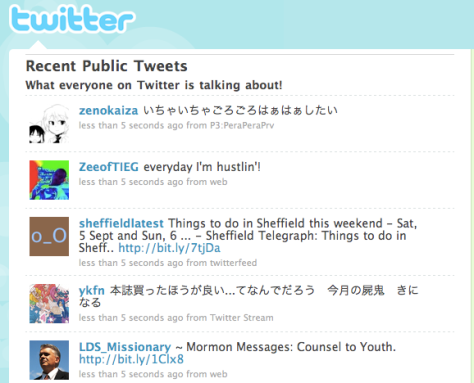
You could show the Twitter public timeline which is the collection of all public tweets.

Twitter-PL

While this shows a range of Twitter users and posts, it looks very similar to your own Twitter feed so in this regard it is a weak illustration and does not truly capture the global aspect of Twitter.

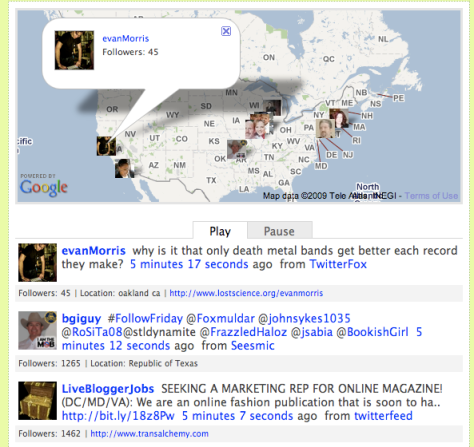
Another approach is to show TwitSpy, which shows the Twitter public timeline in a way that displays the location and profile picture of the user on a Google map along with the tweet. In my mind, this is a much more powerful demonstration to illustrate the global aspect of the Twitter community.

TwitSpy1

TwitSpy2

In these last two examples, you see the languages, profile pictures and global locations – much more effective!  It is fascinating to watch the TwitSpy display as the counties pop up on the screen: Canada, India, USA, England, China … – a true global community.

Note: If you are going to do a demonstration of the Twitter public timeline or TwitSpy, remember that the timeline shows all public tweets. You can not control the tweets, users, languages or more importantly, the content – in this area, you take your chances.

Related Links

Not a Twitter user? Get your account today at Twitter.com

Twitter public timeline

TwitSpy

See you online.

~ Mark

Engaged students: Have we lost the team?

This is certainly an exciting time in education. We have achieved much, we know more,  the learning environment is potentially richer than ever before.  Yet, as I continue to read about key educational strategies and issues, I note one disconnect.

Student engagement! It is talked about, and it should be. It is the focus of teachers and curriculum planning, and it should be. What bothers me is that it is often talked about in isolation.

In an earlier blog post where I weighed in on a 20th/21st century learning discussion I ended my comments with the following statement:

Our journey is all about the learner. Creating the best possible learning environment covers the ‘whole playing field’ – curriculum design, building design, teacher training, assessment, changing with the times, best use of technology and steady, reflective incremental improvement. After all, we are life long learners!

I will stick by this. Teachers, mentors, Boards of Education should play a critical role in engaging students. Why do we talk about this in isolation of parent/guardian roles and responsibilities, and personal ownership.

I had the wonderful experience of having my children study music in the Suzuki string method. Dr. Suzuki designed his entire curriculum, ‘talent education’ in his terms, a clear foundation of student, parent and teacher roles responsibilities were laid out right from the beginning. After finishing 12 years in the program, that foundation is centre of everything that happens. I believe this foundation is one of the keys to the success of the program. In parallel to the education systems, teaching training, resources, curriculum design etc. also play the same key functions. I have great admiration for the work of Dr. Suzuki and all of the wonderful teachers who deliver this excellent music curriculum to students.

Let’s not lose the team aspect of engaged learners in our systems. We must continue to excel in all of the areas that we control in the education systems. Team: students, teachers and parents – fully engaged learning communities.

Related Reading

Dr. Shinichi Suzuki
Introduction to Suzuki
Nurtured by Love

~ Mark

Classroom: Twitter in Action

In my August 19th blog post, Classroom: Student use of Twitter, I ended my post with the following comment:

“Communication strategies and student engagement are often given as reasons for looking at Twitter use in the classroom. I believe the skillful teacher will find the right fit for Twitter as a curriculum support tool.”

Last night I found a good example of a skillful teacher using Twitter in the classroom. How appropriate that I found this example through Twitter!

In the video, The Twitter Experiment – UT Dallas, Dr. Monica Rankin, Professor of History at the University of Texas at Dallas, School of Arts and Humanities, who has been using Twitter in her classroom talks about her approach and initial observations of this new tool. Dr. Rankin acknowledges that Twitter use in her classroom is experimental, and that it is important to ‘play in the mess’ to figure out the most effective use for her classroom, students and subject matter.

While acknowledging the 140 character limit of a Twitter message, both Dr. Rankin and students interviewed identified a number of advantages to incorporating Twitter into the classroom setting. Comments included:

  • greater participation of students
  • accommodation of more input/comments than could have been spoken in class
  • shy students that may not have spoken in class were involved in the discussion
  • the discussion continued outside of class time
  • the instructor participated in ongoing discussions even when duties took her away from the university

I noted that students accessed Twitter with a variety of different technologies: desktops, laptops, netbooks and smartphones. Students that did not have access to technology were accommodated  by having their hand written Tweets entered on their behalf after class.

The YouTube video,  The Twitter Experiment – UT Dallas (apprx 5 1/2 minutes) is well worth the watch.

~ Mark

Smartboard Resources

Smart Board Links for August 29, 2009

A few ideas for the new school year.

Smart Board Templates by Grade groupings

Listing from MSK Computer Technology

K12 Smart Board Collection

Google Doc with resources from the Shenandoah Valley Smart Users Conference

Cybrary Man’s Educational Resources

~ Mark

A Victory for Process: Facebook Privacy Policy to Change

My July 18th blog post referenced issues with Facebook not meeting Canadian privacy laws. This week, announcements were made indicating that following the consultation process with the Canadian Privacy Commission, Facebook would indeed make changes to bring their practices in line with Canadian privacy requirements.

During the upcoming months, Facebook will make several changes to its privacy policy. This will include clarifying messages on the site that inform users about their control over their personal information when they join, deactivate or delete an account or sign up to use an application.

Specific changes Facebook will be making:

• Updating the Privacy Policy to better describe a number of practices, including the reasons for the collection of date of birth, account memorialization for deceased users, the distinction between account deactivation and deletion, and how its advertising programs work.

• Encouraging users to review their privacy settings to make sure the defaults and selections reflect the user’s preferences.

• Increasing the understanding and control a user has over the information accessed by third-party applications. Specifically, Facebook will introduce a new permissions model that will require applications to specify the categories of information they wish to access and obtain express consent from the user before any data is shared. In addition, the user will also have to specifically approve any access to their friends’ information, which would still be subject to the friend’s privacy and application settings.

My View:  To me, this represents more than a victory for privacy. It is a vote of confidence that the process works – and it worked through the identification of issues, consultation, collaboration and resolution. This is powerful and more effective than some ugly court case. The efforts of those involved in this entire process will positively impact the current 200 million Facebook users and all future Facebook users. Three cheers for a great process!!!

Related Reading:

Original complaint by the Canadian Internet Policy and Public Interest Clinic

Original Findings and Recommendations

Facebook Press Release

Globe and Mail perspective

New York Times perspective


~ Mark

Digital Citizenship in the Classroom

Digital Citizenship is an important theme in today’s online world. Educational systems are actively developing strategies to weave this concept into the curriculum. Mike Ribble describes Digital Citizenship as the norms of appropriate, responsible behavior with regard to technology use.  He believes Digital Citizenship is characterized by 9 elements.

1. Digital Etiquette: electronic standards of conduct or procedure.

2.   Digital Communication: electronic exchange of information.

3.   Digital Literacy: process of teaching and learning about technology and the use of technology.

4.   Digital Access: full electronic participation in society.

5.   Digital Commerce: electronic buying and selling of goods.

6.   Digital Law: electronic responsibility for actions and deeds (ethical use)

7.   Digital Rights and Responsibilities: those freedoms extended to everyone in a digital world.

8.   Digital Health and Wellness: physical and psychological well-being in a digital technology world.

9.   Digital Security (self-protection): electronic precautions to guarantee safety.

The full details of the 9 elements are online at DigitalCitizenship.net.

In our Board, Digital Citizenship will handled as part of our Character Development initiative. While this is certainly a topic for most grades, we feel the greatest impact will be achieved working with students grade 4 through 9. We are in the midst of preparing classroom resources to assist with the delivery of this initiative.

To date, we have purchased reference books for each school library, shared some resources and teaching strategies with our Technology Steering Committee and designed a poster which will be distributed to all schools and also used for electronic media. Elements of the electronic media will be used as the background for the computer desktop display image.

The books we purchased for school libraries are:

Digital Citizenship in Schools by Mike Ribble and Gerald Bailey (ISTE) and

Raising a Digital Child by Mike Ribble (ISTE)

Links:

Digital Citizenship and Creative Content

Cyber Smart Curriculum

Safe Social Networking

Brain Pop: Spotlight on Digital Citizenship

Wired Safety

Safe Surfing, An Introduction to the Internet

Doug Johnson’s technology ethics

Stop Cyber Bullying

Web Awareness Workshop Series Note: This series is licensed for use in Ontario publicly funded schools by OSAPAC. OSAPAC priorities for 2009/2010 will include Digital Citizenship and Online Safety through online delivery.

Thank you for teaching, promoting and role modeling Digital Citizenship.

~ Mark

Clarifying 20c / 21c learning

This blog post is the result of connections made between a live event, Twitter, blogs and related commenting. This is a good example of technology supporting a focused learning session,  with an invitation extended for some participation by remote educators. 

Background: David Warlick was delivering a visioning and leadership session at Greater Essex County School Board. As part of the session, David had posed the question: What is the difference between 20th and 21st century learning? There is no doubt this is a great question to ponder and attempt to wrap your mind around. 

The Connections:

  • David wrote a blog article focusing on this question
  • An invitation to ‘weigh in’ on the discussion was posted on Twitter
  • Many active educators on Twitter would view the invite
  • Some would check out the blog post, while others would participate in the commenting as well
  • For those who commented, their writing was reviewed and posted if suitable

The original blog post and the comments are all well written and interesting to read. As an active member of the educational online community, I certainly appreciated the opportunity to ‘weigh in’ and participate. 

A few highlights from the ongoing discussion include:

  • positive traits of 2oth and 21st century learning
  • a decade into the 21st century, why do we still refer to 21st century learning?
  • student engagement – who owns this? and do teachers own it alone?
  • are education and learning the same thing? or different?

After reading the comments and decided to submit a comment, I was thinking about some connections to the Element by Dr. Ken Robinson. In his book, the Element, he discusses the need to develop ALL of the intelligences in a person. Robinson declares that you are in ‘the element’ when you hit the sweet spot of doing what you excel at and what you are passionate about. 

Helping students find their element, by using the best instructional strategies available while taking advantage of appropriate technologies to support student learning and success is the journey we are on together. Perhaps this is what we mean, at least in part,  by 21st century learning.

David Warlick’s original blog post:  What is the difference between 20th and 21st century learning?

My comment (now posted): I like your definition David. There are a few points that stick in my mind that I would like to share.

1. I believe the use of the term ’21st century learning’ is inclusive of embedding the technology tools that we have access to as part of the learning process. It is not about the technology itself, but rather strategic integration of the tools we have (now or at some future point) to foster the best possible learning environment and opportunities. Certainly, we have those that embrace, and those that do not and perhaps this comparison drives our notion of 21st century learning.

2. I also think that there is a potential to make today’s curriculum more individualized for the independent and collaborative learners we develop.

3. In some ways, we reference 20th century learning as if was all bad. This is certainly no so in my mind. I expect we could make a good case to revisit a few areas we excelled at before the ‘digital’ time began.

Our journey is all about the learner. Creating the best possible learning environment covers the ‘whole playing field’ – curriculum design, building design, teacher training, assessment, changing with the times, best use of technology and steady, reflective incremental improvement. After all, we are life long learners!

~ Mark