All posts by markwcarbone

I have 36 years experience in K-12 education. I have been fortunate to work in many different roles including teacher, department head, ICT consultant, IT Manager and CIO. Personal interests include performing in the Venturi Winds woodwind quintet, the Cambridge Symphony and the KW Community Orchestra as well as composing and arranging music. Connect, Learn, Reflect & Share - make a difference today!

Helping the Shift

Overview:  The Connected Educators is based on connected learning communities. Connected learning communities are a three-pronged approach to effective professional development using the local (professional learning community), contextual (personal learning network), and global (community of practice) environments. Connected learners take responsibility for their own professional development. They figure out what they need to learn and then collaborate with others to construct the knowledge they need. Connected learners contribute, interact, share ideas, and reflect.  The book draws heavily on the experience of the authors as members and leaders of connected learning communities.

An inside peak at the chapters:

1: sets the stage for understanding what it is to be a connected learner.
2: makes a case for connected learning in communities.
3: explores the importance of being a learner first, educator second.
4: looks at developing a collaborative culture and a mindset that supports connected learning.
5: invites readers to explore free and affordable technologies and virtual environments that support collaborative learning.
6: guides readers through the steps of implementing a connected learning community.
7: examines how to sustain the momentum of professional learning using scale as a strategy for co-creating and improving a learning community.
8: focuses on leadership system, school, and teacher leadership in a distributive
model.
9: looks at what the future holds for the connected learner and what being a
connected learner means for each reader.

I recently arranged to purchase a copy of this wonderful new resource for each of our (120) school libraries as a resource for all staff as we continue our journey of ‘shift’ along the technology enabled learning path.

Periwinkle sighting: PLP’s  Periwinkle with my Connected Educator book order.

Related Resources

Learn more

Buy a copy

Happy learning and connecting!

~Mark

Google Chromebook: first impressions

Last week I felt a bit like a kid waiting for Christmas. I knew our shipment of Google Chromebooks was on the way, and very soon I would finally get a chance to try one out myself.  “Chrome Day” has now  happened, I have have spent a couple of sessions with a Chromebook.

Out of the box, the Chromebook was dead easy to setup up – no written instructions needed. Simply power up the device, answer a handful of setup questions, connect to wifi and presto. I logged into my Google account and everything was there: bookmarks, docs etc. – easy.  I must admit I was impressed with the ease of this process. I think I was online in less than 5 minutes.

The screen is clear and easy to read. (12″ diameter or roughly 7″ x 10″). Processor speed seems decent, and the battery life is solid so far.

Now that I have tried this ‘unmanaged’ approach, I need to investigate setup this up through the managed interface for comparison. It will be interesting to use a device where literally EVERYTHING is online. My testing will be with an eye to classroom applications and ease of use. Certainly from an IT perspective, the devices offers the browser interface for access to web content and web 2.0 tools for writing, communicating and collaboration with minimal maintenance.  I look forward to learning more about file management in this web only environment.

I will share my learnings and observations in a future post.

Related Resources

Google Chromebook
Samsung
Wikipedia

~Mark

Blearning: #OntCL on Blended Learning

Technology and learning keep evolving, and at a rapid pace these days. As educators, this means there is always something new to explore, new ways to engage students, collaborate and make learning an authentic experience.

The OntCLC live Twitter Chat las Wednesday (March 7th, 2012) provided a great opportunity to share current thinking on Blearning.

What’s Blearning?  Blearning seems to be the evolving new term to mean Blended Learning.  Lisa Neale prepare this blog post as a backgrounder for the discussion:  The What and Why of Blended Learning.

As anticipated, it the live Twitter discussion, yielded some great sharing of ideas, insights and reflections. You can check out the discussion stream at  #OntCL Blended Learning Twitter Stream (March 7, 2012 portion). This is also a great chance to meet and connect with some new educators and build your PLN.

Related Resources:   Ontario ConnectED Leaders Consortium

Next #OntCL Twitter Chat:  April 4th, 2012

Leadership: Points of Reflection

At a recent learning opportunity through the Abel program, I had the opportunity to hear Mary Jean Gallagher speak about leadership. As anticipated, it was a great presentation.

The session began with Mary Jean comparing developments from different time periods and the relative impact. She recalled the first main frame computers, and  Commodore 64’s on the scene and wonderment people had about how things would change. What would happen?

Technology is in a constant state of flux. How will leadership respond to technological change: Does a new technology present a promise  or a threat?

Questions to consider:  How do we embrace new technology in a time when people are concerned about ubiquitous  access and equity, AND  in the same context of parent concerns of  access, identity and privacy AND in the same context of: it is easier to be risk averse rather than push ahead.

It is human nature to pull back. How do we get people engaged in the change process? Perhaps a key role of a leader is to distress the comfortable, and comfort the distressed.  Todays leaders need to add disonance to our organizations sometimes and be less risk averse. Leaders don’t have to know everything, and that is OK. Leaders do need to model in visible ways. Leaders need to help organizations set policies that help organizations move forward by enabling rather than avoiding.

Her presentation concluded by identifying points for leaders to ponder:

  • Are you intentional about what you do?
  • Do you role model in visible ways?
  • Do you intentionally position things for change?
  • Where do you lean: towards anchors or change?
  • Are you reflective?
  • Do you engage with wider collaboration?
  • Do you model learning and inquiry?

I hope you find these points for reflection valuable. Enjoy your reflecting and learning — and happy leap year day.

~Mark

Educon reflection: learning in public online

Educon2.4 was, as anticipated, a great conference this year. There were many great sessions and conversations. This was my second time attending Educon, and I thought the conversations seemed richer both formally in the sessions and less formal hallway discussions. One topic that has stayed with me for reflection, is the idea of learning in public online.

I have been following the learning journey of Dean Shareski. Over the last few months, Dean has been studying the ins and outs of learning online in public, beginning with his own learning.  I admire Dean for putting his own learning and experiences ‘out there’ first. In the Learning Project, Dean posts a video online requesting help to learn to play the guitar. Through online connections, Dean eventually connected  with a music teacher who supported Dean’s learning request by having his students prepare videos to teach Dean various aspect of guiar techniques. The full project description is described here in the  The Learning Project blog post.

Dean’s project demonstrates a great example of learning of learning on line in public through network connections, collaboration tools such as skype, video resources personalized for the needed learning experience and shared through blog reflections.

As part of the presentation, Dean referenced  Shannon Smith who is also experiencing online public learning. Learn more about Shannon’s journey here: Clarinet lesson.  My family had the pleasure of dining with Shannon and Brent on Saturday night at the conference. It was a wonderful evening of conversation, in which we learned about our many musical connections and interests.

At Educon, Dean and Alec Couros led a discussion around this idea of learning online in public. There was a great discussion around the considerations that learning online in public raises:

  • when is learning in public appropriate?
  • what are the privacy implications for students?
  • how would any negative comments be received and handled?
  • how do we prepare pre-service teachers for this type of learning environment?
  • what are the benefits?
  • are there drawbacks?
  • how do we best teach students to manage their online profiles?
  • how do students best create and manage on online portfolio?
  • what else?

The framework of learning online and in public is here as demonstrated. Helping students to develop and manage a personal learning network is an important part of preparing students for the future. I believe the need to use online resources, connections and crowd sourcing to collaborate and problem solve is the way of the future. Simple tools such as a blog can serve as a personal portfolio for students to capture their journey, sharing and reflections.

While this seems like a natural direction or next step, there is much work to do. Many people are uncomfortable in this environments. We have to put strategies in place on overcome the fear factor.  Teachers must be able to put themselves in the place of the learner in this new environment. I believe significant change is needed in pre-service teacher programs to have new professionals ready and comfortable in this environment.

As a post conference follow up, I had the pleasure of assisting Shannon with her clarinet lessons by preparing a recording to assist in her learning. Thanks to the internet, distance was no barrier to providing assistance: a pdf of the music notation was exchanged by email, I recorded the music using an iRig mic on my iPhone e-delivered the audio recording back to Shannon.  I hope I can continue to be involved in Shannon’s music journey!

~Mark

The Notability App

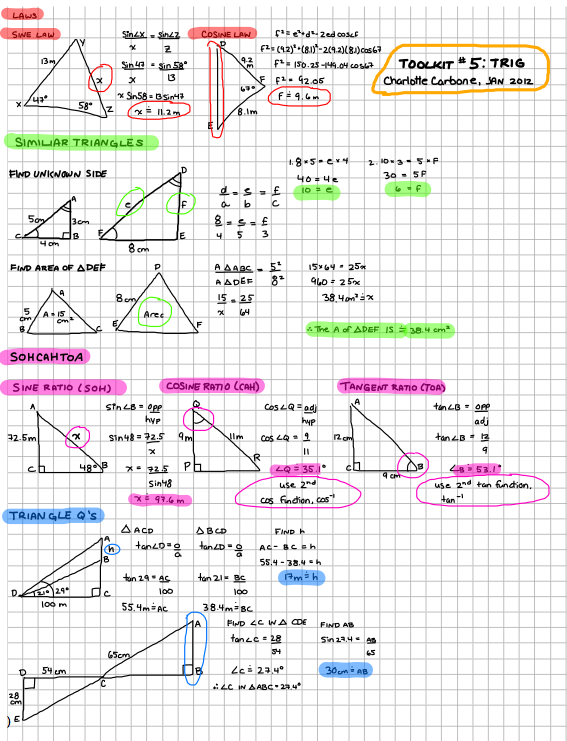
Notability is a great little iPad app that lets you write and/or draw on the iPad screen. This inexpensive app ($0.99) offers a number of features including: advanced word processing, pdf annotation, linked audio recording, auto sync, media insertion and library organization.

The notes below were created by my daughter in preparation for her math exam. I have included screen captures here, as well as a link to the original pdf document.

This is certainly a well priced capable program.

Related Documents:

Notability Trig PDF file

Notability App

~Mark

OntCL Chat Highlights 20120125

Ontario ConnectEd Leaders (OntCL) Chat Highlights from 2012-01-25.

Topic: How are you currently using social media tools in your school/board?


Note: Future Ontario ConnectEd Leaders twitter chats will be scheduled for the first Wednesday evening of each month, 8:00 p.m. to 9:00 p.m. and use the Twitter hash tag #ontcl

~Mark

BYOD: What’s in a device?

I have had two great opportunities to talk about Bring Your Own Device (BYOD) to support student learning — at the Brock U.Teaching with Technology Showcase (Brock U Faculty of Education) and at the Educon 2.4 event.

The discussions covered considerable territory – benefits, challenges and implications for both pre-service and existing teacher training. In my organization, BYOD is certainly a strategy intended to augment access and not replace Board owned equipment. From an IT perspective, building the right infrastructure with sufficient capacity is a critical path forward to support student learning.

There is certainly a wide range of devices that could support learning. I have been pondering the desired functionality needed in any device to support student learning. Here is my initial take on a function list.

Notes/read:  take notes, read common file formats such as pdf and ebook files,

Web enabled: browse web (consume info, research), bookmark, interact with online databases, RSS

Share/Collaborate: write/publish a blog, support wiki use, google docs etc

Digital StoryTelling: capture audio, video, combine with text

Communicate: email, support for standard Social Media tools (FB/Twitter/G+) etc.

Other: good battery life, strong wifi signal

I need your feedback. How thorough is my list? What is missing? Should anything come off the list? What should be added?

Please leave a comment with your ideas, or share an idea with me on Twitter.

~Mark

WRDSB BackPack

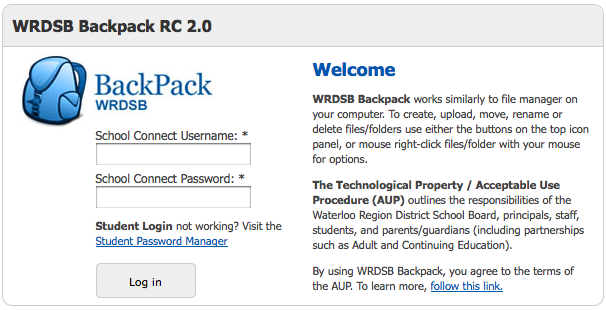
WRDSB has recently introduced the ‘BackPack’ option for secondary school students. This web site provides a mechanism for students to access their Board computer file storage from home.  The login process is active directory compliant.

Login Screen

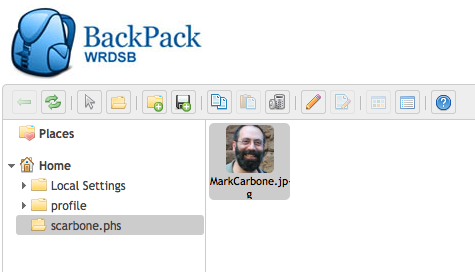
User Interface

The user interface is simple to use, providing icons for file the typical management functions: uploads, downloads, rename, add folder etc.

The solution is based on java based open source code.  Future plans will add functionality for all students. Many thanks to the WRDSB ITS staff who worked on this project to support student learning.

~Mark